Windows 7 Forums


Windows 7: Cannot Download Files - Internet Explorer

24 Oct 2010   #1

Windows 7 Home Premium 64bit
 
 
Cannot Download Files - Internet Explorer

Hello

I've just carried out fresh install of Windows. During the process I moved the user profiles to another drive and I'm wondering if this has caused my problem. For some reason I can't download any files although I have no problem browsing. The error message I receive is as follows:

Quote:
Unable to download [Filename] from [Web Site]

Unable to open this Internet site. The requested site is either unavailable or cannot be found. Please try again later.

I've read somewhere that deleting the index.dat file would rectify the problem, but there is no index.dat file. Infact I can't file the Temporary Internet Files folder at all which is supposed to be located in D:\Users\[Username]\AppData\Local\Microsoft\Windows\Temporary Internet Files

In the Windows folder only the following folders are displayed (and I've turned on show hidden files and folders):
  • 1033
  • Burn
  • Caches
  • Explorer
  • GameExplorer
  • Ringtones
  • Themes
  • WER
Any help would be greatly appreciated.

Thank you.

My System SpecsSystem Spec

24 Oct 2010   #2

Windows 7 Ultimate x64
Milton Keynes, United Kingdom


Hi and welcome to the forums

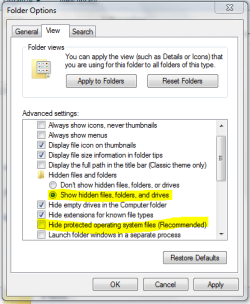
In order to access the temporary internet files folder you need to enable 'hidden files, folder and drives' and 'Hidden system files'.

Cannot Download Files - Internet Explorer-capture.png
Tip   Tip
In explorer, click 'Organize', 'Folder and Search options' then click the 'View' tab


OS
My System SpecsSystem Spec
24 Oct 2010   #3

Windows 7 Home Premium 64bit


Thank you OS

I can see the folder structure now.

Unfortunately deleting the index.dat file didn't correct the problem so I'm back to square one

I just can't download anything from anywhere. I always get the same error message.

This may be of some relevance. Everytime I start Internet Explorer I always revceive the message that "You last browsing session closed unexpectedly" when it didn't appear to.
My System SpecsSystem Spec
.


24 Oct 2010   #4

64-bit Windows 7 Ultimate SP1 & Windows 8 Enterprise
Texas


Hello Ian,

From the error message about your downloads, it appears to be a issue at the website that you are trying to download from. Are you able to download from any other site?

If not, then you might see if resetting IE may help.
My System SpecsSystem Spec
24 Oct 2010   #5

Windows 7 Home Premium 64bit


Hiya

I thought it may have been a website issue too so I visited a few web sites to download something but I always received the same message. To ensure, once and for all, that it was my Windows 7 box I visited the same sites with my Win Xp box and the downloads worked.

Resetting Internet Explorer was one of the fixes I tried but with no luck. I also tried deleting the index.dat file but after a restart it was never recreated.

I just completed another reinstall and everything is working as expected again. I did try transferring one of my user profiles over but it resulted in the same error again so I put it back as it was.

Could it be that profiles don't like being on a RAID 1 configuration?

This is most odd.

Thank you.
My System SpecsSystem Spec
24 Oct 2010   #6

64-bit Windows 7 Ultimate SP1 & Windows 8 Enterprise
Texas


That is odd. I wouldn't think that is would not matter if it was RAID or not as long as Windows 7 could see and access it.

Do you have another location that you could move the profile to that isn't RAID to see how it does there?

I'll do some more testing later tonight to see what happens as well.
My System SpecsSystem Spec
24 Oct 2010   #7

Windows 7 Home Premium 64bit


Alas, I don't have another drive. I have my main Windows 7 boot drive and 2 x 2Tb drives in RAID 1 for all my data.

I suppose I could try a different location on my boot drive.

Update: Just tried on my boot drive and again on my RAID drives with no luck.

Thank you.

Last edited by oOIanOo; 24 Oct 2010 at 12:29 PM.. Reason: Updated with test results
My System SpecsSystem Spec
Reply

 Cannot Download Files - Internet Explorer problems?


Thread Tools


Similar help and support threads for: Cannot Download Files - Internet Explorer
Thread Forum
Internet Explorer 10 for Windows 7 [Download] Browsers & Mail
Internet Explorer - Download Speed and Time Tutorials
Internet Explorer download location? Browsers & Mail
Download Internet Explorer 9 (IE9) Platform Preview. Browsers & Mail


All times are GMT -5. The time now is 10:40 PM.


Seven Forums Android App Seven Forums IOS App Follow us on Facebook

Windows 7 Forums is an independent web site and has not been authorized,
sponsored, or otherwise approved by Microsoft Corporation.
"Windows 7" and related materials are trademarks of Microsoft Corp.
© Designer Media Ltd
  

1 2 3 4 5 6 7 8 9 10 11 12 13 14 15 16 17 18 19 20 21 22 23 24 25 26 27 28 29 30 31 32