Windows 7 Forums


Windows 7: Internet Explorer keeps shutting down

27 Nov 2010   #1

Windows 7 Ultimate x64
 
 
Internet Explorer keeps shutting down

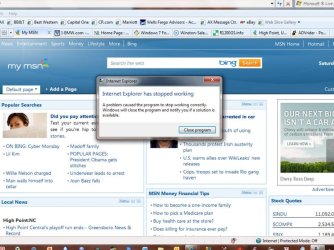
On my new Dell XPS, Windows keeps shutting down Internet Explorer. My older XP machines do not have this problem. Here's what the notices look like:


When I get this, I close the program, re-open IE and, usually, it loads fine. Today, I've gotten this message about a dozen time. It happens at my office, too. Any suggestions?

Mike

Attached Thumbnails
Internet Explorer keeps shutting down-screen-save-1.jpg  
My System SpecsSystem Spec

27 Nov 2010   #2

Windows 7 Ultimate AMD64
Sydney, Nova Scotia


I was getting that with IE 9 beta, eventually it wouldn't launch at all. Haven't had it happen with IE 8 though. Maybe this will help.
How to optimize Internet Explorer

EDIT: I never did figure out why IE 9 crashed and ended up going back to IE 8.
My System SpecsSystem Spec
27 Nov 2010   #3

Windows 7 Ultimate x64


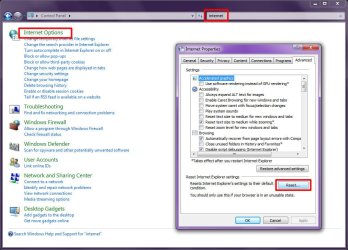
You may have a bad plug-in that is killing Internet Explorer. You can "reset" Internet Explorer as follows:
  1. Open "Control Panel"
  2. In the search box, type "internet" (without quotes)
  3. Click "Internet Options"
  4. Click the "Advanced" tab
  5. Click "Reset..."
The above procedure will unload all extensions, BHO's, plugins, etc that may be crashing Internet Explorer. It will also reset all your IE security settings and you home page.
Attached Thumbnails
Internet Explorer keeps shutting down-image1.jpg  
My System SpecsSystem Spec
.


27 Nov 2010   #4

Windows 7 Ultimate x64


Gosh, I was hoping that would work. It has crashed twice since doing the reset. Any other suggestions?

Thanks,

Mike
My System SpecsSystem Spec
27 Nov 2010   #5
mjf

Windows 7x64 Home Premium SP1 x 2
Australia


I moved to Firefox because IE8 was continuously faulting.

I came across this utility and never used it so can't vouch for it.
Fix Internet Explorer

Last edited by mjf; 27 Nov 2010 at 06:28 PM.. Reason: add
My System SpecsSystem Spec
28 Nov 2010   #6

Windows 7 Ultimate x64


Quote   Quote: Originally Posted by mikegc View Post
Gosh, I was hoping that would work. It has crashed twice since doing the reset. Any other suggestions?

Thanks,

Mike
Hmm...

You're the first i've encountered where "reset" hasn't worked...

Try running an Anti-Virus scan. Maybe there is some virus or malware that's killnig it?
My System SpecsSystem Spec
28 Nov 2010   #7
mjf

Windows 7x64 Home Premium SP1 x 2
Australia


I never had a problem with reset "working" it just never solved the problem of IE8 crashing. Reset was the only advice I received and it didn't work - Firefox has been fine.
My System SpecsSystem Spec
28 Nov 2010   #8

Windows 7 x64 pro/ Windows 7 x86 Pro/ XP SP3 x86


This problem doesnt seem to have a definite solution, so try a couple of these and see if it helps.

1) Click Start, Click All Programs – Accessories – Systems Tools, Click Internet Explorer (No add-ons).

2) Try turning off IE, then turn on again.

Click Start, then click Control Panel. Click Programs and Feature. In the tasks pane, click Turn Windows features on or off. In the list of windows features, clear the check box next to Internet Explorer 8. You receive a warning message in a pop-up window. Click Yes.

3) Run an sfc scan to fix possibly corrupted system files.

SFC /SCANNOW Command - System File Checker
My System SpecsSystem Spec
28 Nov 2010   #9
mjf

Windows 7x64 Home Premium SP1 x 2
Australia


Quote   Quote: Originally Posted by Bill2 View Post
This problem doesnt seem to have a definite solution, so try a couple of these and see if it helps.

1) Click Start, Click All Programs – Accessories – Systems Tools, Click Internet Explorer (No add-ons).

2) Try turning off IE, then turn on again.

Click Start, then click Control Panel. Click Programs and Feature. In the tasks pane, click Turn Windows features on or off. In the list of windows features, clear the check box next to Internet Explorer 8. You receive a warning message in a pop-up window. Click Yes.

3) Run an sfc scan to fix possibly corrupted system files.

SFC /SCANNOW Command - System File Checker
I'd tried all the above(I'm reasonably sure). One of my applications just launched internet explorer by default. Immediately got IE stopped working!! performance index down again.
Time for me to totally disable it.
My System SpecsSystem Spec
28 Nov 2010   #10

Windows 7 Ultimate x64


I was looking around for a fix for IE crashing and found this Microsoft link: FIX: Windows Internet Explorer 7 may crash when you use it to visit a Web site . I ran the fix and it's worked, so far. IE has not crashed since!

Mike
My System SpecsSystem Spec
Reply

 Internet Explorer keeps shutting down problems?


Thread Tools


Similar help and support threads for: Internet Explorer keeps shutting down
Thread Forum
Internet shutting off Browsers & Mail
Explorer.exe shutting down after 10/13/2011 update General Discussion
Problems with Internet Explorer shutting down Browsers & Mail
Internet keeps shutting down. Network & Sharing
Explorer.exe not shutting down General Discussion


All times are GMT -5. The time now is 04:19 PM.


Seven Forums Android App Seven Forums IOS App Follow us on Facebook

Windows 7 Forums is an independent web site and has not been authorized,
sponsored, or otherwise approved by Microsoft Corporation.
"Windows 7" and related materials are trademarks of Microsoft Corp.
© Designer Media Ltd
  

1 2 3 4 5 6 7 8 9 10 11 12 13 14 15 16 17 18 19 20 21 22 23 24 25 26 27 28 29 30 31 32