Windows 7 Forums


Windows 7: Reinstallation of IE

29 Nov 2010   #1

windows 7
 
 
Reinstallation of IE

I'm running 32bit windows 7 Home Premium.

I mistakenly clobbered IE and tried to install IE8. Got error msg telling me it wasn't compatible with my system.

I then tried installing IE9 beta and got a message telling me I had an IE installed which was a more advanced version (!!).

I got rid of all references of IE in the registry and tried the above operations again with the same results.


How can I install any IE on my system?
My System SpecsSystem Spec

29 Nov 2010   #2

Windows 7 Enterprise Trial 32-bit SP1


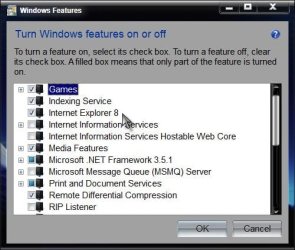
Look at Programs and Features >> Windows Features to make sure IE is checked off. You could also try unchecking it, rebooting, then check it again and reboot. If that doesn't work, sometimes it helps to run sfc /scannow from a command prompt to repair Windows files.

Last edited by Brink; 29 Nov 2010 at 10:40 PM.. Reason: added link
My System SpecsSystem Spec
30 Nov 2010   #3

windows 7


Already tried these, to no avail (IE is not in the list of installed items). Still cannot understand why IE8 or IE9 beta are shut out.
My System SpecsSystem Spec
.


30 Nov 2010   #4

Windows 7 Enterprise Trial 32-bit SP1


Quote   Quote: Originally Posted by Gswiss View Post
Already tried these, to no avail (IE is not in the list of installed items). Still cannot understand why IE8 or IE9 beta are shut out.
IE8 never is in the list of installed items. It only shows up as a box checked off in "Windows Features". Do you mean it's not in the list of check boxes?
My System SpecsSystem Spec
04 Dec 2010   #5

windows 7


I just tried to install them and could not.
My System SpecsSystem Spec
04 Dec 2010   #6

Windows 7 Enterprise Trial 32-bit SP1


Quote   Quote: Originally Posted by Gswiss View Post
I just tried to install them and could not.
"Do you mean it's not in the list of check boxes?"
My System SpecsSystem Spec
04 Dec 2010   #7

Windows 7 Home Premium x64 SP1
Bay Area Peninsula


As roncerr is asking:

Start> In search box type Turn Windows features on or off and press enter

Reinstallation of IE-turn.jpg

Is IE checked?

You may have to do a Repair Install now that you have messed with the registry

Repair Install

A Guy
My System SpecsSystem Spec
07 Dec 2010   #8

windows 7


Even though I certainly messed up things by clearing out all IE references in the registry, how come it refuses my clean installation of IE8 (telling me it's not made for my Windows version) and throws me out when I try IE9 beta under the pretext I have a more recent IE version installed ?
My System SpecsSystem Spec
07 Dec 2010   #9

windows 7


Quote   Quote: Originally Posted by roncerr View Post
Quote   Quote: Originally Posted by Gswiss View Post
I just tried to install them and could not.
"Do you mean it's not in the list of check boxes?"
No, it's not in the list
My System SpecsSystem Spec
07 Dec 2010   #10

Windows7 Pro 64bit SP-1; Windows XP Pro 32bit
Grafton,IL


You need to do a repair install as A Guy posted.
Click here- Repair Install

You will not loose any of your files. It puts Windows back to where it is supposed to be including IE.

Mike
My System SpecsSystem Spec
Reply

 Reinstallation of IE problems?


Thread Tools


Similar help and support threads for: Reinstallation of IE
Thread Forum
Reinstallation Windows Updates & Activation
Windows 7- Reinstallation Installation & Setup
Installation - Reinstallation??? Installation & Setup
Reinstallation Installation & Setup
Reinstallation + Product CD Key Installation & Setup


All times are GMT -5. The time now is 07:55 AM.


Seven Forums Android App Seven Forums IOS App Follow us on Facebook

Windows 7 Forums is an independent web site and has not been authorized,
sponsored, or otherwise approved by Microsoft Corporation.
"Windows 7" and related materials are trademarks of Microsoft Corp.
© Designer Media Ltd
  

1 2 3 4 5 6 7 8 9 10 11 12 13 14 15 16 17 18 19 20 21 22 23 24 25 26 27 28 29 30 31 32