Windows 7 Forums Search
Welcome to Windows 7 Forums. Our forum is dedicated to helping you find solutions with any problems, errors or issues you are experiencing with Windows 7. The Windows 7 forum also covers news and updates and has an extensive Windows 7 tutorial section that covers a wide range of tips and tricks.


Windows 7 - Windows Live Mail will not install

 
12-12-2010   #1


Windows 7


Windows Live Mail will not install

I had windows live mail installed and then it started not working. Could not connect to server. I uninstalled it and tried to reinstall it and the file will not install. I have no email access. I've tried everything I know including creating a new user and it still will not install. It had been working until 2 days ago. Then it just stopped receiving my email. I deleted the account and set it up again. Nothing works.

Can anyone help me?

My System SpecsSystem Spec
12-13-2010   #2


Windows 7


I did a system restore back to when I had my email that was hanging, and I now have it installed back on my laptop, but it connected once and now it hangs up on receiving email. It's acting very weird. I wonder if anyone else is having a problem with the Windows Mail? I can pick up my email on my desktop computer, no problem. Just not on my laptop.
My System SpecsSystem Spec
12-13-2010   #3


Operating System : Windows 7 Home Premium Edition 6.01.7600 SP1 (x64)


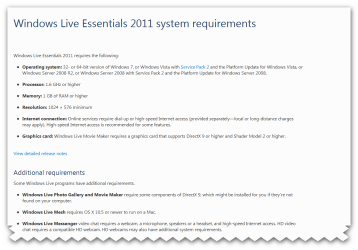
what windows 7 version are you using? requirements Windows Live Essentials 2011 in the pic
Attached Thumbnails
Windows Live Mail will not install-snap_2010.12.13-16.53.27_012.png  
My System SpecsSystem Spec
.


12-13-2010   #4


Operating System : Windows 7 Home Premium Edition 6.01.7600 SP1 (x64)


Perform a SFC Scan

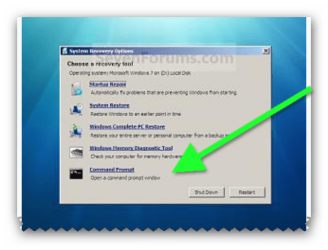
1. Click Start, click All Programs, click Accessories, right-click Command Prompt, and then click Run as administrator. If you are prompted for an administrator password or for a confirmation, type the password, or click Allow

2. Type the following command, and then press ENTER:

sfc /scannow

A message will appear stating that 'The system scan will begin'. Be patient because the scan may take some time

3. If any files require a replace SFC will replace them. You may be asked to insert your Windows 7 DVD for this process to continue

4. If everything is okay you should, after the scan, see the following message "Windows resource protection did not find any integrity violations"

5. After the scan has completed, close the command prompt window, restart the computer and check.

more information here How to use the System File Checker tool to troubleshoot missing or corrupted system files on Windows Vista or on Windows 7
My System SpecsSystem Spec
12-14-2010   #5


Windows 7


Windows Live Mail Issues

Thank you, I'll try this. The version of 7 I'm using is Home Premium. I'm also having issues with the computer shutting off. I have to press the off button and hold it down for a few seconds for it to turn completely off. This happened the same time my email started acting up. I can pick up my email on my desktop computer, it's my new laptop that I'm having issues with so I know it's not my internet provider. I was wondering how to do a check disk, or something like that to see if some files were messed up. We had a power outage on Friday, lost all power for several hours. As well as losing our internet connection. Once the power came back on and we got our internet back on, my computer was acting up. It wasn't a power surge, so I know there is no damage like that. Our power transformer for the entire block went out. I disconnected my laptop as soon as it happened because I didn't want the power to come back up and zap my laptop. But it would not turn off on it's own. I had to press the off button. Once we had everything back up and running, I could not access my email.

I appreciate the help and will try this scan.

Thank you,

Sherry Chilcote
My System SpecsSystem Spec
12-14-2010   #6


Operating System : Windows 7 Home Premium Edition 6.01.7600 SP1 (x64)


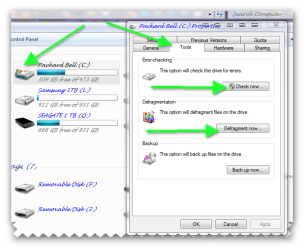
it wont hurt to error check the c drive and defrag

1.
  1. go to computer (make sure you are in administrative mode)
  2. right click on the c drive
  3. click on properties in the window
  4. click on tools
  5. click on check now
windows will part scan then ask you to schedule on next restart to check the drive click yes and reboot
when windows reboots just let it do its job it will repair if it needs to when its finished it will start as normal when you are logged on defrag the hard drive

2.
  1. go to computer (make sure you are in administrative mode)
  2. right click on the c drive
  3. click on properties in the window
  4. click on defrag and follow instructions


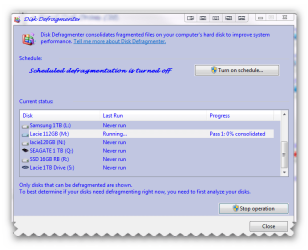
What is disk defragmentation?

Disk defragmentation describes the process of consolidating fragmented files on your computer's hard disk.

Fragmentation happens to a hard disk over time as you save, change, or delete files. The changes that you save to a file are often stored at a location on the hard disk that's different from the original file. Additional changes are saved to even more locations. Over time, both the file and the hard disk itself become fragmented, and your computer slows down as it has to look in many different places to open a file. Disk Defragmenter is a tool that rearranges the data on your hard disk and reunites fragmented files so your computer can run more efficiently.

SEE ALSO BRINKS TUTORIAL Disk Defragmenter - Open and Use

How to Turn the Windows 7 Disk Defragmenter Schedule On or Off Disk Defragmenter Schedule- Turn On or Off
Attached Thumbnails
Windows Live Mail will not install-snap_2010.12.14-18.22.15_001.png   Windows Live Mail will not install-snap_2010.12.14-18.49.30_002.png  
My System SpecsSystem Spec
12-14-2010   #7


Windows 7


Windows Live Mail Issues

Thank you Brian. I'm doing the sfc scan now, the computer has been on "verification 61% complete" for a little over 2 hours now. Does that sound right? The curser is blinking so it seems to be working but should it take this long at 61%?

I don't have a Windows DVD for this laptop. I created the backup DVD's when I purchased this machine a year ago. I wouldn't know which one is the Windows DVD as it backup doesn't label them that way. It's a set of "Recovery Disks", disk 1-3 and a Drivers Disk. You mentioned before it might ask me to put in the Windows Disk as some point.

I'm wondering if I should go buy another copy of Windows 7 and install. I don't want to do a clean install or complete systems restore because I don't want to lose all my music and pictures and video. I don't mind buying another copy of Windows. At least I would have one if I needed it later. I don't like how you buy a new computer today and it doesn't come with the DVD's. Everything is preloaded. If I were to buy another Windows 7 copy, should I keep the same one, Home Premium?

I just got the machine back from the factory 4 weeks ago. They had to put a new motherboard and hard drive on it and installed a new Windows Os. I lost everything that was on it at that time. I would hate to lose it all again. I don't know how to back up my iTunes so I keep all my album covers. I did backup the music files but when I did the restore, I lost over half of the album covers. It took me hours to get them all back from iTunes.

I did not make another "recovery disk" set when I got the machine back. Should I? Wouldn't it be the same as the original ones?

The machine was working great until just this past Friday. Well great, after they put a new motherboard and hard drive in it.

If I installed another copy of Windows 7, it might fix the problems I'm having with turning it off too. It will not turn completely off without using the off/on button.

This was a $1400 laptop. I'm just about done with it! I'm thinking I need to go buy a cheap $500 desktop and get on down the road!

Thank you for all your help,

Sherry Chilcote
My System SpecsSystem Spec
12-14-2010   #8


Operating System : Windows 7 Home Premium Edition 6.01.7600 SP1 (x64)


i can understand your frustration yes make a new set of recovery discs and a rescue disc why buy another windows 7? buy yourself a portable hard drive and back up all your stuff instead!! and reinstall the windows with the discs that seems a long time for the scan to me but wait a bit longer and see. if you have your old discs there pop them in the drive and see whats on them they should be labeled 1-3?

My System SpecsSystem Spec
12-14-2010   #9


Operating System : Windows 7 Home Premium Edition 6.01.7600 SP1 (x64)


my choice is a good desktop pc laptop i dont use only for work bit limited for my use.
My System SpecsSystem Spec
12-14-2010   #10


Operating System : Windows 7 Home Premium Edition 6.01.7600 SP1 (x64)


another way to save data is with google or live mail if you have a account with both i store all my documents with gmail (google documents) https://docs.google.com/?tab=mo&auth...2dsZV9jaHJvbWU
and pics with google picasa Picasa 3: Free download from Google
Attached Thumbnails
Windows Live Mail will not install-snap_2010.12.14-19.55.41_003.png   Windows Live Mail will not install-snap_2010.12.14-19.57.39_005.png  
My System SpecsSystem Spec
Reply

 Windows Live Mail will not install problems?


Thread Tools


Similar Threads for: Windows Live Mail will not install
Thread Forum
Window Live Mail Windows Mail and Similar Clients System Security
Solved Importing Outlook Express mail into Windows Live Mail Browsers & Mail
Windows Live Mail - Set up Hotmail, Yahoo!, GMail, AOL e-mail Tutorials
Solved Offline install for Windows Live Mail 2011 (15.4.3508)? Browsers & Mail
Office Word 2007 and Windows Mail Live--mail merge Microsoft Office


All times are GMT -5. The time now is 02:32 PM.


Windows 7 Forums is an independent web site and has not been authorized,
sponsored, or otherwise approved by Microsoft Corporation.
"Windows 7" and related materials are trademarks of Microsoft Corp.
© Designer Media Ltd
  

1 2 3 4 5 6 7 8 9 10 11 12 13 14 15 16 17 18 19 20 21 22 23 24 25 26 27 28 29 30