| Windows 7: WLM 2011 Deleted messages |
13 Dec 2010
|
#1 | | Windows 7 Home Premium x64 SP 1 Florida |
WLM 2011 Deleted messages I'm deleting messages, but they're not showing up in the Deleted Items folder. I know I must be missing a setting somewhere. What do I do to delete and message and have it appear in Deleted Items? Thanks. | My System Specs |
| Computer type PC/Desktop System Manufacturer/Model Number Dell Studio XPS 8100 OS Windows 7 Home Premium x64 SP 1 CPU Intel Core i7 860 @ 2.8 GHz Motherboard Dell 0T568R (CPU1) Memory 8.0 GB Dual Channel DDR3 @ 664 MHz (9-9-9-24) Graphics Card nVidia GeForce GTS 240 Sound Card M-Audio Delta Audiophile 2496 Monitor(s) Displays Dell 2407WFP Screen Resolution 1920x1200 Hard Drives 977 GB Western Digital WDC WD1001FAES-75W7A0 (SCSI) Antivirus MSE, MalwareBytes Anti-Malware Browser Firefox Other Info Microsoft Security Essentials, Mozilla Firefox, Mozilla Thunderbird. M-Audio Keystation 88es (keyboard controller), Western Digital Passport 250 GB external HD, Logitech Z2300 speaker system, two Mushkin Enhanced Mulholland 16GB USB flash drives, AKG K240 Studio headphones. |
13 Dec 2010
|
#2 | | Windows 7 Home Premium x64 SP 1 Florida |
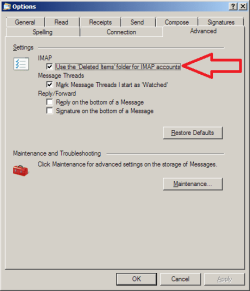
I think the attached might answer my own question. You gotta check as indicated. Then, when I delete a message, it'll show up in the Deleted Items folder. Correct?
I haven't tested it, but is there a difference whether one uses the keyboard delete key or right-clicking the message for the delete option in the context menu?
Thanks. | My System Specs | | Computer type PC/Desktop System Manufacturer/Model Number Dell Studio XPS 8100 OS Windows 7 Home Premium x64 SP 1 CPU Intel Core i7 860 @ 2.8 GHz Motherboard Dell 0T568R (CPU1) Memory 8.0 GB Dual Channel DDR3 @ 664 MHz (9-9-9-24) Graphics Card nVidia GeForce GTS 240 Sound Card M-Audio Delta Audiophile 2496 Monitor(s) Displays Dell 2407WFP Screen Resolution 1920x1200 Hard Drives 977 GB Western Digital WDC WD1001FAES-75W7A0 (SCSI) Antivirus MSE, MalwareBytes Anti-Malware Browser Firefox Other Info Microsoft Security Essentials, Mozilla Firefox, Mozilla Thunderbird. M-Audio Keystation 88es (keyboard controller), Western Digital Passport 250 GB external HD, Logitech Z2300 speaker system, two Mushkin Enhanced Mulholland 16GB USB flash drives, AKG K240 Studio headphones. |
14 Dec 2010
|
#3 | | Windows 7 Enterprise Trial 32-bit SP1 |

Quote: Originally Posted by gogreen ...You gotta check as indicated. Then, when I delete a message, it'll show up in the Deleted Items folder. Correct?
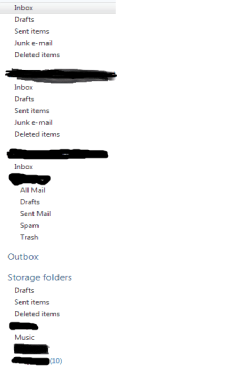
I haven't tested it, but is there a difference whether one uses the keyboard delete key or right-clicking the message for the delete option in the context menu? There are many "Deleted Items" folders in WLM. One under each pop3 account (inbox, sent, deleted) and one under the storage folders which are shared by all of the IMAP accounts. I believe the check box you mentioned only applies to the deleted items folder which resides on the IMAP mail server itself.
The delete key functions like right-click delete. | My System Specs | | System Manufacturer/Model Number OQO 2+ OS Windows 7 Enterprise Trial 32-bit SP1 CPU Intel Atom 1.86 GHz Motherboard OQO 2+ Memory 2 GB Graphics Card Intel GMA 500 Sound Card IDT Monitor(s) Displays LCD Screen Resolution 800 x 480 (portable) 1280 x 1024 (docked) Keyboard Slide out (portable) DiNovo Edge (docked) Mouse Eraser head (portable) Logitech Bluetooth (docked) PSU 9 Ah Battery (portable) or OQO Brick (docked) Case Shirt Pocket Sized Cooling Tiny Fan Hard Drives 64 GB SSD Internet Speed WWAN or 802.11G (portable) T1 (docked) Other Info DVD-RW OQO Docking Station |
14 Dec 2010
|
#4 | | Windows 7 Home Premium x64 SP 1 Florida |
Hmmmm. I've tried deleting both ways, and still can't see any messages in a deleted folder. What gives? | My System Specs | | Computer type PC/Desktop System Manufacturer/Model Number Dell Studio XPS 8100 OS Windows 7 Home Premium x64 SP 1 CPU Intel Core i7 860 @ 2.8 GHz Motherboard Dell 0T568R (CPU1) Memory 8.0 GB Dual Channel DDR3 @ 664 MHz (9-9-9-24) Graphics Card nVidia GeForce GTS 240 Sound Card M-Audio Delta Audiophile 2496 Monitor(s) Displays Dell 2407WFP Screen Resolution 1920x1200 Hard Drives 977 GB Western Digital WDC WD1001FAES-75W7A0 (SCSI) Antivirus MSE, MalwareBytes Anti-Malware Browser Firefox Other Info Microsoft Security Essentials, Mozilla Firefox, Mozilla Thunderbird. M-Audio Keystation 88es (keyboard controller), Western Digital Passport 250 GB external HD, Logitech Z2300 speaker system, two Mushkin Enhanced Mulholland 16GB USB flash drives, AKG K240 Studio headphones. |
14 Dec 2010
|
#5 | | Windows 7 Enterprise Trial 32-bit SP1 |

Quote: Originally Posted by gogreen Hmmmm. I've tried deleting both ways, and still can't see any messages in a deleted folder. What gives?  Which deleted folders are you looking at and what type of account were they downloaded from (IMAP, POP3, HTTP)?
Last edited by roncerr; 14 Dec 2010 at 08:30 PM..
| My System Specs | | System Manufacturer/Model Number OQO 2+ OS Windows 7 Enterprise Trial 32-bit SP1 CPU Intel Atom 1.86 GHz Motherboard OQO 2+ Memory 2 GB Graphics Card Intel GMA 500 Sound Card IDT Monitor(s) Displays LCD Screen Resolution 800 x 480 (portable) 1280 x 1024 (docked) Keyboard Slide out (portable) DiNovo Edge (docked) Mouse Eraser head (portable) Logitech Bluetooth (docked) PSU 9 Ah Battery (portable) or OQO Brick (docked) Case Shirt Pocket Sized Cooling Tiny Fan Hard Drives 64 GB SSD Internet Speed WWAN or 802.11G (portable) T1 (docked) Other Info DVD-RW OQO Docking Station |
14 Dec 2010
|
#6 | | Windows 7 Home Premium x64 SP 1 Florida |
One's an IMAP account, the other two are POP3 accounts from the same provider (but different email addresses). The "Deleted Items" folders appear with the POP3 folders and the Storage folder. The IMAP account has no deleted items folder, but it does have a trash folder. | My System Specs | | Computer type PC/Desktop System Manufacturer/Model Number Dell Studio XPS 8100 OS Windows 7 Home Premium x64 SP 1 CPU Intel Core i7 860 @ 2.8 GHz Motherboard Dell 0T568R (CPU1) Memory 8.0 GB Dual Channel DDR3 @ 664 MHz (9-9-9-24) Graphics Card nVidia GeForce GTS 240 Sound Card M-Audio Delta Audiophile 2496 Monitor(s) Displays Dell 2407WFP Screen Resolution 1920x1200 Hard Drives 977 GB Western Digital WDC WD1001FAES-75W7A0 (SCSI) Antivirus MSE, MalwareBytes Anti-Malware Browser Firefox Other Info Microsoft Security Essentials, Mozilla Firefox, Mozilla Thunderbird. M-Audio Keystation 88es (keyboard controller), Western Digital Passport 250 GB external HD, Logitech Z2300 speaker system, two Mushkin Enhanced Mulholland 16GB USB flash drives, AKG K240 Studio headphones. |
14 Dec 2010
|
#7 | | Windows 7 Enterprise Trial 32-bit SP1 |

Quote: Originally Posted by gogreen Hmmmm. I've tried deleting both ways, and still can't see any messages in a deleted folder. What gives?  Do they completely disappear or remain in the original folder?
Does the problem happen for both pop3 and IMAP deletions? | My System Specs | | System Manufacturer/Model Number OQO 2+ OS Windows 7 Enterprise Trial 32-bit SP1 CPU Intel Atom 1.86 GHz Motherboard OQO 2+ Memory 2 GB Graphics Card Intel GMA 500 Sound Card IDT Monitor(s) Displays LCD Screen Resolution 800 x 480 (portable) 1280 x 1024 (docked) Keyboard Slide out (portable) DiNovo Edge (docked) Mouse Eraser head (portable) Logitech Bluetooth (docked) PSU 9 Ah Battery (portable) or OQO Brick (docked) Case Shirt Pocket Sized Cooling Tiny Fan Hard Drives 64 GB SSD Internet Speed WWAN or 802.11G (portable) T1 (docked) Other Info DVD-RW OQO Docking Station |
14 Dec 2010
|
#8 | | Windows 7 Home Premium x64 SP 1 Florida |
I delete the message, either with the keyboard delete key or right-clicking the message and clicking delete in the context menu. Then--nothing. It's just gone, no longer in the original folder, and I don't know where it is--it sure ain't in the delete folder. Happens with both IMAP and POP3 deletions. | My System Specs | | Computer type PC/Desktop System Manufacturer/Model Number Dell Studio XPS 8100 OS Windows 7 Home Premium x64 SP 1 CPU Intel Core i7 860 @ 2.8 GHz Motherboard Dell 0T568R (CPU1) Memory 8.0 GB Dual Channel DDR3 @ 664 MHz (9-9-9-24) Graphics Card nVidia GeForce GTS 240 Sound Card M-Audio Delta Audiophile 2496 Monitor(s) Displays Dell 2407WFP Screen Resolution 1920x1200 Hard Drives 977 GB Western Digital WDC WD1001FAES-75W7A0 (SCSI) Antivirus MSE, MalwareBytes Anti-Malware Browser Firefox Other Info Microsoft Security Essentials, Mozilla Firefox, Mozilla Thunderbird. M-Audio Keystation 88es (keyboard controller), Western Digital Passport 250 GB external HD, Logitech Z2300 speaker system, two Mushkin Enhanced Mulholland 16GB USB flash drives, AKG K240 Studio headphones. |
14 Dec 2010
|
#9 | | Windows 7 Enterprise Trial 32-bit SP1 |
You might try a repair install. Go to Programs and Features "Windows Live Essentials" and choose to repair. It should repair whatever parts of the Essentials package were installed, including Mail. | My System Specs | | System Manufacturer/Model Number OQO 2+ OS Windows 7 Enterprise Trial 32-bit SP1 CPU Intel Atom 1.86 GHz Motherboard OQO 2+ Memory 2 GB Graphics Card Intel GMA 500 Sound Card IDT Monitor(s) Displays LCD Screen Resolution 800 x 480 (portable) 1280 x 1024 (docked) Keyboard Slide out (portable) DiNovo Edge (docked) Mouse Eraser head (portable) Logitech Bluetooth (docked) PSU 9 Ah Battery (portable) or OQO Brick (docked) Case Shirt Pocket Sized Cooling Tiny Fan Hard Drives 64 GB SSD Internet Speed WWAN or 802.11G (portable) T1 (docked) Other Info DVD-RW OQO Docking Station |
14 Dec 2010
|
#10 | | Windows 7 Home Premium x64 SP 1 Florida |
Wouldn't let me repair. Said I had to uninstall, which I did. Just reinstalled it. Testing. | My System Specs | | Computer type PC/Desktop System Manufacturer/Model Number Dell Studio XPS 8100 OS Windows 7 Home Premium x64 SP 1 CPU Intel Core i7 860 @ 2.8 GHz Motherboard Dell 0T568R (CPU1) Memory 8.0 GB Dual Channel DDR3 @ 664 MHz (9-9-9-24) Graphics Card nVidia GeForce GTS 240 Sound Card M-Audio Delta Audiophile 2496 Monitor(s) Displays Dell 2407WFP Screen Resolution 1920x1200 Hard Drives 977 GB Western Digital WDC WD1001FAES-75W7A0 (SCSI) Antivirus MSE, MalwareBytes Anti-Malware Browser Firefox Other Info Microsoft Security Essentials, Mozilla Firefox, Mozilla Thunderbird. M-Audio Keystation 88es (keyboard controller), Western Digital Passport 250 GB external HD, Logitech Z2300 speaker system, two Mushkin Enhanced Mulholland 16GB USB flash drives, AKG K240 Studio headphones. WLM 2011 Deleted messages problems? All times are GMT -5. The time now is 05:09 PM. | |