Here's how it works in Firefox:
When clicking a download link you are asked if you want to
open (run) the file you are downloading or
save it. If you select
Open it is temporarily stored to default %TEMP% folder. This is because Windows (Firefox) thinks you don't want to save the file, you just want to run in once from download location. Because this is not possible, Windows needs to move it to Temp, run it from there, and forget that the file existed

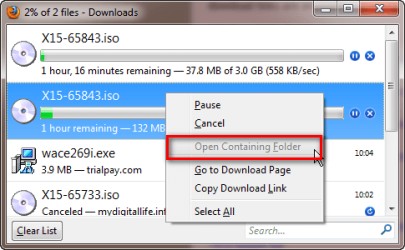
That's why context menu option
Open Containing Folder is not enabled.
Variable %TEMP% (shows the default TEMP folder) has a default value
C:\Users\Your_Username_\AppData\Local\Temp, that's where you should look for your missing downloads.
When you choose to
save the file, it is saved to the default download save location if you have not changed that. Default location is
C:\Users\Your_Username\Downloads.
Same with pics:
I've chosen to
open an ISO image with Magic ISO Maker, instead of saving it for later use:
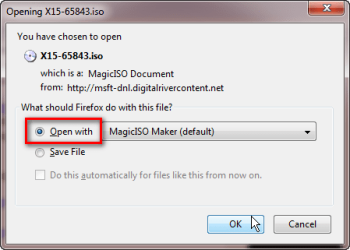
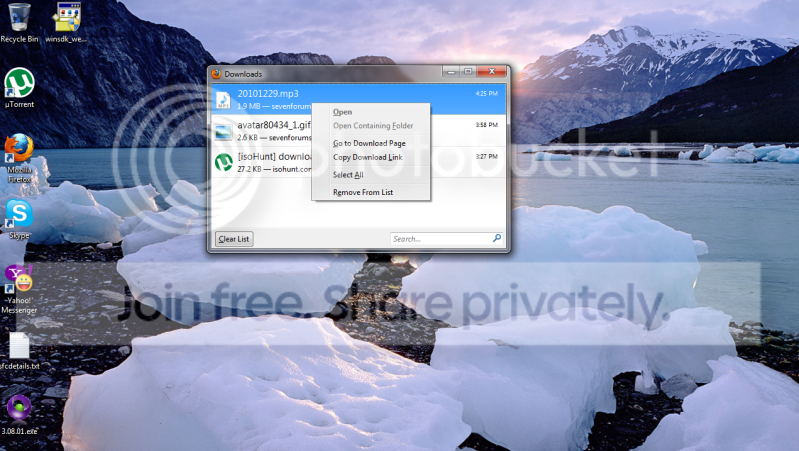
Because I did not ask Windows to save the file, just to run it once, the file location can not be opened i.e. context menu selection
Open Containing Folder is grayed out:
Same file, same download location. This time I choose to
save the file:
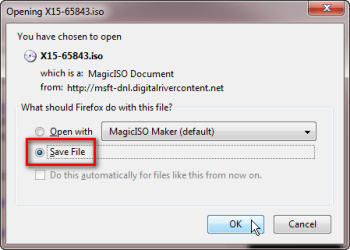
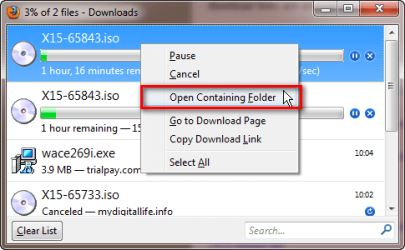
Because the file is this time really saved, also the
Open Containing Folder option is enabled:
That's it.
Kari



 but how about on IE 8 are there config similar to it?

