
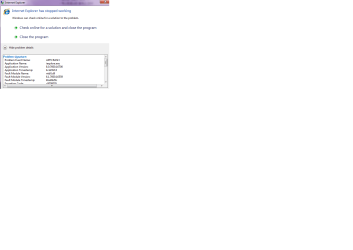
IE 8 crash ntdll.dll (win7x64)

kimboy

New member
ntdll.png

hi
when ever i run a embedded video IE8 crashes.
this is one of the example websites </title> <meta http-equiv=Content-Type content=text/html; charset=EUC-KR> <link rel=StyleSheet HREF=skin/blackcat_bbs/style.css type=text/css title=style> </head> <body topmargin='0' leftmargin='0' marginwidth='0' marginheight='0' bgcolor=white > <ht

i hav tried every possible solutions out there but it wont work.
in one of the solutions it said that it could be a problem with an addon in IE so i tried disabling addons one by one. once i disable "shockwave flash object" the problem doesn't occur but then i cant watch the video anyway because its disabled. so i tried reinstalling adobe flash player and shockwave player but it didn't do anything.

i tried cleaning my registry and did a full computer scan with norton. i didn't download any new programs from what i can recall...it just started crashing. youtube works fine tho. also i hav tried changing to IE7 and even IE9 but problem persists. this problem occurs even wif firefox.

can ppl plz help me
 

My Computer

Computer type
PC/Desktop
OS
Microsoft Windows 7 Ultimate 64-bit 7601 Multiprocessor Free Service Pack 1
CPU
Intel(R) Core(TM) i5-2500K CPU @ 3.30GHz
Motherboard
ASUSTeK Computer INC. P8Z68-V
Memory
8.00 GB
Graphics Card(s)
AMD Radeon HD 7900 Series
Sound Card
(1) Microsoft LifeCam VX-5000. (2) Realtek High Definition
Screen Resolution
1920 x 1080 x 32 bits (4294967296 colors) @ 60 Hz
Hard Drives
ST31000524AS ATA Device
PSU
Cooler Master GX 750W PSU SLI Ready Single +12V Rail 60A PS
Case
NZXT Lexa S Black Steel Mid Tower Chassis
Flash is indeed crashing - changing versions of IE isn't going to help. There is an uninstall program to actually fully remove Flash from your computer (from Adobe). I would run that, reboot, and then make sure all else works in IE before going back to Adobe and installing Flash again. If the problems continue after that, you'd have to get with Adobe tech support. Hopefully that won't be necessary, and the previous steps will be sufficient.
 

My Computer

Computer type
PC/Desktop
Computer Manufacturer/Model Number
Custom
OS
Windows 10 Pro x64
CPU
Intel Core i7 4790K @ 4.5GHz
Motherboard
Asus Maximus Hero VII
Memory
32GB DDR3
Graphics Card(s)
Nvidia GeForce GTX970
Sound Card
Realtek HD Audio
Screen Resolution
1920x1200
Hard Drives
1x Samsung 250GB SSD
4x WD RE 2TB (RAIDZ)
PSU
Corsair AX760i
Case
Fractal Design Define R4
Cooling
Noctua NH-D15
thanks for the reply but i still get the error. i'll ask adobe myself. thanks for the quick reply
 

My Computer

Computer type
PC/Desktop
OS
Microsoft Windows 7 Ultimate 64-bit 7601 Multiprocessor Free Service Pack 1
CPU
Intel(R) Core(TM) i5-2500K CPU @ 3.30GHz
Motherboard
ASUSTeK Computer INC. P8Z68-V
Memory
8.00 GB
Graphics Card(s)
AMD Radeon HD 7900 Series
Sound Card
(1) Microsoft LifeCam VX-5000. (2) Realtek High Definition
Screen Resolution
1920 x 1080 x 32 bits (4294967296 colors) @ 60 Hz
Hard Drives
ST31000524AS ATA Device
PSU
Cooler Master GX 750W PSU SLI Ready Single +12V Rail 60A PS
Case
NZXT Lexa S Black Steel Mid Tower Chassis
you hav to pay money to get adobe support? so lame....
 

My Computer

Computer type
PC/Desktop
OS
Microsoft Windows 7 Ultimate 64-bit 7601 Multiprocessor Free Service Pack 1
CPU
Intel(R) Core(TM) i5-2500K CPU @ 3.30GHz
Motherboard
ASUSTeK Computer INC. P8Z68-V
Memory
8.00 GB
Graphics Card(s)
AMD Radeon HD 7900 Series
Sound Card
(1) Microsoft LifeCam VX-5000. (2) Realtek High Definition
Screen Resolution
1920 x 1080 x 32 bits (4294967296 colors) @ 60 Hz
Hard Drives
ST31000524AS ATA Device
PSU
Cooler Master GX 750W PSU SLI Ready Single +12V Rail 60A PS
Case
NZXT Lexa S Black Steel Mid Tower Chassis
Are you using the 32-bit IE8? It works for me since my system is 32-bit. Try to use the above link to uninstall flash, reset IE8 (Tools/Internet Options/Advanced/Reset), Then reinstall Flash from Adobe.
 

My Computer

Computer type
PC/Desktop
Computer Manufacturer/Model Number
OQO 2+
OS
Windows 8 Pro w/MC 32-bit
CPU
Intel Atom 1.86 GHz
Motherboard
OQO 2+
Memory
2 GB
Graphics Card(s)
Intel GMA 500
Sound Card
IDT
Monitor(s) Displays
LCD
Screen Resolution
800 x 480 (portable) 1280 x 1024 (docked)
Hard Drives
64 GB SSD
PSU
9 Ah Battery (portable) or OQO Brick (docked)
Case
Shirt Pocket Sized
Cooling
Tiny Fan
Keyboard
Slide out (portable) DiNovo Edge (docked)
Mouse
Eraser head (portable) Logitech Bluetooth (docked)
Internet Speed
WWAN or 802.11G (portable) T1 (docked)
Browser
IE 10
Other Info
DVD-RW OQO Docking Station
like i said i hav tried everything including reseting internet explorer settings.

yes i am running 32bit IE8. everything has been working fine but it just doesn't work anymore for some reason and i cant figure it out.
 

My Computer

Computer type
PC/Desktop
OS
Microsoft Windows 7 Ultimate 64-bit 7601 Multiprocessor Free Service Pack 1
CPU
Intel(R) Core(TM) i5-2500K CPU @ 3.30GHz
Motherboard
ASUSTeK Computer INC. P8Z68-V
Memory
8.00 GB
Graphics Card(s)
AMD Radeon HD 7900 Series
Sound Card
(1) Microsoft LifeCam VX-5000. (2) Realtek High Definition
Screen Resolution
1920 x 1080 x 32 bits (4294967296 colors) @ 60 Hz
Hard Drives
ST31000524AS ATA Device
PSU
Cooler Master GX 750W PSU SLI Ready Single +12V Rail 60A PS
Case
NZXT Lexa S Black Steel Mid Tower Chassis
Back
Top