| Windows 7: Adobe Flash won't install on IE8 |
18 Jan 2011
|
#11 | | Windows 7 Home Premium 64 bit Illinois |
| My System Specs |
| System Manufacturer/Model Number Self-built OS Windows 7 Home Premium 64 bit CPU Intel Core i7-3770 Motherboard MSI Z77A-G45 Memory G.SKILL 8GB (2 x 4GB) DDR3 F3-10666CL9D-8GBNT Graphics Card Sapphire ATI Radeon HD 6670 Sound Card On-Board Realtek Monitor(s) Displays Samsung SyncMaster P2370HD, Dell 1703FPT Screen Resolution 1920 x 1080, 1280 x 1024 Keyboard Logitech K270 Mouse Logitech M705 PSU SeaSonic M12II SS-500GM Case Lian Li PC-9F Cooling Zalman CNPS9900ALED Hard Drives Samsung HD103SJ Internet Speed 16 Mbps Other Info Bose Companion 2 Multimedia Speakers |
18 Jan 2011
|
#12 | | Win 7 Home Premium 64bit Ver 6.1.7600 Build 7601 - SP1 Central Pa. |
Finally Success!!!
I tried p5dbkw's suggestion here: 
Quote: Originally Posted by p5bdkw And Flash downloaded, installed, and Worked!
The only thing you have to watch is the "Agree to license and download now" box popped under the FileHippo page. ~~~ ~~~~~ ~~~
As a test. I then went to the site I found from Kashile on the social.technet site, and it too worked.: ZEPoRAMA.com : Découvrez le véritable ZEP en chair et en pixels. L'actualité de Titeuf et des autres héros de Zep sur son site officiel
It installed on IE8 just like it would with less hassle with FireFox.
Don't worry 'bout the language it was painless and automatic.
As a matter of fact (Don't ask me why) the installs from zeporama initialize, and run faster than the ones from FileHippo.
I'll give anyone three guesses which download I kept, and the first two don't count! | My System Specs | | Computer type PC/Desktop System Manufacturer/Model Number Gateway DX4831e (Mid-Tower Desktop) OS Win 7 Home Premium 64bit Ver 6.1.7600 Build 7601 - SP1 CPU Intel i3 530 2.93GHz, 2933MHz 2 Cores 4 Logical Processors Motherboard Gateway H57M01 133 megahertz Memory 6GB of 1,333MHz DDR3 SDRAM Graphics Card 32MB Intel Graphics Media Accelerator HD IGChip Sound Card Realtek High Definition Audio Monitor(s) Displays Gateway HX2000 20inch TFT active matrix TN Screen Resolution 1600 x 900 x 59 hertz Keyboard MS 'Natural' Standard PS/2 Enhanced 101-102 Key Mouse Gateway USB wired optical PSU 300watts. Case Mid-Tower Desktop Cooling Stock from Gateway Hard Drives WDC WD10EADS-00M2B0 [HDD] (1000.20 GB) -- drive 0,
HL-DT-ST DVDRAM GH41N [CD-ROM dr]
HP Photosmart Plus B210a e_series AIO Printer
Four card readers, and Four USB 2.0 Internet Speed Verizon FIOS 24.57Mbps Down - 5.68Mbps up Antivirus MSE Browser IE9.0.8112.16421-Upd ver 9.0.13, FireFox 19.2, Opera 12.14 Other Info BIOS: American Megatrends Inc. P01-A0 11/17/2009
System Specs by Belarc.
Join Date March 27th 2010 at 10:44:15 AM. |
18 Jan 2011
|
#13 | | Windows 7 Ultimate x64 SP1 |
Seems like the same download from the Adobe website. Have no idea why downloading from the other sites worked as opposed to the official download from the Adobe website. Not going to try and guess this one though; I'll just chalk it up to Flash being Flash and Windows being Windows. | My System Specs | | OS Windows 7 Ultimate x64 SP1 CPU Intel Core i3 530 2.93 Ghz Clarkdale Motherboard ASRock P55 PRO/USB3 LGA 1156 Memory 4 GB OCZ DDR3 1600 (PC12800) Low Voltage Desktop Memory Graphics Card Nvidia GeForce GTX 550 Ti with 1 GB of RAM Sound Card Realtek HD ALC892 Monitor(s) Displays 20'' eMachines E202HDbmd Glare Panel Widescreen Screen Resolution 1600 x 900 Keyboard Microsoft Wireless Optical Desktop Elite Mouse Microsoft Wireless Optical Desktop Elite PSU Rosewill Xtreme Series RX750-D-B ATX12V v2.2 & EPS12V (750W) Case Cooler Master Centurion 534 RC-534-KKN2-GP Mid-Tower Cooling Standard Case Fans and Stock CPU Heatsink Hard Drives Western Digital 1 TB Caviar Black Edition (7200 RPM) SATA
Hitachi Deskstar 500 GB (7200 RPM) SATA
Samsung SpinPoint 400 GB (7200 RPM) SATA Internet Speed 7.1 Mbps Verizon DSL |
23 Feb 2011
|
#14 | | Windows 7 home prem 32 bit |
Darician,
I have torn my hair out over this. I must have uninstalled & reinstalled a dozen times, first getting something like "not authorized", then getting "download complete". Then it disappeared and was not recognized on the Adobe test site.
Then I read your post #3, did the manual install, still no go. Then I followed these instructions that you wrote "If not, you may want to go to Tools --> Manage Add-ons and then ensure that on the left hand side below "Show:", you select "All add-ons". Then on the right-hand side, look for one called "Shockwave Flash Object" and check to see if it is enabled or not. If it is disabled, click on it then below, click to enable it."
Eurkea! If you were sitting here, I would kiss you! Thinking back on what may have happened, everything was working fine, then my brand new Dell OptiPlex started slowing down. So I disabled a bunch of add-ons, messaging crap and the like, just about everything I thought I didn't need. Couple days later, I went to You Tube (I know, not on company time...) and it said I needed to update my flash player to view the video. Then all this started and I was stumped. Thanks so much for your help. | My System Specs | | System Manufacturer/Model Number Dell optliplex OS Windows 7 home prem 32 bit |
23 Feb 2011
|
#15 | | Win 7 Home Premium 64bit Ver 6.1.7600 Build 7601 - SP1 Central Pa. |
Hi! Linda431, welcome to 7F
I am glad to hear that one of our solved threads has been helpful to you! | My System Specs | | Computer type PC/Desktop System Manufacturer/Model Number Gateway DX4831e (Mid-Tower Desktop) OS Win 7 Home Premium 64bit Ver 6.1.7600 Build 7601 - SP1 CPU Intel i3 530 2.93GHz, 2933MHz 2 Cores 4 Logical Processors Motherboard Gateway H57M01 133 megahertz Memory 6GB of 1,333MHz DDR3 SDRAM Graphics Card 32MB Intel Graphics Media Accelerator HD IGChip Sound Card Realtek High Definition Audio Monitor(s) Displays Gateway HX2000 20inch TFT active matrix TN Screen Resolution 1600 x 900 x 59 hertz Keyboard MS 'Natural' Standard PS/2 Enhanced 101-102 Key Mouse Gateway USB wired optical PSU 300watts. Case Mid-Tower Desktop Cooling Stock from Gateway Hard Drives WDC WD10EADS-00M2B0 [HDD] (1000.20 GB) -- drive 0,
HL-DT-ST DVDRAM GH41N [CD-ROM dr]
HP Photosmart Plus B210a e_series AIO Printer
Four card readers, and Four USB 2.0 Internet Speed Verizon FIOS 24.57Mbps Down - 5.68Mbps up Antivirus MSE Browser IE9.0.8112.16421-Upd ver 9.0.13, FireFox 19.2, Opera 12.14 Other Info BIOS: American Megatrends Inc. P01-A0 11/17/2009
System Specs by Belarc.
Join Date March 27th 2010 at 10:44:15 AM. |
23 Mar 2012
|
#16 | | |
It's not a bug, it's a feesure! 
Quote: Originally Posted by Darician I'm at a loss. Usually these steps work for most people and get Flash up and running in IE. Sorry it didn't work out for you. Let's hope someone else has other ideas for this issue.
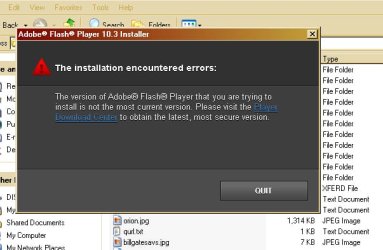
What are you talking about? There is explicit code in the Flash 10 player installer to check for a more recent version and not install if there is. Version 11 makes 10 obsolete by design. This is more marketing crap to get you to upgrade your browser. Oh, there's no higher version for your OS? Upgrade your OS. It's a big Win 7 promotion.
Bottom line, if you're using IE 8 and are prompted to upgrade to Flash 11, don't do it! The other part of the arm twisting is sites like youtube that won't work anymore in version 10. That's because there's a tag in the html page that basically says, "require version 11". The code is still version 10- sometimes as old as 6!- and those swfs will play JUST FINE. They only don't, and prompt you to upgrade because a programmer stuck a tag in the html that said so. They want the latest version on their resume, screw you. Ditto the marketers.
Some sites maintained an offline installer for version 10.3 so that you could get around this. Of course the legal beagles had to threaten them unless they cooperated in screwing you up the arse. No doubt it still around somewhere if you can find it.
Bottom line, this is the kind of crap you accept when you run Windows. You really need to sit down and think about why you're trusting your computer to people that put marketers wet dreams ahead of your being able to get stuff done, every time. | My System Specs | | System Manufacturer/Model Number Dell OS XP Other Info I only use this sytstem for backward compatibility testing. For real work and productivity I have Ubuntu boxes, of course. I've installed it, then Windoze, then back on the same hardware and benchmarked it. Windoze is using 1/2 of your hardware resources in poor algorithms and fighting attacks due to poor design. When you buy a Win system, just divide the hardware specs by 1/2. |
23 Mar 2012
|
#17 | | |
That will work IF you get rid of the registry keys that explicitly disallow the older version from installing. Here's how to do it. You might have to edit the cmd file to put the full path to the executable in. I've gotten this to work on about 75% of the machines with the problem. It at least proves that this isn't a technical problem, or an incompatibility. Marketers got tired of your not upgrading and decided to make you upgrade. Flash Player | Windows registry permissions | My System Specs | | System Manufacturer/Model Number Dell OS XP Other Info I only use this sytstem for backward compatibility testing. For real work and productivity I have Ubuntu boxes, of course. I've installed it, then Windoze, then back on the same hardware and benchmarked it. Windoze is using 1/2 of your hardware resources in poor algorithms and fighting attacks due to poor design. When you buy a Win system, just divide the hardware specs by 1/2. |
23 Mar 2012
|
#18 | | Win 7 Home Premium 64bit Ver 6.1.7600 Build 7601 - SP1 Central Pa. |
Hi WroteWindoze1, welcome to 7F!
Thank you for the added tutorial, but as the Thread Starter, and pseudo Moderator I must ask you why you feel the need to shout even though you do not use Caps.
To paraphrase your paragraphs. 
Quote: Originally Posted by WroteWindoze1 What are you talking about? After I read this paragraph, I could feel my hair blowin' in the breeze....
Then: 
Quote: Originally Posted by WroteWindoze1 Bottom line, 
Quote: Originally Posted by WroteWindoze1 Bottom line, With this paragraph; Did you really feel it was necessary to condemn Microsoft?
In your second post: 
Quote: Originally Posted by WroteWindoze1 That will work IF Let it be known that I use my Authoritative Voice on occasion, but I still do not come across as you have.
I would like to make a request, If you still desire to continue to post in your "fashion" Please, keep that form of decorum reserved to your personal sphere, and not in any of my threads!
I could make a request to the Adminstrators, and Moderators here at 7F to remove your first post, the reason?
Your reference to a "nocturnal emission", but I think I will wait, wait to see if you do the right thing, you do have the power to edit your post.
You do have an intuitive mind, let us think of Tron; in order to see, not only the problem, but beyond the problem. Do not waste it on trying to be cocky. | My System Specs | | Computer type PC/Desktop System Manufacturer/Model Number Gateway DX4831e (Mid-Tower Desktop) OS Win 7 Home Premium 64bit Ver 6.1.7600 Build 7601 - SP1 CPU Intel i3 530 2.93GHz, 2933MHz 2 Cores 4 Logical Processors Motherboard Gateway H57M01 133 megahertz Memory 6GB of 1,333MHz DDR3 SDRAM Graphics Card 32MB Intel Graphics Media Accelerator HD IGChip Sound Card Realtek High Definition Audio Monitor(s) Displays Gateway HX2000 20inch TFT active matrix TN Screen Resolution 1600 x 900 x 59 hertz Keyboard MS 'Natural' Standard PS/2 Enhanced 101-102 Key Mouse Gateway USB wired optical PSU 300watts. Case Mid-Tower Desktop Cooling Stock from Gateway Hard Drives WDC WD10EADS-00M2B0 [HDD] (1000.20 GB) -- drive 0,
HL-DT-ST DVDRAM GH41N [CD-ROM dr]
HP Photosmart Plus B210a e_series AIO Printer
Four card readers, and Four USB 2.0 Internet Speed Verizon FIOS 24.57Mbps Down - 5.68Mbps up Antivirus MSE Browser IE9.0.8112.16421-Upd ver 9.0.13, FireFox 19.2, Opera 12.14 Other Info BIOS: American Megatrends Inc. P01-A0 11/17/2009
System Specs by Belarc.
Join Date March 27th 2010 at 10:44:15 AM. |
23 Mar 2012
|
#19 | | Windows 7 Enterprise Trial 32-bit SP1 |

Quote: Originally Posted by WroteWindoze1 ...There is explicit code in the Flash 10 player installer to check for a more recent version and not install if there is. Version 11 makes 10 obsolete by design... The reason Flash is updated so often has to do with security fixes, not that old versions don't work. | My System Specs | | System Manufacturer/Model Number OQO 2+ OS Windows 7 Enterprise Trial 32-bit SP1 CPU Intel Atom 1.86 GHz Motherboard OQO 2+ Memory 2 GB Graphics Card Intel GMA 500 Sound Card IDT Monitor(s) Displays LCD Screen Resolution 800 x 480 (portable) 1280 x 1024 (docked) Keyboard Slide out (portable) DiNovo Edge (docked) Mouse Eraser head (portable) Logitech Bluetooth (docked) PSU 9 Ah Battery (portable) or OQO Brick (docked) Case Shirt Pocket Sized Cooling Tiny Fan Hard Drives 64 GB SSD Internet Speed WWAN or 802.11G (portable) T1 (docked) Other Info DVD-RW OQO Docking Station Adobe Flash won't install on IE8 problems? All times are GMT -5. The time now is 07:43 PM. | |