| Windows 7: Windows 7 internet explorer 32bit version not working |
05 Feb 2011
|
| | windows 7 ultimate x64 4 posts |
Windows 7 internet explorer 32bit version not working  so my "hp g60-247cl notebook pc" laptop's 32 bit ie just randomly stopped working. whenever i open it it says internet explorer can not be display the webpage. but my 64 bit ie works just fine i have done everything i could find to do on the internet and nothing works and i just dont know what to do please help. | My System Specs |
| System Manufacturer/Model Number g60-247cl OS windows 7 ultimate x64 |
05 Feb 2011
|
| | Windows 7 Ultimate x64, XP Mode, W8 RP VM, Linux Mint Debian 2nd OS HD- 7 Pro x64 second case 7,904 posts New England |
Hello tallman27 Welcome to the Seven Foorums!
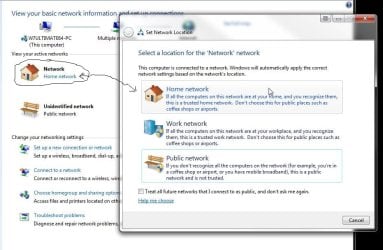
There are a pairr of steps you can try to resolve this. Since you are running one of the full featured editions of Windows 7 you can try disabling the TCP Checksum Offload as well as verify you have the correct option selected in the Network & Sharing Center found in the Control Panel.
If you are running into the "DNS server cannot be found" error you would try disabling that. First however click on the network icon seen the N&S Center to bring up the screen and select the Home option to see if you reconnect as shown in the first screen below.
If that doesn't work you then go to the N&S Center and click on the change network adapter setting link found on the left column. A right click on the connection for the properties>configure button>Adanced tab will bring you to the second screen where you simply scroll down the list of items. | My System Specs | | OS Windows 7 Ultimate x64, XP Mode, W8 RP VM, Linux Mint Debian 2nd OS HD- 7 Pro x64 second case CPU AMD Phenom II X4 975 Deneb 3.6ghz - 965 on new mini tower Motherboard Gigabyte GA-790XTA-UD4 Memory Kingston Hyper X DDR3 1600 1.5v 16gb - Mushkin on 2nd build Graphics Card MSI HD Radeon 5750 1gb - MSI HD Radeon 6450 on mini tower Sound Card Creative Labs X-Fi XtremeGamer - Realtek onooard 2nd case Monitor(s) Displays 2 x Acer P191W 19" widesscreen - HP 20" widescreen mini towe Screen Resolution 1440x900 native - 1600x1024 on 7 Pro x64 build Keyboard Microsoft Recusa Razor - MS Comfort 3000 on second build Mouse MS Trackball Explorer - A4TECH dual scroll wheel trackball PSU Corsair 750TX - primary / Corsair CX600 - second Case Antec 900-2 - SSD compatible / NZXT Vulcan mini tower Cooling Zalman CNPS9900A Hard Drives Primary Ultimate x64 build-
WD Black Edition 1tb Sata 6.0 = 2
WD Black Edition 1tb Sata 3.0 = 2 (OS drives)
WD 1tb Green Power sata = 2 1 external
usb flash drives = 18
Second 7 Pro x64 mini tower-
WD Caviar SE 500gb sata II single drive presen Internet Speed 30mbps upgrade - primary hard wired - mini tower usb WiFi |
06 Feb 2011
|
| | Windows 7 Home Premium x64 SP1 32,121 posts Bay Area Peninsula |
Welcome to Seven Forums tallman27. Try this:
1. Go to start
2. In search box, type cmd , right click cmd.exe, and then click "Run as administrator"
3. Then type:
netsh winsock reset
4. Press enter
5. Restart PC
Hopefully that will fix it
A Guy | My System Specs | | OS Windows 7 Home Premium x64 SP1 CPU INTEL Core i5-750 Quad-Core 3.37GHz Motherboard ASUS P7P55D Memory KINGSTON 4GB (2 x 2GB) HyperX PC3-12800 DDR3 1600MHz CL8 Graphics Card MSI N240GT-MD1G/D5 GeForce GT 240 1GB 128-bit GDDR5 Monitor(s) Displays Samsung SyncMaster B2430H 24" Screen Resolution 1920 x 1080 PSU ANTEC TruePower New TP-550, 80 PLUS, 550W Case ANTEC Three Hundred Illusion Cooling COOLER MASTER Hyper 212 Plus, 4 x 120mm 1 x 140mm Noctua's Hard Drives Intel X25M Gen2 80GB, SEAGATE 500GB Barracudaź 7200.12, SATA 3 Gb/s, 7200 RPM, 16MB cache Internet Speed 20 + Mbps Antivirus Avast Browser Opera |
07 Feb 2011
|
| | windows 7 ultimate x64 4 posts |
thank you so much guy i have been searching for the answer to this forever and your idea worked thank you thank you thank you | My System Specs | | System Manufacturer/Model Number g60-247cl OS windows 7 ultimate x64 |
07 Feb 2011
|
| | Windows 7 Home Premium x64 SP1 32,121 posts Bay Area Peninsula |
I'm glad we could help. You are very welcome
A Guy | My System Specs | | OS Windows 7 Home Premium x64 SP1 CPU INTEL Core i5-750 Quad-Core 3.37GHz Motherboard ASUS P7P55D Memory KINGSTON 4GB (2 x 2GB) HyperX PC3-12800 DDR3 1600MHz CL8 Graphics Card MSI N240GT-MD1G/D5 GeForce GT 240 1GB 128-bit GDDR5 Monitor(s) Displays Samsung SyncMaster B2430H 24" Screen Resolution 1920 x 1080 PSU ANTEC TruePower New TP-550, 80 PLUS, 550W Case ANTEC Three Hundred Illusion Cooling COOLER MASTER Hyper 212 Plus, 4 x 120mm 1 x 140mm Noctua's Hard Drives Intel X25M Gen2 80GB, SEAGATE 500GB Barracudaź 7200.12, SATA 3 Gb/s, 7200 RPM, 16MB cache Internet Speed 20 + Mbps Antivirus Avast Browser Opera |
26 Mar 2011
|
| | 32 bit Windows 7 Ultimate 19 posts |
Windows 7 32 bit XP Mode 
Quote: Originally Posted by Night Hawk Hello tallman27 Welcome to the Seven Foorums!
There are a pairr of steps you can try to resolve this. Since you are running one of the full featured editions of Windows 7 you can try disabling the TCP Checksum Offload as well as verify you have the correct option selected in the Network & Sharing Center found in the Control Panel.
If you are running into the "DNS server cannot be found" error you would try disabling that. First however click on the network icon seen the N&S Center to bring up the screen and select the Home option to see if you reconnect as shown in the first screen below.
If that doesn't work you then go to the N&S Center and click on the change network adapter setting link found on the left column. A right click on the connection for the properties>configure button>Adanced tab will bring you to the second screen where you simply scroll down the list of items. I have the same problem with Internet Explorer 8 in the XP Mode using Windows 7 32 bit. Internet Explorer works okay in Windows 7. Internet Explorer was working for a while in the XP Mode. Mozilla works without any problems in the XP Mode.
Internet Explorer open with MSN Home Page. When I try to go to microsoft.com I receive the message Webpage Cannot be found HTTP 400. I tried yahoo.com Internet Explorer stalled.
I uninstalled XP Mode and reinstalled it I get the same error with Internet Explorer. I checked Mozilla and it works fine.
Last edited by courtyard; 26 Mar 2011 at 08:10 PM..
Reason: Amended to add Internet Explorer
| My System Specs | | System Manufacturer/Model Number Clone OS 32 bit Windows 7 Ultimate CPU Intel 2 Quad Q9550 @ 2.83GHz Motherboard MSI Memory 8.00 GB |
26 Mar 2011
|
| | Windows 7 Ultimate x64, XP Mode, W8 RP VM, Linux Mint Debian 2nd OS HD- 7 Pro x64 second case 7,904 posts New England |
Welcome to SF! courtyard
The situation with the XP Mode is a bit different from the start there over what is seen with the 7 host OS. On the XP Mode you use XP's not 7's network setup wizard, settings, and troubleshooting tools.
There is one thing you can try however which would be downloading the XP version of IE 8 to the XP Mode's own C drive on the VPC there and reinstalling IE 8 over itself to correct any problems. Back when running both 7 RCs and the XP Mode's own RC was first seen I ran into a similar problem and simply downloaded a fresh copy of IE 8 to clear that up.
The image attached here shows the device manager item as well as bringing up the network properties screen on the XP Mode. Here that one time only was when IE 8 or any other browser tried out on the XP Mode failed to connect. | My System Specs | | OS Windows 7 Ultimate x64, XP Mode, W8 RP VM, Linux Mint Debian 2nd OS HD- 7 Pro x64 second case CPU AMD Phenom II X4 975 Deneb 3.6ghz - 965 on new mini tower Motherboard Gigabyte GA-790XTA-UD4 Memory Kingston Hyper X DDR3 1600 1.5v 16gb - Mushkin on 2nd build Graphics Card MSI HD Radeon 5750 1gb - MSI HD Radeon 6450 on mini tower Sound Card Creative Labs X-Fi XtremeGamer - Realtek onooard 2nd case Monitor(s) Displays 2 x Acer P191W 19" widesscreen - HP 20" widescreen mini towe Screen Resolution 1440x900 native - 1600x1024 on 7 Pro x64 build Keyboard Microsoft Recusa Razor - MS Comfort 3000 on second build Mouse MS Trackball Explorer - A4TECH dual scroll wheel trackball PSU Corsair 750TX - primary / Corsair CX600 - second Case Antec 900-2 - SSD compatible / NZXT Vulcan mini tower Cooling Zalman CNPS9900A Hard Drives Primary Ultimate x64 build-
WD Black Edition 1tb Sata 6.0 = 2
WD Black Edition 1tb Sata 3.0 = 2 (OS drives)
WD 1tb Green Power sata = 2 1 external
usb flash drives = 18
Second 7 Pro x64 mini tower-
WD Caviar SE 500gb sata II single drive presen Internet Speed 30mbps upgrade - primary hard wired - mini tower usb WiFi |
26 Mar 2011
|
| | 32 bit Windows 7 Ultimate 19 posts |
INTERNET EXPLORER XP MODE 
Quote: Originally Posted by Night Hawk Welcome to SF! courtyard
The situation with the XP Mode is a bit different from the start there over what is seen with the 7 host OS. On the XP Mode you use XP's not 7's network setup wizard, settings, and troubleshooting tools.
There is one thing you can try however which would be downloading the XP version of IE 8 to the XP Mode's own C drive on the VPC there and reinstalling IE 8 over itself to correct any problems. Back when running both 7 RCs and the XP Mode's own RC was first seen I ran into a similar problem and simply downloaded a fresh copy of IE 8 to clear that up.
The image attached here shows the device manager item as well as bringing up the network properties screen on the XP Mode. Here that one time only was when IE 8 or any other browser tried out on the XP Mode failed to connect. I unisntalled IE 8 and replaced with IE 6 SP3. I get the same error message HTTP 400. I ran the diagnose connection problems there are no connection errors. I can now get to microsoft.com but any link I try to go in microsoft.com the message HTTP 400 appears. | My System Specs | | System Manufacturer/Model Number Clone OS 32 bit Windows 7 Ultimate CPU Intel 2 Quad Q9550 @ 2.83GHz Motherboard MSI Memory 8.00 GB |
26 Mar 2011
|
| | Windows 7 Ultimate x64, XP Mode, W8 RP VM, Linux Mint Debian 2nd OS HD- 7 Pro x64 second case 7,904 posts New England |
Since you continue to see the same problem when reverting to the old version one suggestion would be trying the general tips for fixing HTTP 400 errors at HTTP Error 400 Bad request
You will want to stay with IE 8 however over reverting to the now outdated and far less secure older version. Another MSDN reference for troubleshooting HTTP 400 errors can be seen at How to troubleshoot HTTP 400 errors | My System Specs | | OS Windows 7 Ultimate x64, XP Mode, W8 RP VM, Linux Mint Debian 2nd OS HD- 7 Pro x64 second case CPU AMD Phenom II X4 975 Deneb 3.6ghz - 965 on new mini tower Motherboard Gigabyte GA-790XTA-UD4 Memory Kingston Hyper X DDR3 1600 1.5v 16gb - Mushkin on 2nd build Graphics Card MSI HD Radeon 5750 1gb - MSI HD Radeon 6450 on mini tower Sound Card Creative Labs X-Fi XtremeGamer - Realtek onooard 2nd case Monitor(s) Displays 2 x Acer P191W 19" widesscreen - HP 20" widescreen mini towe Screen Resolution 1440x900 native - 1600x1024 on 7 Pro x64 build Keyboard Microsoft Recusa Razor - MS Comfort 3000 on second build Mouse MS Trackball Explorer - A4TECH dual scroll wheel trackball PSU Corsair 750TX - primary / Corsair CX600 - second Case Antec 900-2 - SSD compatible / NZXT Vulcan mini tower Cooling Zalman CNPS9900A Hard Drives Primary Ultimate x64 build-
WD Black Edition 1tb Sata 6.0 = 2
WD Black Edition 1tb Sata 3.0 = 2 (OS drives)
WD 1tb Green Power sata = 2 1 external
usb flash drives = 18
Second 7 Pro x64 mini tower-
WD Caviar SE 500gb sata II single drive presen Internet Speed 30mbps upgrade - primary hard wired - mini tower usb WiFi |
27 Mar 2011
|
| | 32 bit Windows 7 Ultimate 19 posts |
HTTP ERROR 400 BAD REQUEST 
Quote: Originally Posted by Night Hawk Since you continue to see the same problem when reverting to the old version one suggestion would be trying the general tips for fixing HTTP 400 errors at HTTP Error 400 Bad request
You will want to stay with IE 8 however over reverting to the now outdated and far less secure older version. Another MSDN reference for troubleshooting HTTP 400 errors can be seen at How to troubleshoot HTTP 400 errors I have reinstalled IE 8. I run a couple of applications in the XP Mode that do not work in Windows 7 32 bit. I only use IE for Windows Updates. Once in a while to upgrade the application software.
It may be the Virus Protection not being monitored with all the Windows updates. I will try adding anti-virus software. | My System Specs | | System Manufacturer/Model Number Clone OS 32 bit Windows 7 Ultimate CPU Intel 2 Quad Q9550 @ 2.83GHz Motherboard MSI Memory 8.00 GB Windows 7 internet explorer 32bit version not working problems? All times are GMT -5. The time now is 04:43 AM. | |
