Windows 7 Forums


Windows 7: fonts problem in ie9

05 Mar 2011   #1

windows 7 ultimate x64
 
 
fonts problem in ie9

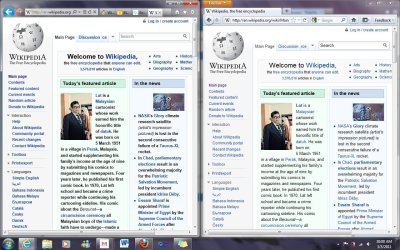
Hi guys, I have IE9 RC installed no big problems so far, but somehow now some fonts are displaying too bold and I didnt change any settings, I tried resetting to defaults but it didnt solve the problem.

Do you know what can be the problem??

I attached an image.

Attached Thumbnails
fonts problem in ie9-asdasd.jpg  
My System SpecsSystem Spec

05 Mar 2011   #2

windows 7 ultimate x64


any idea how can I fix this? I already reinstalled ie9 and the problem has not been fixed.
My System SpecsSystem Spec
05 Mar 2011   #3
JMH

Win 7 Ultimate 64-bit. SP1.


A link for you to peruse...
It may provide some information.


Sub-pixel Fonts in IE9 - IEBlog - Site Home - MSDN Blogs
My System SpecsSystem Spec
.


05 Mar 2011   #4

windows 7 ultimate x64


thanks for the reply.

I tried to adjust the clear type but that didnt solve my problem

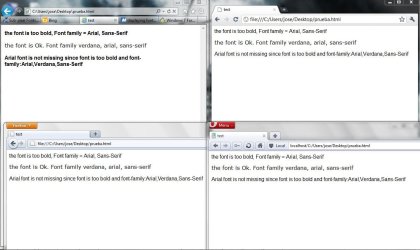
I did some tests with an html with some text and changing the font family.
The problem comes when I set the font-family to "Arial,Sans-Serif", if I change the font family to "Verdana" it displays the font correctly.

IE9 is not missing the font but rendering it differently I don't know why, I uninstalled and tried with IE8 and no problems :S
Attached Thumbnails
fonts problem in ie9-font_problem.jpg  
My System SpecsSystem Spec
06 Mar 2011   #5

Windows 8 Release Preview
Belgrade, Serbia


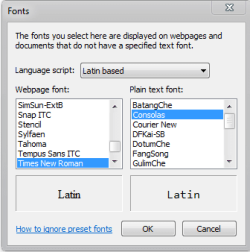
Click the gear icon, go to Internet Options.
On the General tab click Fonts and post back a screenshot.
fonts problem in ie9-fonts.png
My System SpecsSystem Spec
06 Mar 2011   #6

windows 7 ultimate x64


the only difference is Courier New instead of Consolas, but that did not change anything
Attached Thumbnails
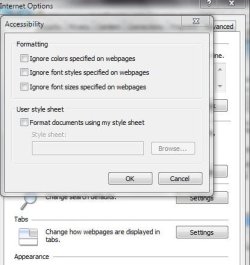
fonts problem in ie9-capture.jpg   fonts problem in ie9-capture2.jpg  
My System SpecsSystem Spec
07 Mar 2011   #7

Windows 8 Release Preview
Belgrade, Serbia


That's okay, I changed that myself on purpose.
It's a shame IE doesn't have more options to customize the fonts.
Perhaps checking "ignore font styles specified..." would help, though I doubt that will fix everything.
My System SpecsSystem Spec
07 Mar 2011   #8

Windows 7 Ultimate x64 SP1


Quote   Quote: Originally Posted by 65daysofstatic View Post
Hi guys, I have IE9 RC installed no big problems so far, but somehow now some fonts are displaying too bold and I didnt change any settings, I tried resetting to defaults but it didnt solve the problem.

Do you know what can be the problem??

I attached an image.

Try turning off Hardware acceleration, and see if that makes any difference.

http://www.sevenforums.com/tutorials...-turn-off.html


Not sure about it's enabled effects in IE9 since I don't use it, but I do know that having Hardware Acceleration has similar font display issues when it's enabled in Firefox, from a Direct2D and DirectWrite issue.

Possible something similar is happening there.
My System SpecsSystem Spec
07 Mar 2011   #9

windows 7 ultimate x64


hi,
thank you for your response.
I tried turning off HW acceleration but it didnt fix it.

If I check "ignore font styles" every site will be displayed with the times new roman or the one that is selected.

I reported this to connect.microsoft.com to see if they know how to fix it.
My System SpecsSystem Spec
10 Jan 2012   #10

Windows 7 Pro x64
UK


Have this problem too in IE9 right now. Was any solution found ?

In comparison the same pages rendered in Firefox look much, much more readable.
My System SpecsSystem Spec
Reply

 fonts problem in ie9 problems?


Thread Tools


Similar help and support threads for: fonts problem in ie9
Thread Forum
Problem installing new fonts General Discussion
Solved Problem with seeing fonts on my desktop General Discussion
Solved Microsoft Updates Core System Fonts To Fix Blurred Fonts Issues Browsers & Mail
Fonts problem, please help General Discussion


All times are GMT -5. The time now is 05:07 AM.


Seven Forums Android App Seven Forums IOS App Follow us on Facebook

Windows 7 Forums is an independent web site and has not been authorized,
sponsored, or otherwise approved by Microsoft Corporation.
"Windows 7" and related materials are trademarks of Microsoft Corp.
© Designer Media Ltd
  

1 2 3 4 5 6 7 8 9 10 11 12 13 14 15 16 17 18 19 20 21 22 23 24 25 26 27 28 29 30 31 32