Windows 7 Forums


Windows 7: Internet Explorer 9 for Windows 7 - Problems

17 Mar 2011   #1

Windows 7
South Africa
 
 
Internet Explorer 9 for Windows 7 - Problems

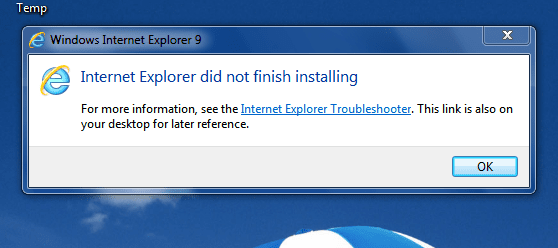
I have a PC desktop (HP Compaq 500B MT), running Windows 7 Professional. The system is completely up to date and running well. However when I try to install Internet Explorer 9 the installation stops half way with the message: "did not finalize installation'. (see attachment) I have gone through all the information; KB2399238, KB 2454826, KB2409098. I have downloaded the program from different sites. I have tried to install normally and as administrator. I have contacted the local MS Office, who haven't come across this problem. I have rebooted several times. I have not uninstalled I.E.8.
Does anyone have any suggestion??
Tony

Attached Thumbnails
Internet Explorer 9 for Windows 7 - Problems-capture-2.png  
My System SpecsSystem Spec

17 Mar 2011   #2

Windows 7 Ultimate - 64-bit | Windows 8 Pro - 64-bit


Quote   Quote: Originally Posted by Muirfield View Post
I have a PC desktop (HP Compaq 500B MT), running Windows 7 Professional. The system is completely up to date and running well. However when I try to install Internet Explorer 9 the installation stops half way with the message: "did not finalize installation'. (see attachment) I have gone through all the information; KB2399238, KB 2454826, KB2409098. I have downloaded the program from different sites. I have tried to install normally and as administrator. I have contacted the local MS Office, who haven't come across this problem. I have rebooted several times. I have not uninstalled I.E.8.
Does anyone have any suggestion??
Tony
Hello Tony,

Go to Start | under search type in Event Viewer | expand Windows Logs then Application and tell us if you find any error message.
My System SpecsSystem Spec
18 Mar 2011   #3

Windows 7
South Africa
 
 
IE and Windows 7

Thanks for the suggestion. I checked the Event Viewer. There is nothing there.
Tony
My System SpecsSystem Spec
.


18 Mar 2011   #4

Windows 7
South Africa


I did as you suggested but could find nothing relevant.
Tony
My System SpecsSystem Spec
18 Mar 2011   #5

Windows 7
South Africa


I tried again and found the following which is only gibberish to me.


C:\Windows\Logs\CBS\CbsPersist_20110210092155.cab C:\Windows\Logs\CBS\CbsPersist_20110218065310.cab C:\Windows\Logs\CBS\CbsPersist_20110223071501.cab C:\Windows\Logs\CBS\CbsPersist_20110316055030.cab C:\Windows\Logs\CBS\CbsPersist_20110317095900.cab C:\Windows\Logs\CBS\CBS.log C:\Windows\servicing\Sessions\Sessions.xml C:\Windows\winsxs\poqexec.log C:\Windows\inf\setupapi.dev.log


C:\ProgramData\Microsoft\Windows\WER\ReportQueue\Critical_6.1.7600.16385_d6bb334d0e6d5b65d821daf3114 359997ae39b_cab_10c937b4
Any suggestions?
Tony
My System SpecsSystem Spec
18 Mar 2011   #6

Windows 8 RTM Professional X64


Quote   Quote: Originally Posted by Muirfield View Post
I have a PC desktop (HP Compaq 500B MT), running Windows 7 Professional. The system is completely up to date and running well. However when I try to install Internet Explorer 9 the installation stops half way with the message: "did not finalize installation'. (see attachment) I have gone through all the information; KB2399238, KB 2454826, KB2409098. I have downloaded the program from different sites. I have tried to install normally and as administrator. I have contacted the local MS Office, who haven't come across this problem. I have rebooted several times. I have not uninstalled I.E.8.
Does anyone have any suggestion??
Tony
Hi:
You shouldn't have any previous release of internet explorer in your PC, for example Internet Explorer 9.0 RC/Internet Explorer 9.0 Beta or ...
so if you have any of this versions you should uninstall it.
For doing that go to -> Start -> Control Panel -> Program and Features -> Installed Updates -> Right Click on Internet Explorer 9 -> choose Uninstall.
Now do a clean and fresh install of IE9.
Hope it helped.
--------
Unknown01
My System SpecsSystem Spec
19 Mar 2011   #7

Windows 7
South Africa


Hi again
I checked and I have no previous IE 9. Nor do I have SP 1. I found the following from Microsoft:-

"How to get SP1
The recommended (and easiest) way to get SP1 is to turn on automatic updating in Windows Update in Control Panel, and wait for Windows 7 to notify you that SP1 is ready to install. It takes about 30 minutes to install, and you'll need to restart your computer about halfway through the installation."

I guess I netter just wait.
Thanks for all your trouble.
Tony
My System SpecsSystem Spec
19 Mar 2011   #8

Windows 7 Ultimate - 64-bit | Windows 8 Pro - 64-bit


Hi there,

Disable all your security settings. Then click on

Start | under search type in Troubleshoot
Under Troubleshoot select System and Security
Under there Select Windows Update and run the troubleshoot and see if that fixes or finds any problem.

If that didn't resolve check this article Troubleshoot IE9 Installation Issues on Windows 7 | Captain Debugger

Hope this helps,
Captain

Last edited by Capt.Jack Sparrow; 19 Mar 2011 at 07:20 AM..
My System SpecsSystem Spec
20 Mar 2011   #9

Windows 7
South Africa


Many thanks to everyone. Success at last. I followed Capt. Jack Sparrows advice and downloaded and followed - in detail - The trouble shoot list. The SFC /sannow did find some corrupted files, so I downloaded and ran KB947821. I reran the install file and, lo and behold, it succeeded.
Once again many thanks
Sincerely
Tony
My System SpecsSystem Spec
21 Mar 2011   #10

Windows 7 Enterprise Trial 32-bit SP1


Quote   Quote: Originally Posted by Capt.Jack Sparrow View Post
www.captain-debugger.co.cc captain-debugger.co.cc has expired ( ~ 2011-03-20) Renew This domain will be deleted from DB on 20-Sep-2011 Free domain service .CO.CC
My System SpecsSystem Spec
Reply

 Internet Explorer 9 for Windows 7 - Problems problems?


Thread Tools


Similar help and support threads for: Internet Explorer 9 for Windows 7 - Problems
Thread Forum
Problems after re-installing internet explorer 9 Browsers & Mail
Solved Windows Explorer (Not Internet Explorer) Causing problems General Discussion
Problems with Internet Explorer shutting down Browsers & Mail
Internet Explorer 8 – Add Ons Account for 70% Problems. News
Internet Explorer Problems Network & Sharing


All times are GMT -5. The time now is 12:50 AM.


Seven Forums Android App Seven Forums IOS App Follow us on Facebook

Windows 7 Forums is an independent web site and has not been authorized,
sponsored, or otherwise approved by Microsoft Corporation.
"Windows 7" and related materials are trademarks of Microsoft Corp.
© Designer Media Ltd
  

1 2 3 4 5 6 7 8 9 10 11 12 13 14 15 16 17 18 19 20 21 22 23 24 25 26 27 28 29 30 31 32