Windows 7 Forums


Windows 7: How to deal with IE9 - Tips and tricks With the IE9 we find that are

19 Mar 2011   #1
whs

Vista, Windows7, Mint Mate, Zorin, Windows 8
Florida in winter, Black Forest/Germany
 
 
How to deal with IE9 - Tips and tricks With the IE9 we find that are

With the release of IE9 we discover differences to the previous Internet Explorers and everybody has their own ways to deal with them. In this thread we should share our discoveries so that we learn from each other.

There is a Tutorial that Shawn has posted that is a good starting point. This one I have alredy "polluted" with some other suggestions (which was rightfully criticized by Night Hawk).

For now I would like to add this:

If you middle click (click with the scroll wheel) on a URL in e.g. Favorites, IE9 opens a new tab with this webpage. But it does not open the webpage itself.

My System SpecsSystem Spec

19 Mar 2011   #2

Server 2008 R2 SP1, Win7 x64 Pro SP1


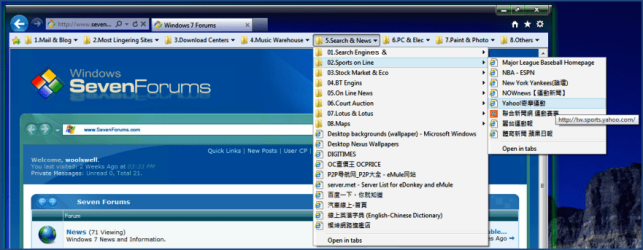
I always arrange the IE favorite bar something like this:

Image I:
How to deal with IE9 - Tips and tricks With the IE9 we find that are-01.png

Image II:
How to deal with IE9 - Tips and tricks With the IE9 we find that are-03.png
My System SpecsSystem Spec
19 Mar 2011   #3
whs

Vista, Windows7, Mint Mate, Zorin, Windows 8
Florida in winter, Black Forest/Germany


Hmm, that is interesting. And if you enable "Links" in the taskbar, then you can get to your websites from there too. No need to access "Favorites" any more. You can care less whether they are left or right.

Unfortunately that would not work for me because for one I have too many favorites files and then I use the Favorites bar to store webpages for "later reading" all the time. So my favorites bar is constantly changing.
My System SpecsSystem Spec
.


19 Mar 2011   #4

Server 2008 R2 SP1, Win7 x64 Pro SP1


Quote   Quote: Originally Posted by whs View Post
......
Unfortunately that would not work for me because for one I have too many favorites files and then I use the Favorites bar to store webpages for "later reading" all the time. So my favorites bar is constantly changing.


There must be more than one thousand websites or webpages in my favorite files.
They changes or being modified everday, more or less. This kind of favorite bar has
accompanied me for more than ten years. Without it, I will know not how to enjoy
the world of internet~~~
My System SpecsSystem Spec
09 Oct 2012   #5
too

Windows 7 x64 Ultimate


Thing I would really like to see in IE9 is:
Pocket (old read it later), just like Firefox.
New tab with your favorites pinned tabs on (exactly like Firefox), not the most popular sites there is today.
A better content download (pictures and such) and a better built in screen capture as well.
One thing that really makes me unhappy about IE9, you can't just simply drag and drop to save a single image to an folder, why Mircosfot, why??? :-(
After all it's really the smoothest fastest browser, really good, manages well heavy content sites, long forum pages, but lacks in features to Firefox.

Last edited by too; 09 Oct 2012 at 02:20 PM..
My System SpecsSystem Spec
Reply

 How to deal with IE9 - Tips and tricks With the IE9 we find that are problems?


Thread Tools


Similar help and support threads for: How to deal with IE9 - Tips and tricks With the IE9 we find that are
Thread Forum
6 Cool VLC Tips & Tricks You Might Not Know About Music, Pictures & Video
85 Win 7 Tips, Tricks, and Secrets General Discussion
Win 7 Wish List * *TIPS AND TRICKS * * * General Discussion


All times are GMT -5. The time now is 11:31 AM.


Seven Forums Android App Seven Forums IOS App Follow us on Facebook

Windows 7 Forums is an independent web site and has not been authorized,
sponsored, or otherwise approved by Microsoft Corporation.
"Windows 7" and related materials are trademarks of Microsoft Corp.
© Designer Media Ltd
  

1 2 3 4 5 6 7 8 9 10 11 12 13 14 15 16 17 18 19 20 21 22 23 24 25 26 27 28 29 30 31 32