

Airbot
----------------------
EDIT - Microsoft has released an update regarding some blurry font in IE9. Some users also note it seems to have improved the fonts in Firefox as well.
http://www.sevenforums.com/news/172125-font-smoothing-ie9-update-latest-recommended-updates.html
As I see so many posts all over asking "Why is the text blurry"??, I'll post this thread and maybe it might help you out possibly.
Here's just one example from me in Firefox 4.
With gfx.direct2d.disabled set to True, normal look on the left, and with the enabled blurry look on the right:


Some users, not all, now notice blurry text in Firefox 4 and/or IE9.
*Some may only get this with system specific hardware/drivers. Some may not get the problem at all.*
It basically comes down to (not going to get technically into it) a problem relating to Hardware Acceleration that these new browser now use, and Microsoft's Direct Write/Direct2D/Direct draw components. Pretty much a fix needs to come from MS, not the browsers' developers. (Both browsers now have HA enabled by default).
Until then, a couple workarounds that have worked for me since I encountered it months ago and others, can be implemented.
A particular workaround in Firefox that I use is to type in the address bar -
about:config
I'll be careful/OK
Find the Boolean entry - gfx.direct2d.disabled, and set it to True.
You could also un-check - Use Hardware acceleration when available, in Firefox's Options Advanced/General tab.
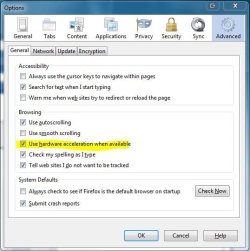
I leave mine enabled, and just set the Boolean value to True and it fixes the blurry text for me. This only disables Direct2D, and leaves Direct3D enabled.
For IE9,
Enabling - Use software rendering instead of GPU rendering, which effectively turns off Hardware acceleration in IE9, doesn't seem to fix the blurry text at all for me.
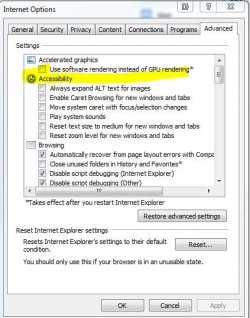
What does seem to work for me is to set that particular website that shows blurry in Compatibility View Mode.
If you find most if not all websites give you blurry text, then you can set all to display in Compatibility View Mode if desired.
http://www.sevenforums.com/tutorials/1220-internet-explorer-compatilbility-view-all-websites.html
While this may not help all, I hope this helps some until some actual solution is given out to fix the problem, as it has me since I've used both browsers. If this doesn't work for you, you may have better results googling "blurry text in Firefox 4", or IE9 and researching for a possible workaround.
Some of these settings may basically turn off or partially disable HA. For me, I'd rather have my fonts display right and not be all blurry and cruddy looking over using HA. But that's just me.
FF reference: Direct2D/DirectWrite Accelerated Rendering
You may also want to check out this add-on for Firefox: Anti-Aliasing Tuner
You should be able to modify the text to your liking while leaving HA completely enabled.
http://www.sevenforums.com/news/172125-font-smoothing-ie9-update-latest-recommended-updates.html
As I see so many posts all over asking "Why is the text blurry"??, I'll post this thread and maybe it might help you out possibly.
Here's just one example from me in Firefox 4.
With gfx.direct2d.disabled set to True, normal look on the left, and with the enabled blurry look on the right:
Some users, not all, now notice blurry text in Firefox 4 and/or IE9.
*Some may only get this with system specific hardware/drivers. Some may not get the problem at all.*
It basically comes down to (not going to get technically into it) a problem relating to Hardware Acceleration that these new browser now use, and Microsoft's Direct Write/Direct2D/Direct draw components. Pretty much a fix needs to come from MS, not the browsers' developers. (Both browsers now have HA enabled by default).
Until then, a couple workarounds that have worked for me since I encountered it months ago and others, can be implemented.
A particular workaround in Firefox that I use is to type in the address bar -
about:config
I'll be careful/OK
Find the Boolean entry - gfx.direct2d.disabled, and set it to True.
You could also un-check - Use Hardware acceleration when available, in Firefox's Options Advanced/General tab.
I leave mine enabled, and just set the Boolean value to True and it fixes the blurry text for me. This only disables Direct2D, and leaves Direct3D enabled.
For IE9,
Enabling - Use software rendering instead of GPU rendering, which effectively turns off Hardware acceleration in IE9, doesn't seem to fix the blurry text at all for me.
What does seem to work for me is to set that particular website that shows blurry in Compatibility View Mode.
If you find most if not all websites give you blurry text, then you can set all to display in Compatibility View Mode if desired.
http://www.sevenforums.com/tutorials/1220-internet-explorer-compatilbility-view-all-websites.html
While this may not help all, I hope this helps some until some actual solution is given out to fix the problem, as it has me since I've used both browsers. If this doesn't work for you, you may have better results googling "blurry text in Firefox 4", or IE9 and researching for a possible workaround.
Some of these settings may basically turn off or partially disable HA. For me, I'd rather have my fonts display right and not be all blurry and cruddy looking over using HA. But that's just me.
FF reference: Direct2D/DirectWrite Accelerated Rendering
You may also want to check out this add-on for Firefox: Anti-Aliasing Tuner
You should be able to modify the text to your liking while leaving HA completely enabled.
Last edited:
My Computer
- Computer type
- PC/Desktop
- Computer Manufacturer/Model Number
- Airbot 2.0
- OS
- Windows 7 Ultimate x64 SP1
- CPU
- Core i7 920 (D0) @ 4Ghz, *26c idle *65c full load on air
- Motherboard
- Asus P6X58D Premium - Sata 6Gb/s - USB 3.0
- Memory
- 12GB DDR3 Corsair Dominator -CMD12GX3M6A1600C8 at 1600MHz
- Graphics Card(s)
- Zotac Geforce GTX 770
- Sound Card
- ASUS Xonar D2X
- Monitor(s) Displays
- 1 LG 24" Flatron W2453V-PF 1 Samsung 24" P2450H both 2ms RT
- Screen Resolution
- 1920x1080@60hz
- Hard Drives
- 1 Samsung 250GB 840 Evo SSD
1 OCZ Vertex2 180GB SSD
1 TB Samsung Spinpoint F1 7200RPM 32MB cache
2 500GB WD Caviar Blacks 7200RPM 32MB cache (WD5001AALS)
Pioneer DVD Burner DVR-S18M
- PSU
- Corsair HX1000W
- Case
- Cooler Master HAF 932
- Cooling
- Case Fans *3 230mm, *1 140mm/CPU - *Tuniq Tower 120 Extreme
- Keyboard
- Logitech Wireless MK700
- Mouse
- Logitech Wireless MK700
- Internet Speed
- DL 15 Mbps UL 0.98 Mbps
- Antivirus
- None
- Browser
- Firefox Nightly
- Other Info
- Processor-7.7 *RAM- 7.9 *Graphics-7.9 *Gaming Graphics- 7.9 *SSD- 7.8 W.E.I final score= 7.7
*Phone- LG Nexus 5


