| Windows 7: Multiple Web Pages on 1 screen/page?? |
23 Mar 2011
|
#1 | | Windows 7 Pro SP1 64-bit England, Cheshire |
Multiple Web Pages on 1 screen/page?? Hi,
Does anyone know of an easy way or an application that can display something like 4 web pages on one screen (this screen can be an application or another web page)
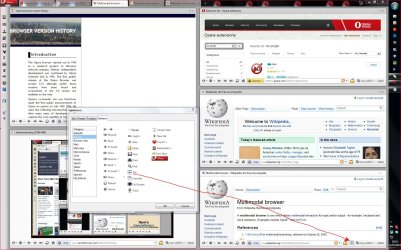
I would like something like this:

I have a projector that is used for monitoring some systems and rather than having the web pages rotating through tabs i want them all to display on one page.
Regards,
JDobbsy1987
EDIT:
Just so you are aware, these web pages i wish to display are internal sites so when trying to use this service it didnt work - http://www.viewista.com/index.php | My System Specs |
| System Manufacturer/Model Number Self Built OS Windows 7 Pro SP1 64-bit CPU Intel Core i5-2500K @ 3.30GHz - S1155 Motherboard Asus P8P67 LE Rev3, Intel P67, S115 Memory 8GB Corsair DDR3 XMS3, PC3-12800 Graphics Card 1GB XFX Radeon HD 6770, PCI-E 2.1 (x16) Sound Card On-Board Monitor(s) Displays 2 x 19" {Entended Display} Screen Resolution 1280 x 1024 Keyboard Logitech K120 Mouse World of Warcraft Cataclysm MMO Gaming Mouse PSU 550W Coolermaster GX550 Case Silverstone Precision PS04B Cooling Stock Hard Drives 1TB Seagate Internet Speed 40 MB |
23 Mar 2011
|
#2 | | Dual Booting Windows 7 64-Bit Ultimate Edition and Fedora 16. India |
You want a screen shot or the whole working web page on the screen? | My System Specs | | System Manufacturer/Model Number AMD _(Assembled)_ OS Dual Booting Windows 7 64-Bit Ultimate Edition and Fedora 16. CPU AMD Phenom X4 925 Motherboard MSI 785g-E53 Memory 4gb DDR3 G.skill RipJaws Graphics Card ATI Radeon HD 6770 Sound Card Realtek Monitor(s) Displays Dell IN2020M LED Screen Resolution 1600*900 20" Keyboard Logitech K100 Mouse Razor Death Adder v2 3500 dPi (Razer Goliathus Pad) PSU Cooler Master Case Cooler Master Cooling Cooler Master Hard Drives Seagate 500 Gibs
External 320 Gb Western Digital(Got Glitchy) Internet Speed Back to college Internet with Cyberroam X| |
23 Mar 2011
|
#3 | | Windows 7 Pro SP1 64-bit England, Cheshire |

Quote: Originally Posted by youllbelost You want a screen shot or the whole working web page on the screen? Cheers for the reply,
It would need to be a working page rather than screen shots.
Regards,
JDobbsy1987 | My System Specs | | System Manufacturer/Model Number Self Built OS Windows 7 Pro SP1 64-bit CPU Intel Core i5-2500K @ 3.30GHz - S1155 Motherboard Asus P8P67 LE Rev3, Intel P67, S115 Memory 8GB Corsair DDR3 XMS3, PC3-12800 Graphics Card 1GB XFX Radeon HD 6770, PCI-E 2.1 (x16) Sound Card On-Board Monitor(s) Displays 2 x 19" {Entended Display} Screen Resolution 1280 x 1024 Keyboard Logitech K120 Mouse World of Warcraft Cataclysm MMO Gaming Mouse PSU 550W Coolermaster GX550 Case Silverstone Precision PS04B Cooling Stock Hard Drives 1TB Seagate Internet Speed 40 MB |
23 Mar 2011
|
#4 | | Windows 7 Pro SP1 64-bit England, Cheshire |
As a test i have tried creating a new page with the following: HTML Code: <div id='div1'><iframe src='http://jde-html/''></iframe></div>
<div id='div1'><iframe src='http://ittimesheets:8080/ehour/eh/login/Login/''></iframe></div>
<div id='div1'><iframe src='http://nagios/nagios/''></iframe></div>
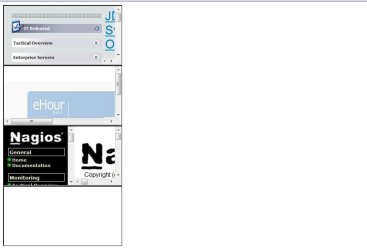
<div id='div1'><iframe src='http://tfs01/default.aspx''></iframe></div> but it displays like this:
How would i get these in a 2x2 grid?
Regards,
JDobbsy1987 | My System Specs | | System Manufacturer/Model Number Self Built OS Windows 7 Pro SP1 64-bit CPU Intel Core i5-2500K @ 3.30GHz - S1155 Motherboard Asus P8P67 LE Rev3, Intel P67, S115 Memory 8GB Corsair DDR3 XMS3, PC3-12800 Graphics Card 1GB XFX Radeon HD 6770, PCI-E 2.1 (x16) Sound Card On-Board Monitor(s) Displays 2 x 19" {Entended Display} Screen Resolution 1280 x 1024 Keyboard Logitech K120 Mouse World of Warcraft Cataclysm MMO Gaming Mouse PSU 550W Coolermaster GX550 Case Silverstone Precision PS04B Cooling Stock Hard Drives 1TB Seagate Internet Speed 40 MB System Manufacturer/Model Number HP OS Windows 7 CPU Intel Core i7 x980 @3.33GHz Memory 12.0 |
23 Mar 2011
|
#6 | | |
HTML Code: <table style="width:1000px;">
<tr>
<td align="center" width="50%"><iframe src="http://slashdot.org" style="width:500px;height:400px;"></iframe></td>
</tr>
<tr>
<td align="center" width="50%"><iframe src="http://slashdot.org" style="width:500px;height:400px;"></iframe></td>
</tr>
</table> You'll have to change your desired urls in the iframes, and can play around w/ heights and widths depending on the display you're going to be running on.
Produces.... | My System Specs | | |
23 Mar 2011
|
#7 | | Windows 7 Ultimate x64 SP1 clean install Italy |
Add Code: style="overflow: auto" to iframes to have scrollbars. | My System Specs | | System Manufacturer/Model Number Custom Build OS Windows 7 Ultimate x64 SP1 clean install CPU AMD Athlon 64 X2 6400+ Motherboard Asus M2N-E SLI Memory 4 GB Graphics Card 2 x NVidia Geforce 8600 GTS Sound Card Trust 5.1 Surround USB Monitor(s) Displays Benq FP931 19" Screen Resolution 1280x1024@32bit@75MHz Keyboard Logitech Cordless Desktop EX 100 Mouse Logitech Cordless Optical PSU 650W Hard Drives 1 x Western Digital 500GB SATA (OS installation), 2 x Seagate 320GB SATA, 1 x Seagate 250GB IDE (in external USB box), 1 x TrekStor 750GB USB Internet Speed 8192 kbps / 640 kbps |
23 Mar 2011
|
#8 | | |

Quote: Originally Posted by CyberZeus Add Code: style="overflow: auto" to iframes to have scrollbars. Overflow of auto is default for iframes on most mainstream browsers these days. You shouldn't need it but it cannot hurt either. | My System Specs | | |
23 Mar 2011
|
#9 | | Windows 7 Pro SP1 64-bit England, Cheshire |
Thank you for all your replys on this, i have managed to get 2 things working now 
The code above has helped and i also found a firefox addon that allows the screen to be split.
If it helps anyone then i have used this addon in firefox 4.0 - https://addons.mozilla.org/en-US/fir...don/tile-tabs/
Regards,
JDobbsy1987 | My System Specs | | System Manufacturer/Model Number Self Built OS Windows 7 Pro SP1 64-bit CPU Intel Core i5-2500K @ 3.30GHz - S1155 Motherboard Asus P8P67 LE Rev3, Intel P67, S115 Memory 8GB Corsair DDR3 XMS3, PC3-12800 Graphics Card 1GB XFX Radeon HD 6770, PCI-E 2.1 (x16) Sound Card On-Board Monitor(s) Displays 2 x 19" {Entended Display} Screen Resolution 1280 x 1024 Keyboard Logitech K120 Mouse World of Warcraft Cataclysm MMO Gaming Mouse PSU 550W Coolermaster GX550 Case Silverstone Precision PS04B Cooling Stock Hard Drives 1TB Seagate Internet Speed 40 MB |
23 Mar 2011
|
#10 | | |

Quote: Originally Posted by JDobbsy1987 Thank you for all your replys on this, i have managed to get 2 things working now 
The code above has helped and i also found a firefox addon that allows the screen to be split.
If it helps anyone then i have used this addon in firefox 4.0 - https://addons.mozilla.org/en-US/fir...don/tile-tabs/
Regards,
JDobbsy1987 Glad you got something working. And thanks for sharing that addon. Looks pretty awesome and I can surely find a use for that w/ my various snmp graphs. | My System Specs | | Multiple Web Pages on 1 screen/page?? problems? All times are GMT -5. The time now is 12:56 AM. | |