Downloading with IE9

huffman

New member
Pro User
Local time
6:41 PM
Messages
715
Two things that having bcome very annoying with IE9 downloads:

At first IE 9 did not show the "Menu". After numerous attempts I finally got that fixed. Microsoft really needs to fix that. IT was really stupid not to have the Menu to start with.

How can the option to be notified when downloads are complete be added? This can be a real issue when downloading large files.

I don't have any options to change the download location. I do frequent downloads of small files that I want to go specific locations (rarely the same location). It is a pain having to move files from the default Download folder to where I actually want the file to begin with. If there any way to change where the file will be downloaded to?

Thanks for any help on these issues.
 

My Computer My Computer

At a glance

Windows 7 ProIntel(R) Pentium(R) Duel CPU E2200 2.20 Ghz4 gb 2.96 UsableOnboard
OS
Windows 7 Pro
CPU
Intel(R) Pentium(R) Duel CPU E2200 2.20 Ghz
Motherboard
GA-G41M-ES2L
Memory
4 gb 2.96 Usable
Graphics Card(s)
Onboard
Sound Card
Onboard
Hard Drives
2 - 1TB WD Sata Drives
1) If you mean the menu bar, its very simple. Just right click anywhere at the top of the IE window, then check menu bar.
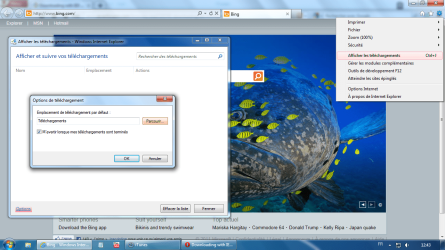
2) To change download behaviour, click on the Gear icon at the top right in the IE window. Click "View Downloads", in the window that opens click on "Options" blue link at bottom left. You can now change both the default download directory as well as check the option to be notified when the download is complete.
 
Last edited by a moderator:

My Computer My Computer

At a glance

Windows 7 x64 pro/ Windows 7 x86 Pro/ XP SP3 x86
Computer Manufacturer/Model Number
Too many to describe...
OS
Windows 7 x64 pro/ Windows 7 x86 Pro/ XP SP3 x86
telecharger.png
 

My Computer My Computer

At a glance

Windows 7 pro 64 bit2 GoNvidia
OS
Windows 7 pro 64 bit
Memory
2 Go
Graphics Card(s)
Nvidia
Mouse
Microsoft optical mouse
Just right click anywhere at the top of the IE window, then check menu bar.

That worked in IE8, but NOT in IE9. I forget the steps I had to go thru but it did take a few steps to get the Menu.

To change download behaviour, click on the Gear icon at the top right in the IE window. Click "View Downloads", in the window that opens click on "Options" blue link at bottom left.

Thank you worked great.
 
Last edited by a moderator:

My Computer My Computer

At a glance

Windows 7 ProIntel(R) Pentium(R) Duel CPU E2200 2.20 Ghz4 gb 2.96 UsableOnboard
OS
Windows 7 Pro
CPU
Intel(R) Pentium(R) Duel CPU E2200 2.20 Ghz
Motherboard
GA-G41M-ES2L
Memory
4 gb 2.96 Usable
Graphics Card(s)
Onboard
Sound Card
Onboard
Hard Drives
2 - 1TB WD Sata Drives
Last edited by a moderator:

My Computer My Computer

At a glance

Windows 7 x64 pro/ Windows 7 x86 Pro/ XP SP3 x86
Computer Manufacturer/Model Number
Too many to describe...
OS
Windows 7 x64 pro/ Windows 7 x86 Pro/ XP SP3 x86
In IE8 I was able to choose where each download was saved to. I can't find that option in IE9?
 

My Computer My Computer

At a glance

Windows 7 Ultimate 32-bitT9330 2.53GHz2Gb - DDR2 - 667MHznVidia M770
Computer Manufacturer/Model Number
Dell M4400
OS
Windows 7 Ultimate 32-bit
CPU
T9330 2.53GHz
Motherboard
Dell
Memory
2Gb - DDR2 - 667MHz
Graphics Card(s)
nVidia M770
Sound Card
IDT
Monitor(s) Displays
LED
Hard Drives
500Gb Hitachi 7200rpm
PSU
Dell 90watt adapter
Case
Dell
Cooling
Dell
1) 2) To change download behaviour, click on the Gear icon at the top right in the IE window. Click "View Downloads", in the window that opens click on "Options" blue link at bottom left. You can now change both the default download directory as well as check the option to be notified when the download is complete.

I don't want the download to go to the same place each time. This option only allows to choose another "permanent" location. It takes 3 times as long in IE9 to pick a download location. I download files all day long that I categorize as I download. In IE8 the download would automatically open in the last file location. If I wanted to change it, the Windows Explorer screen was already open and it was just a matter of choosing a new location. Now I have to right click, choose another location, then the Windows Explorer opens in the the Download location, then I have to find the place - lots of clicking - I'm trying to simplify things, not make them more complicated! Everything I've read said there is no way to return to the file downloading options of IE8 while using IE9 - is that true?

After one day, I found it so annoying, that I'm ready to go back to IE8. Since I'm now running Win7, should I just choose the IE8 that works with Vista? I only changed to get more screen real estate and supposedly increase speed, but my thumb is taking a beating and IE9 is slowing me down.
 

My Computer My Computer

At a glance

Win7
OS
Win7
When the pop-up for downloads appeared the "Save" and "Save and Run" options were very slow to appear. Will check add-ons to see if this has an impact. Thanks
 
Last edited:

My Computer My Computer

At a glance

Windows 7 Ultimate 32-bitT9330 2.53GHz2Gb - DDR2 - 667MHznVidia M770
Computer Manufacturer/Model Number
Dell M4400
OS
Windows 7 Ultimate 32-bit
CPU
T9330 2.53GHz
Motherboard
Dell
Memory
2Gb - DDR2 - 667MHz
Graphics Card(s)
nVidia M770
Sound Card
IDT
Monitor(s) Displays
LED
Hard Drives
500Gb Hitachi 7200rpm
PSU
Dell 90watt adapter
Case
Dell
Cooling
Dell
Hey solowin - Looks like we are reaching a high frustration level with the ie9 download procedure. A few minutes ago I was trying to download a picture and when the download pop-up bar appeared it had either automatically downloaded the picture or the "Save" button wasn't visible????

You mentioned when you had to "right-click". How was you utilizing this to manipulate the download location?

Now when I download a file the pop-up bar seems to be working fine and the "Save" button has the 3 options and the "Save As" displays the last location that I chose for a download. Something is not consistent with IE9 and downloads.
 

My Computer My Computer

At a glance

Windows 7 Ultimate 32-bitT9330 2.53GHz2Gb - DDR2 - 667MHznVidia M770
Computer Manufacturer/Model Number
Dell M4400
OS
Windows 7 Ultimate 32-bit
CPU
T9330 2.53GHz
Motherboard
Dell
Memory
2Gb - DDR2 - 667MHz
Graphics Card(s)
nVidia M770
Sound Card
IDT
Monitor(s) Displays
LED
Hard Drives
500Gb Hitachi 7200rpm
PSU
Dell 90watt adapter
Case
Dell
Cooling
Dell
I noticed the same thing yesterday; sometimes 2 choices, sometimes 3. I was rightclicking the file name that I wanted to download, then choosing Save As there. It eliminated one step of having to go to the download bar at the bottom of the screen. Still not what I wanted. In addition to this downloading issue, my Kensington mouse wasnt' working nice with IE9. I just found a post here on the forum that described how to uninstall IE9 through the update page - IE8 was there when I re-started the computer. Everythings back to how I had it before; I eliminated a couple things on top to increase my visible screen size, and I doubt I'll look at IE9 again until I've read that there have been a few updates.

If I wanted Chrome, I'd be using Chrome - the download option is what I don't like about it and why I've stayed with IE. I'll check back here to see if anyone has a solution, but reading in several other places, this is the way IE9 handles downloads. Good luck!
 

My Computer My Computer

At a glance

Win7
OS
Win7
Usually while trying to download any file using internet explorer 9, you will be prompted with a same window at the below of the screen with the following options:
  • Run
  • Save
  • Cancel
Click on arrow button next to Save button and select Save as. Now you will be able to select the download location.

This worked for me
 

My Computer My Computer

At a glance

Windows 10 Pro 64-bitIntel I7 920 @ 2.67 GHz24 GigATI 5670
Computer type
PC/Desktop
Computer Manufacturer/Model Number
Dell XPS 9100
OS
Windows 10 Pro 64-bit
CPU
Intel I7 920 @ 2.67 GHz
Motherboard
Dell
Memory
24 Gig
Graphics Card(s)
ATI 5670
Sound Card
Internal
Monitor(s) Displays
23" Wide Flat LED HDMI
Screen Resolution
1366 X 768
Hard Drives
Samsung 250 GB SSD
WD 1TB internal
Seagate 1TB internal
WD 2TB external USB 3
PSU
550 W
Case
Mid
Cooling
Fan
Keyboard
US USB
Mouse
USB
Internet Speed
3.84 Mbps down .44 Mbps up
Antivirus
MS Defener
Browser
IE 11
Other Info
1 Liteon DVD wrighter
1 Liteon BD drive
When I want to DL something, I right click the link and select "Save Target As" or "Save Picture As" and select where you want it.

Now if it's a java scripted download button kind of thing, then click the button and then at the bottom, on the DL manager popup, click the little drop arrow and "Save As" and select the location.

I don;t know if I've run into a DL scenario that didnt fit either of those solutions. If you have one, share it and we'll try it out :)

[Edit] Ooops, 5clint7 beat me to step 2 :)[/edit]
 

My Computer My Computer

At a glance

Windows 7 x64 Ultimatei7 96012 Gig Corsair DominatorNvidia 480
Computer Manufacturer/Model Number
Scratch built
OS
Windows 7 x64 Ultimate
CPU
i7 960
Motherboard
Asus P6X58D
Memory
12 Gig Corsair Dominator
Graphics Card(s)
Nvidia 480
Sound Card
Maudio Delta 44 + breakout box
Monitor(s) Displays
Dell UltraSharp U2410 24in and Samsung 21 dual monitors
Screen Resolution
1920x1200 and 1280x1024
Hard Drives
Primary: Intel X-25M G2 160G SSD
Secondary: Segate baracuda 1.0 TB
HDs in AHCI mode.
PSU
Corasair TX850
Case
Cooler Master HAF
Cooling
Corsair H50
Keyboard
Logitech G15 + N52 game pad
Mouse
Logitech MX518
Internet Speed
15kbs down 4.5kbps up
Other Info
WEI 7.6
CPU & RAM 7.6
Graphics 7.9
Hard disk 7.7
Usually while trying to download any file using internet explorer 9, you will be prompted with a same window at the below of the screen with the following options:
  • Run
  • Save
  • Cancel
Click on arrow button next to Save button and select Save as. Now you will be able to select the download location.

This worked for me

Yes, that works. But it adds about 2 extra steps for downloading files than IE8 did. For someone like me with arthritis in my hands, every click adds to the pain, so I want to reduce steps, not add them. It would be fine if I downloaded occasionally, but I download a lot of small files everyday and I categorize them as I go. SAVE used to bring up the Windows explorer where I could save to the last folder location, choose another folder, or also choose "recently changed" files that is under Favorites (where I can usually find many of my used folders.) Also, with IE8 I can often use the keyboard ENTER, TAB and arrow keys to avoid the mouse (even my expensive ergonomic mouse causes pain with a lot of use); having to use a dropdown on SAVE in IE9 forces mouse use right away. If MS adds options for downloading, I'll try IE9 again, but for now, I have to stay with IE8.
 

My Computer My Computer

At a glance

Win7
OS
Win7
Back
Top