Windows 7 Forums


Windows 7: Bookmarks folder in FF4 Bookmarks toolbar

08 Apr 2011   #1

Win7 Home Premium x64
Las Vegas
 
 
Bookmarks folder in FF4 Bookmarks toolbar

Probably should ask this over in the Mozilla forums, hell, there is probably an answer already there, but you guys are much faster, and smarter.

In the new Firefox 4, on the bookmarks toolbar, there is an additional folder of the bookmarks


The bookmarks folder under the firefox tab at the top right is more than enough for me, the one on the toolbar just takes up space for other bookmarks! Can this folder be removed?

Thanks all!

My System SpecsSystem Spec

08 Apr 2011   #2

Windows 7 Ultimate x64 SP1


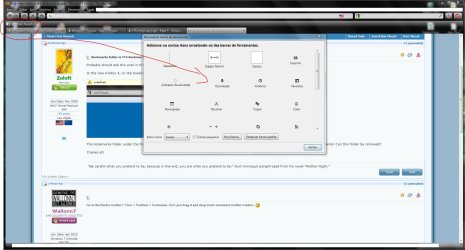
Go to the Firefox toolbar > View > Toolbars > Customize. Now just drag it and drop it into customize toolbar window.

Attached Thumbnails
Bookmarks folder in FF4 Bookmarks toolbar-capturar.jpg  
My System SpecsSystem Spec
08 Apr 2011   #3

Win 7 Ultimate SP1 x64
SG


Open up your FF menu. Navigate to options, untick bookmarks toolbar.
My System SpecsSystem Spec
.


08 Apr 2011   #4

Win7 Home Premium x64
Las Vegas


Wallonn7, that was actually the first thing I tried, but it doesn't seem to remove it, unless there is some sort of "delete" option I am missing.

D3ft0n3Z, I want to keep the toolbar itself, I like it there, I just want to remove that excess link/folder at the end of the toolbar.

Thanks for your efforts though!

Russell
My System SpecsSystem Spec
08 Apr 2011   #5

Windows 7 Ultimate x64 SP1


Quote   Quote: Originally Posted by Zoloft View Post
Wallonn7, that was actually the first thing I tried, but it doesn't seem to remove it, unless there is some sort of "delete" option I am missing.

D3ft0n3Z, I want to keep the toolbar itself, I like it there, I just want to remove that excess link/folder at the end of the toolbar.

Thanks for your efforts though!

Russell

That's weird. I play the process about three times and in all the folder was removed...
My System SpecsSystem Spec
08 Apr 2011   #6

Win 7 Ultimate SP1 x64
SG


Quote   Quote: Originally Posted by Zoloft View Post
D3ft0n3Z, I want to keep the toolbar itself, I like it there, I just want to remove that excess link/folder at the end of the toolbar.
My bad.. I thought you want to remove it completely.
My System SpecsSystem Spec
08 Apr 2011   #7

Win 7 Ultimate SP1 x64
SG


Quote   Quote: Originally Posted by Wallonn7 View Post
Go to the Firefox toolbar > View > Toolbars > Customize. Now just drag it and drop it into customize toolbar window.

I tested your suggestion. It works for me. No bookmarks folder left, only the toolbar.
My System SpecsSystem Spec
08 Apr 2011   #8

Win7 Home Premium x64
Las Vegas


Hells bells, don't know what I did wrong last time, but it worked this time, greatly appreciated guys. Sometimes I think I'm to dumb to own a computer lol. Always the "simple" stuff that flubbs me up!
My System SpecsSystem Spec
08 Apr 2011   #9

Win7 Home Premium x64
Las Vegas


AHHH! I see! When the menu bar is visible, it's not there, when the menu bar is hidden, it comes back! I guess I will just leave the menu bar active, it's better than the extra link on the bookmarks toolbar!
My System SpecsSystem Spec
08 Apr 2011   #10

Windows 7 Ultimate x64 SP1


Quote   Quote: Originally Posted by Zoloft View Post
Hells bells, don't know what I did wrong last time, but it worked this time, greatly appreciated guys. Sometimes I think I'm to dumb to own a computer lol. Always the "simple" stuff that flubbs me up!

Glad I did not lose my sanity ...
My System SpecsSystem Spec
Reply

 Bookmarks folder in FF4 Bookmarks toolbar problems?


Thread Tools


Similar help and support threads for: Bookmarks folder in FF4 Bookmarks toolbar
Thread Forum
Solved C:\users folder is missing and need to back up Firefox bookmarks help! Backup and Restore
bookmarks toolbar folder wont sort alphabetically General Discussion
FF /Minefield Bookmarks Toolbar Icons Browsers & Mail
Firefox 3.5.x bookmarks folder Browsers & Mail
FF Bookmarks Toolbar Size Customization


All times are GMT -5. The time now is 08:19 PM.


Seven Forums Android App Seven Forums IOS App Follow us on Facebook

Windows 7 Forums is an independent web site and has not been authorized,
sponsored, or otherwise approved by Microsoft Corporation.
"Windows 7" and related materials are trademarks of Microsoft Corp.
© Designer Media Ltd
  

1 2 3 4 5 6 7 8 9 10 11 12 13 14 15 16 17 18 19 20 21 22 23 24 25 26 27 28 29 30 31 32