Windows 7 Forums


Windows 7: How To Select Text In Links

11 Apr 2011   #1

Windows 7 Home Premium 64 bit (OEM) SP1
 
 
How To Select Text In Links

Some times there will be web addresses that I want to select part of it and copy it to the clipboard.

ie.:Windows 7 Forums > Windows 7 help and support > General Discussion

Here in this link at the top of the page I would like to select and copy just part of it "help and support", I can select it but the copy is greyed out and can't copy it.

Is there a way to do this?

My System SpecsSystem Spec

11 Apr 2011   #2

Windows 7 Ultimate SP1 x64
Macedonia


I do this:
Copy the selected->open new tab -> paste the text there. From the new tab I copy it and paste in where I want.
No links.
My System SpecsSystem Spec
11 Apr 2011   #3

Windows 7 Home Premium 64 bit
Illinois


Your browser should have an option for copy link location.

Firefox - Copy Link Location
IE9 - Copy Shortcut.
My System SpecsSystem Spec
.


11 Apr 2011   #4

Windows 7 Home Premium 64 bit (OEM) SP1


http://www.sevenforums.com/newreply.php?do=newreply&noquote=1&p=1341956

For example:

In this address I want to select 'sevenforums' and copy it somewhere in text but when I select it the copy is greyed out for 'copy' but is highlighted for "copy shortcut".

I guess I could live with it though.
My System SpecsSystem Spec
11 Apr 2011   #5

Windows 7 Pro X64
Space Coast of Florida


Copy what you want, paste into notepad then copy and paste it wherever you want it.

If pasting here, click on the A/A box to display BB Code and delete what the parts that make it a link, the url stuff.
My System SpecsSystem Spec
11 Apr 2011   #6

Windows 7 Ultimate SP1 x64
Macedonia


Quote   Quote: Originally Posted by George1 View Post
http://www.sevenforums.com/newreply.php?do=newreply&noquote=1&p=1341956

For example:

In this address I want to select 'sevenforums' and copy it somewhere in text but when I select it the copy is greyed out for 'copy' but is highlighted for "copy shortcut".

I guess I could live with it though.
Check my post above.
My System SpecsSystem Spec
11 Apr 2011   #7

Windows 7 Home Premium 64 bit (OEM) SP1


Quote   Quote: Originally Posted by Ztruker View Post
Copy what you want, paste into notepad then copy and paste it wherever you want it.

If pasting here, click on the A/A box to display BB Code and delete what the parts that make it a link, the url stuff.
How I do it now,
copy link,
open notepad,
then paste,
then edit,
then copy what's needed,
then close notepad and don't save the file.
My System SpecsSystem Spec
11 Apr 2011   #8

Windows 7 Home Premium 64 bit (OEM) SP1


Quote   Quote: Originally Posted by StalkeR View Post
I do this:
Copy the selected->open new tab -> paste the text there. From the new tab I copy it and paste in where I want.
No links.
I tried this and the new tab says "what do you want to do next, there's no place to paste.
My System SpecsSystem Spec
11 Apr 2011   #9

Windows 7 Home Premium 64 bit
Illinois


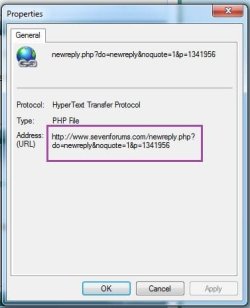
Using IE9,
Select Properties, then you can copy it from there.

How To Select Text In Links-capture.jpg
My System SpecsSystem Spec
11 Apr 2011   #10

Windows 7 Home Premium 64 bit (OEM) SP1


This will have to do.
select link,
open new tab,
select 'show copied text' ( I can select and copy what I want here)

Or go to properties and select from there.


Thanks all for the help.

I've found this forum to be of great value as my last computer had Windows ME.
My System SpecsSystem Spec
Reply

 How To Select Text In Links problems?


Thread Tools


Similar help and support threads for: How To Select Text In Links
Thread Forum
Solved Mouse won't select text after typing Software
Blurry text & icons in select applications General Discussion
Solved How do I get rid of that blue arrow everytime I select text? Browsers & Mail
Select text suddenly boldened Customization
Select, copy and paste text from windows General Discussion


All times are GMT -5. The time now is 07:49 AM.


Seven Forums Android App Seven Forums IOS App Follow us on Facebook

Windows 7 Forums is an independent web site and has not been authorized,
sponsored, or otherwise approved by Microsoft Corporation.
"Windows 7" and related materials are trademarks of Microsoft Corp.
© Designer Media Ltd
  

1 2 3 4 5 6 7 8 9 10 11 12 13 14 15 16 17 18 19 20 21 22 23 24 25 26 27 28 29 30 31 32