| Windows 7: firefox eating 480 MB of memory? |
08 Jul 2009
|
#1 | | Windows 7 7264x64(main), 7260x86(secendary), XP SP3 Triple Boot Amman, Jordan |
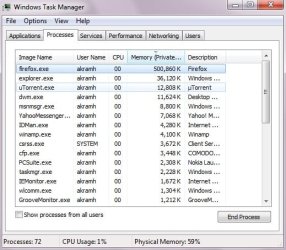
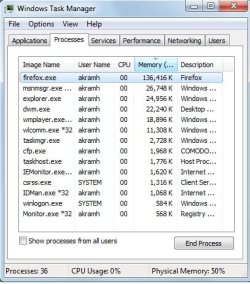
firefox eating 480 MB of memory? was looking at the task manager and it was kind of shocking to see firefox eating up 500MB of memory.. does that mean something could be wrong? I noticed sometimes when I am typing there is a delay for letters to appear, maybe that's a bad sign.... here is a picy attached!
I only have 2 tabs open at the moment, both pointing to seven forums. could it be cashe settings? I think I was playing around with the cash settings recently but don't remember if it was disk cashe or memory cashe...
I'm using firefox v3.0.11, since I had some issues with v3.5 like not being able to drag & drop URLs to the bookmark toolbar..
as I type these words, again there is a delay when I type letters.. | My System Specs |
| System Manufacturer/Model Number home made OS Windows 7 7264x64(main), 7260x86(secendary), XP SP3 Triple Boot CPU Intel Core 2 Duo E7400 2.8Mhz Motherboard Intel G33 express chipset Memory 2GB DD2 667 Graphics Card Intel(R) 82G33 Graphics and Memory Controller Hub Sound Card Realtek Built into the G31 Monitor(s) Displays 19" Screen Resolution 1280x1024 Keyboard Genius Mouse Logitech Case Gigabyte SETTO Hard Drives 320GB SATA (Main), 160GB IDE (Backup) Internet Speed 1MB Download, 128k Upload |
08 Jul 2009
|
#2 | | Win 8 Release candidate 8400 |
mem leak in FF 
Quote: Originally Posted by akramh was looking at the task manager and it was kind of shocking to see firefox eating up 500MB of memory.. does that mean something could be wrong? I noticed sometimes when I am typing there is a delay for letters to appear, maybe that's a bad sign.... here is a picy attached!
I only have 2 tabs open at the moment, both pointing to seven forums. could it be cashe settings? I think I was playing around with the cash settings recently but don't remember if it was disk cashe or memory cashe...
I'm using firefox v3.0.11, since I had some issues with v3.5 like not being able to drag & drop URLs to the bookmark toolbar..
as I type these words, again there is a delay when I type letters.. I have seen that in both 3.0 and to a lesser extent in 3.5. IM using 3.5 and FF is using 215MB.You can lower the cache but that will slw down FF do you want to do that?
Ken | My System Specs | | System Manufacturer/Model Number HP Pavillion dv-7 1005 Tx OS Win 8 Release candidate 8400 CPU 2@2.4 Memory 4 gigs Graphics Card Nvidia 9600M Sound Card HD built-in Monitor(s) Displays 17" Wxga Screen Resolution 1440x900 Cooling none Internet Speed 45Mb down 5Mb up |
08 Jul 2009
|
#3 | | Windows 7 7264x64(main), 7260x86(secendary), XP SP3 Triple Boot Amman, Jordan |
no I don't want to slow down firefox :P
just closed firefox and checked the task manager, it took 20 seconds for firefox to fully close and disapear from the task manager then started it again, it imediatly took 50MB of memory, and now after 10 minuts of browsing it's taking 75MB which is OK.
considering your firefox is taking 200MB then you were not really that far behind me! I will watch and see what happens, btw when it was at 500MB I haven't restarted firefox for a long time as I was surfing other sites so maybe that has something to do with it... but when you close those sites isn't it supposed to free that memory? | My System Specs | | System Manufacturer/Model Number home made OS Windows 7 7264x64(main), 7260x86(secendary), XP SP3 Triple Boot CPU Intel Core 2 Duo E7400 2.8Mhz Motherboard Intel G33 express chipset Memory 2GB DD2 667 Graphics Card Intel(R) 82G33 Graphics and Memory Controller Hub Sound Card Realtek Built into the G31 Monitor(s) Displays 19" Screen Resolution 1280x1024 Keyboard Genius Mouse Logitech Case Gigabyte SETTO Hard Drives 320GB SATA (Main), 160GB IDE (Backup) Internet Speed 1MB Download, 128k Upload |
08 Jul 2009
|
#4 | | Win 8 Release candidate 8400 |
firefox 
Quote: Originally Posted by akramh no I don't want to slow down firefox :P
just closed firefox and checked the task manager, it took 20 seconds for firefox to fully close and disapear from the task manager then started it again, it imediatly took 50MB of memory, and now after 10 minuts of browsing it's taking 75MB which is OK.
considering your firefox is taking 200MB then you were not really that far behind me! I will watch and see what happens, btw when it was at 500MB I haven't restarted firefox for a long time as I was surfing other sites so maybe that has something to do with it... but when you close those sites isn't it supposed to free that memory? Firefox doesnt release the mem till all windows are closed. I hade 10 windows open and it was using 440mb, I closed all but 1 and it only went done to 300. I regularly restart FF
Ken | My System Specs | | System Manufacturer/Model Number HP Pavillion dv-7 1005 Tx OS Win 8 Release candidate 8400 CPU 2@2.4 Memory 4 gigs Graphics Card Nvidia 9600M Sound Card HD built-in Monitor(s) Displays 17" Wxga Screen Resolution 1440x900 Cooling none Internet Speed 45Mb down 5Mb up |
08 Jul 2009
|
#5 | | |
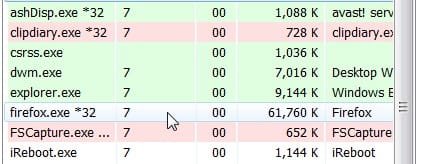
Sounds like a lot I have 4 tabs open and it is at 61mb : | My System Specs | | OS Vista x64 / 7 X64 CPU E8400 Motherboard ASRock 1333 GLAN R2.0 Memory 2x1 gb 800mhz Graphics Card 9500gt 1gb Case Coolermaster Cooling Winpower 500w Hard Drives Maxtor 160gb-2mb cache |
08 Jul 2009
|
#6 | | Win 8 Release candidate 8400 |
FireFox 
Quote: Originally Posted by SIW2 Sounds like a lot I have 4 tabs open and it is at 61mb : Attachment 17136 Maybe its which tabs are open. Im running 4 SF tabs and i at 200+megs
K
Last edited by zigzag3143; 21 Jul 2009 at 06:16 AM..
| My System Specs | | System Manufacturer/Model Number HP Pavillion dv-7 1005 Tx OS Win 8 Release candidate 8400 CPU 2@2.4 Memory 4 gigs Graphics Card Nvidia 9600M Sound Card HD built-in Monitor(s) Displays 17" Wxga Screen Resolution 1440x900 Cooling none Internet Speed 45Mb down 5Mb up |
08 Jul 2009
|
#7 | | Win 7 RC 64-Bit, XP Pro 32-Bit, Suse Linux |
As good as Firefox is, and as good as the Mozilla folks are, This is one dragon they have never slayed. Firefox has had a memory leak since inception. They have never fixed it. One tab open or many, doesn't matter. Leak, leak, leak. I have posted a ton about this in other forums.
Take an ordinary machine...my wife's...a Celeron running XP Pro with 512 Gb of RAM. OPen Firefox to a single page...Yahoo. Wait. It eats some RAM. Wait some more and it eats more. Eventually, it takes all the RAM and crashes itself or the machine or both. I've watched this happen. Granted, it takes a couple of days, but it will act like a flesh eating bacteria and consume everything including itself.
To me, that's a BIG problem. Working in software myself I know memory management can be a bear. But this is bad...and has been forever. | My System Specs | | System Manufacturer/Model Number Self Built OS Win 7 RC 64-Bit, XP Pro 32-Bit, Suse Linux CPU I7 620 Motherboard Asus P6T Deluxe V2 Memory 6 Gb Corsair Dominator DDR3 1600 CAS 8 Graphics Card EVGA Nvidea GTX275 Sound Card Onboard Monitor(s) Displays Acer H242H 24" HD 1080p Widescreen PSU SeaSonic 700W Case Cooler Master Storm Sniper Cooling Zalman Hard Drives 2xWD Raptors in RAID 0; 1xWD Black 1 TB |
09 Jul 2009
|
#8 | | Windows 7 Professional 64-bit |
Do you have lots of plugins installed? Each one of those will use up memory. | My System Specs | | System Manufacturer/Model Number self built OS Windows 7 Professional 64-bit CPU Intel E8400 3GHz Motherboard Intel DX48BT2 Memory Kingston PC3-10700H 4Gb Graphics Card XFX Radeon HD 5850 BlackEd. Sound Card Asus Xonar DG Monitor(s) Displays 2x Samsung SM-T220HD 22" Screen Resolution 1680x1050 on two monitors Keyboard Microsoft Comfort Curve USB Mouse Razer Diamondback 3G PSU Thermaltake ToughPower 850w Case Thermaltake Armor Cooling Scythe Mugen II Hard Drives OCZ Vertex 2 120gb 3.5" (OS)
Seagate Momentus XT 500gb
Samsung F3 1Tb (games)
2x Samsung F1 1Tb Internet Speed 8128/443 |
09 Jul 2009
|
#9 | | |
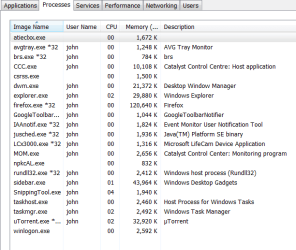
See anything out of the normal please comment: | My System Specs | | System Manufacturer/Model Number Dell E520 OS 7600x64 RTM CPU Intel® Q6700, 2.66 GHz stock clock (upgraded) Motherboard Dell Memory 4g (upgraded) Graphics Card Sapphire Radeon Toxic HD 3870 512MB GDDR4 (upgraded) Sound Card HT Omega Claro Plus (upgraded) Monitor(s) Displays 22' , 40" Screen Resolution 1050, 1080p Keyboard dell Mouse dell PSU Zalman 600w (upgraded) Case Dell Cooling stock Dell Hard Drives 1.5tb (upgraded) Internet Speed 100m Fiber optical Other Info Bought the Dell secondhand for cheap and upgraded cpu, vga, ram, soundcard, psu and HDD's. |
09 Jul 2009
|
#10 | | Windows 7 Professional 64-bit |
firefox is only using 120mb which is quite reasonable. Apart from that I see nothing unusual in that screenshot. | My System Specs | | System Manufacturer/Model Number self built OS Windows 7 Professional 64-bit CPU Intel E8400 3GHz Motherboard Intel DX48BT2 Memory Kingston PC3-10700H 4Gb Graphics Card XFX Radeon HD 5850 BlackEd. Sound Card Asus Xonar DG Monitor(s) Displays 2x Samsung SM-T220HD 22" Screen Resolution 1680x1050 on two monitors Keyboard Microsoft Comfort Curve USB Mouse Razer Diamondback 3G PSU Thermaltake ToughPower 850w Case Thermaltake Armor Cooling Scythe Mugen II Hard Drives OCZ Vertex 2 120gb 3.5" (OS)
Seagate Momentus XT 500gb
Samsung F3 1Tb (games)
2x Samsung F1 1Tb Internet Speed 8128/443 firefox eating 480 MB of memory? problems? All times are GMT -5. The time now is 03:30 AM. | |