Windows 7 Forums


Windows 7: Opening links in entirely new tabs

18 Apr 2011   #1

Windows 7 Home Premium 64-bit (6.1, Build 7600)
 
 
Opening links in entirely new tabs

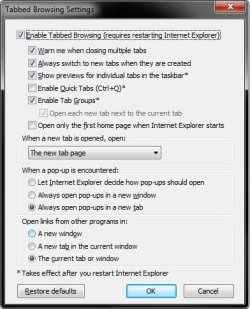
I would like to set my browser up to where when I click on a link, it will automatically open it up in a new tab without removing the original tab. I have gone to Tools-->Internet Options-->Tabs, Settings, and seem to have the correct settings set, but it still opens new link in my current tab as opposed to in a new one. Any ideas about this?

My System SpecsSystem Spec

18 Apr 2011   #2

64-bit Windows 7 Ultimate SP1 & Windows 8 Enterprise
Texas


Hello Matt,

Double check to see if your settings look like below. It's how I have mine set for this.

Opening links in entirely new tabs-settings.jpg

Hope this helps,
Shawn
My System SpecsSystem Spec
Reply

 Opening links in entirely new tabs problems?


Thread Tools


Similar help and support threads for: Opening links in entirely new tabs
Thread Forum
Solved Opening tabs Performance & Maintenance
Solved How do I stop new tabs opening Browsers & Mail
BSOD when browsing internet, opening several tabs BSOD Help and Support
IE 9 crashes when opening tabs while playing a flash video Browsers & Mail
Opening links in IE9(b) Browsers & Mail


All times are GMT -5. The time now is 07:39 AM.


Seven Forums Android App Seven Forums IOS App Follow us on Facebook

Windows 7 Forums is an independent web site and has not been authorized,
sponsored, or otherwise approved by Microsoft Corporation.
"Windows 7" and related materials are trademarks of Microsoft Corp.
© Designer Media Ltd
  

1 2 3 4 5 6 7 8 9 10 11 12 13 14 15 16 17 18 19 20 21 22 23 24 25 26 27 28 29 30 31 32