Windows 7 Forums Search
Welcome to Windows 7 Forums. Our forum is dedicated to helping you find solutions with any problems, errors or issues you are experiencing with Windows 7. The Windows 7 forum also covers news and updates and has an extensive Windows 7 tutorial section that covers a wide range of tips and tricks.


Windows 7 - Unable to display menu in WLM

 
04-21-2011   #1


Windows 7


Unable to display menu in WLM

I know this issue has been raised many time previously.
I really wouldnt be re posting it if the replies I have found corrected the problem.
This plea for help is a result of me not finding what I need to fix the problem.

The problem is that I cannot bring up the Tools Menu. I have no little arrows arround the Help icon, the ALT key does not bring up any option for it, Right clicking doesnt help and I cant find anything in the existing menus.
My objective is to point WLM to my mail directory - which is not the default.

I am using - Windows 7 and
- WLM Version 2011 (Build 15.4.3508.1109)

Can this be resolved?

Thanks

My System SpecsSystem Spec
04-21-2011   #2


Windows 7 Ultimate x64 SP1


Hello Tropix,

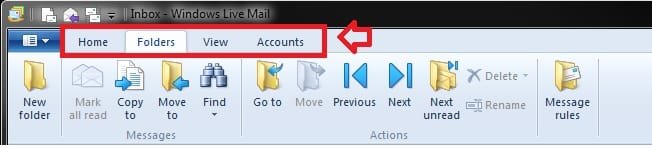
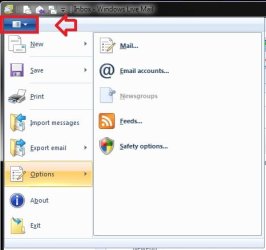
In Windows Live Mail 2011, the traditional Menu bar has been replaced with the ribbon bar tabs, and the drop down menu. You would just need to click on one of the tabs or the drop down menu arrow as in the screenshot below for these options now.

Unable to display menu in WLM-ribbon-bar-tabs.jpg

Unable to display menu in WLM-menu.jpg

Hope this helps,
Shawn
My System SpecsSystem Spec
04-21-2011   #3


Windows 7 Pro x64


Quote   Quote: Originally Posted by Tropix View Post
I know this issue has been raised many time previously.
I really wouldnt be re posting it if the replies I have found corrected the problem.
This plea for help is a result of me not finding what I need to fix the problem.

The problem is that I cannot bring up the Tools Menu. I have no little arrows arround the Help icon, the ALT key does not bring up any option for it, Right clicking doesnt help and I cant find anything in the existing menus.
My objective is to point WLM to my mail directory - which is not the default.

I am using - Windows 7 and
- WLM Version 2011 (Build 15.4.3508.1109)

Can this be resolved?

Thanks
Is this mail directory (Now called a folder) of yours originally created by Windows Live Mail or some other program?

If it was created by some other program, like Outlook Express, then I can tell you how to get these emails into Windows Live Mail.

If they were created with WLM then I can tell you how to move the default WLM storage folder, that is if you do want to move it, and then include these other emails it to that storage folder or to the original storage folder.

What you want to do is fairly simple once you know how.
My System SpecsSystem Spec
.


04-21-2011   #4


Windows 7


Brink,
Thankyou for the solution.
Although I visited that area on several occasion it did not occur the me that these settings would be under the heading of Mintanence ans Troubleshooting.

Shootist,
Thankyou for your reply.
I was trying to connect to the saved mail I have from a previous version of WLM that I keep on a seperate drive.

The problem is now solved.

Thanks for the good work guys!!
My System SpecsSystem Spec
04-21-2011   #5


Windows 7 Ultimate x64 SP1


Glad we could help Tropix.
My System SpecsSystem Spec
Reply

 Unable to display menu in WLM problems?


Thread Tools


Similar Threads for: Unable to display menu in WLM
Thread Forum
Solved Unable to remove MagicISO context menu from right click menu in Win 7 Customization
Unable to display internal web page? Network & Sharing
Unable to display subs of MKV files Music, Pictures & Video
Display Favorites as a link not a menu in Start Menu Customization
Unable to use TV as standalone display Graphic Cards


All times are GMT -5. The time now is 03:58 PM.


Windows 7 Forums is an independent web site and has not been authorized,
sponsored, or otherwise approved by Microsoft Corporation.
"Windows 7" and related materials are trademarks of Microsoft Corp.
© Designer Media Ltd
  

1 2 3 4 5 6 7 8 9 10 11 12 13 14 15 16 17 18 19 20 21 22 23 24 25 26 27 28 29 30