| Windows 7: Problems in Windows Live Mail Essential 2011 |
30 Apr 2011
|
#1 | | |
Problems in Windows Live Mail Essential 2011 Hello, I have Windows 7, WLM Essential 2011, Firefox.
PLEASE help with these 3 glitches?: 1. How to alphabetize the folders I created in the email at the left column? they don't arrange automatically...
2. System folder “Outbox” is missing, how to get it?
3. How to get rid of the tiny triangular “icons” (don’t know the name) which make the sub-folders? I want a straight, non-indented column of my folders.
Thanks ever so much for any help! Adela | My System Specs |
| System Manufacturer/Model Number Dell Inspiron 560 Desktop OS Windows 7 Home, 64 bit. Monitor(s) Displays LCD |
30 Apr 2011
|
#2 | | Vista and now 7 in 32 and 64 bit. Denmark |
Could you post a picture, I don't appear to have any of those problems???
Perhaps, at this stage, a reinstall of WLM would solve it? | My System Specs | | System Manufacturer/Model Number Three desktops and one laptop with good specs.. OS Vista and now 7 in 32 and 64 bit. |
01 May 2011
|
#3 | | |
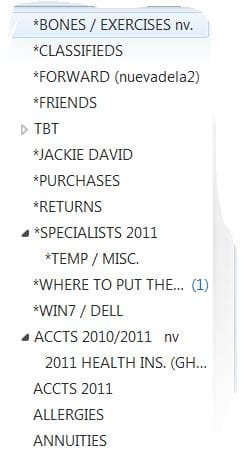
Thanks. Here's a screenshot of my problem #3. The other 2 are self-explanatory Davehc.
Here you can see how the folders aren't in alphabetical order and also the tiny triangles I spoke about which produce the sub-folders, meaning indented folders which I do not want.
Any ideas?
Thanks again. Adela
P.S. I uploaded the screenshot as attachment but don't see it here. Please let me know if you received it? | My System Specs | | System Manufacturer/Model Number Dell Inspiron 560 Desktop OS Windows 7 Home, 64 bit. Monitor(s) Displays LCD |
01 May 2011
|
#4 | | 64-bit Windows 7 Ultimate SP1 & Windows 8 Enterprise Texas |
Hello Adela,
Answers inline.
Your screenshot is not uploaded or attached in your post above though. 
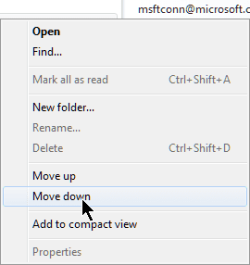
Quote: Originally Posted by Adela 1. How to alphabetize the folders I created in the email at the left column? they don't arrange automatically... You can right click on the main email account name in the left pane, and click on Move up or Move down to manually move each email account list to the order you want them to be. 
Quote: Originally Posted by Adela 2. System folder “Outbox” is missing, how to get it? Did you already use the scroll bar to scroll down in the left pane to see if the Outbox may have just been further down and out of view? 
Quote: Originally Posted by Adela 3. How to get rid of the tiny triangular “icons” (don’t know the name) which make the sub-folders? I want a straight, non-indented column of my folders. These triangles are to indicate opened/expanded (outlined white) and closed/unexpanded (solid black) message folders. The indented folders are subfolders of a message folder. This cannot be changed. Hope this helps,
Shawn | My System Specs | | Computer type PC/Desktop System Manufacturer/Model Number Self built custom OS 64-bit Windows 7 Ultimate SP1 & Windows 8 Enterprise CPU Intel i7-3930K 3.2 Ghz (O/C 4 Ghz) Motherboard ASRock X79 Extreme11 Memory 32 GB (8GBx4) G.SKILL DDR3 Quad PC3-19200 2400MHz Graphics Card Sapphire HD5870 Eyefinity 6 2GB Sound Card SB Recon 3Di Integrated Chip Monitor(s) Displays 3x 27" Asus VE278Q Screen Resolution 1920x1080 Keyboard Logitech Cordless Desktop MX 5500 Revolution Mouse Logitech Cordless Desktop MX 5500 Revolution PSU OCZ Series Gold OCZZ1000M 1000W Case Thermaltake Level 10 GT Snow Edition Cooling Corsair Hydro H100 Hard Drives 256GB OCZ Vector
160GB OCZ RevoDrive X2
2 x 1TB Samsung HDD HD154UI SATA Internet Speed 50 Mb/s Download and 2 Mb/s Upload Other Info Microsoft LifeCam Cinema
Lite-On iHBS212 12x BD Writer
Samsung CLX-3175FW Printer
Netgear WNDR3800 Router
Motorola SBG6580 Cable Modem
2x APC Back-UPS XS 1500 |
01 May 2011
|
#5 | | |
Hi and thank you Brink! (In uploading my screenshot I did do everything that the link you so kindly sent me, listed. But, since I didn’t maximize the window I didn’t see the “UPLOAD” button at all. So sorry. I went back and did it again even though you have already answered my problems), can you see it? 
"(1) You can right click on the main email account name in the left pane, and click on Move up or Move down to manually move each email account list to the order you want them to be." It’s not the account that I wanted to have in alphabetical order – it is the individual folders underneath the email account...
"(2) Did you already use the scroll bar to scroll down in the left pane to see if the Outbox may have just been further down and out of view?
Yes I did and it isn’t there.
"(3) These triangles are to indicate opened/expanded (outlined white) and closed/unexpanded (solid black) message folders. The indented folders are subfolders of a message folder. This cannot be changed." Oh what a shame! But at least I wish to have the individual folders arranged in alphabetical order. How to do this??? 
Thank you again! Adela
P.S. I'm sorry that the "Quote" button isn't working here. It put "Quote" codes in the middle of the paragraph splitting it into 2 quoted paragraphs, and didn't show the quoted content in the 3rd paragraph. | My System Specs | | System Manufacturer/Model Number Dell Inspiron 560 Desktop OS Windows 7 Home, 64 bit. Monitor(s) Displays LCD |
01 May 2011
|
#6 | | 64-bit Windows 7 Ultimate SP1 & Windows 8 Enterprise Texas |
Adela,
Yes, the screenshot is showing now.
There's not a way to arrange the message folders for an email account either though.
Could you post a screenshot of the left pane with the message folders in it scrolled down all the to the bottom? | My System Specs | | Computer type PC/Desktop System Manufacturer/Model Number Self built custom OS 64-bit Windows 7 Ultimate SP1 & Windows 8 Enterprise CPU Intel i7-3930K 3.2 Ghz (O/C 4 Ghz) Motherboard ASRock X79 Extreme11 Memory 32 GB (8GBx4) G.SKILL DDR3 Quad PC3-19200 2400MHz Graphics Card Sapphire HD5870 Eyefinity 6 2GB Sound Card SB Recon 3Di Integrated Chip Monitor(s) Displays 3x 27" Asus VE278Q Screen Resolution 1920x1080 Keyboard Logitech Cordless Desktop MX 5500 Revolution Mouse Logitech Cordless Desktop MX 5500 Revolution PSU OCZ Series Gold OCZZ1000M 1000W Case Thermaltake Level 10 GT Snow Edition Cooling Corsair Hydro H100 Hard Drives 256GB OCZ Vector
160GB OCZ RevoDrive X2
2 x 1TB Samsung HDD HD154UI SATA Internet Speed 50 Mb/s Download and 2 Mb/s Upload Other Info Microsoft LifeCam Cinema
Lite-On iHBS212 12x BD Writer
Samsung CLX-3175FW Printer
Netgear WNDR3800 Router
Motorola SBG6580 Cable Modem
2x APC Back-UPS XS 1500 |
02 May 2011
|
#7 | | |
Quote: Could you post a screenshot of the left pane with the message folders in it scrolled down all the to the bottom? Hi and thank you Shawn. Yes I can, but only of the visible segment (attached) which I took from where I left off the previous one, because it doesn’t show the entire column all the way down to the Storage Folders. To copy them segment by segment I’d need to do around 10 screenshots.
However, the rest of the column shows more or less the same pattern as the previous screenshot; i.e., the indented sub-folders which I don’t like but you said can’t be changed; and the lack of alphabetical order in the folders which I very much hope to learn how to do...
Also, at the bottom there’s nothing that could give a clue - the column just ends without even a line!
Thanks again! Adela
P.S. I just discovered the “Outbox” folder within the “Storage Folders” column all the way down below. Is there a way to move it above among the other system folders? | My System Specs | | System Manufacturer/Model Number Dell Inspiron 560 Desktop OS Windows 7 Home, 64 bit. Monitor(s) Displays LCD |
02 May 2011
|
#8 | | Windows 7 HP 64bit, Windows 8 Pro w/Media Center 64bit Covington, La |
First thing to try is to right click on the Outlook folder and see if it has a choice to Move Up or Move Down.
To remove the Triangles - Left Click and Hold on a folder and drag it to the Account Name and it will be appear right under the Deleted folder. Do this for each folder and they will be inline after the Deleted folder. If you have any Message Rules setup you will have to change them to match the move.
Jim | My System Specs | | Computer type PC/Desktop System Manufacturer/Model Number Home Built OS Windows 7 HP 64bit, Windows 8 Pro w/Media Center 64bit CPU Phenom II X6 1100T Motherboard ASUS M5A99X EVO Memory Crucial Balistic 8gb DDR3-1866 CL9 Graphics Card MSI R6850 Cyclone IGD5 PE Sound Card On Board Monitor(s) Displays ASUS VE258Q 25" LED with DVI-HDMI-DisplayPort Screen Resolution 1920 x 1080 Keyboard Logitech K120 Mouse Logitech Marble Mouse USB, Logitech Precision Game Pad PSU Seasonic X650 80 Plus GOLD Modular Case Corsair 400R Cooling Antec Kuhler H2O 620, Two 120mm and four 140mm Hard Drives Two WD Cavier Black 2TB Sata III, WD My Book Essential 2TB USB 3.0 Internet Speed 15MB Antivirus Norton IS 2012, Malwarebytes Pro Browser IE-10, FF-19 Other Info APC UPS ES 750, Netgear WNR3500L Gigabit & Wireless N Router with SamKnows Test Program, Motorola SB6120 Gigabit Cable Modem. Brother HL-2170W Laser Printer, Epson V300 Scanner |
02 May 2011
|
#9 | | Vista and now 7 in 32 and 64 bit. Denmark |
If you right click the "OutBox", you will find an option to move it up or down. | My System Specs | | System Manufacturer/Model Number Three desktops and one laptop with good specs.. OS Vista and now 7 in 32 and 64 bit. |
02 May 2011
|
#10 | | |
Thanks so much Davehc and Jim! I tried as follows: Outlook Button: Doesn’t have the menu with options to go up or down...I then tried to move it by left click and drag...but it wouldn't budge! Remove Triangles: (“Left Click and Hold on a folder and drag it to the Account Name...”): They don’t remove themselves! They reappear and multiply! Alphabetize Folders: (“Left Click and Hold on a folder and drag it to the Account Name and it will be appear right under the Deleted folder. Do this for each folder and they will be inline after the Deleted folder....”) Something strange happened here: (1) The first 3 or 4 folders I moved up, placed themselves right under the “Delete” folder in alphabetical order and I was happy...but when I tried the rest of them they either didn’t move or they moved to any other place, for which I had to search all over... (2) In desperation, I tried to move it right under the proper alphabetical folder name...but this brought on more triangles on each folder I moved and therefore more indented folder names! Quote: If you have any Message Rules setup you will have to change them to match the move. (3) I never setup any Message Rules, how do you set them up to put folders in alphabetical order? Please forgive this new set of problems, hopefully you and/or other “geeks” will help me further? Anticipating my deep thanks. Adela | My System Specs | | System Manufacturer/Model Number Dell Inspiron 560 Desktop OS Windows 7 Home, 64 bit. Monitor(s) Displays LCD Problems in Windows Live Mail Essential 2011 problems? All times are GMT -5. The time now is 06:28 AM. | |