Windows 7 Forums


Windows 7: remove hotmail account

01 May 2011   #1

Widows 7 home premium 64 bit
Canada
 
 
remove hotmail account

My brother went to check his hotmail account on my computer. Now every time I open my e mail, his hotmail account comes up first (with all his e mail stuff) and I have to click it off before I can open my regular e mail account from Windows Essentials 2011. I looked in accounts, but his hotmail e mail account is not listed. While not a major issue, it is annoying to me. Is there a way to remove his hotmail account from my computer. For my self, I do not use hotmail and never had an account with them.
ps I tried to find a solution in the tutorials before posting.

My System SpecsSystem Spec

01 May 2011   #2

Windows 8 Release Preview
Belgrade, Serbia


Check if the account is listed in Options->Email Accounts rather than the left sidebar.
You should also check that he didn't leave an automatic sign in option for Mail, which could explain why his account is synced every time you start the program.
My System SpecsSystem Spec
01 May 2011   #3

Widows 7 home premium 64 bit
Canada


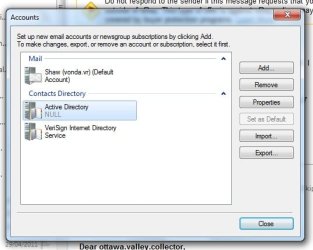
Thanks for the reply, the only account I could find is in the attachment.
Attached Thumbnails
remove hotmail account-untitled.jpg  
My System SpecsSystem Spec
.


01 May 2011   #4

Windows 7 Home Premium x64 SP1
Bay Area Peninsula


Perhaps the fix would be to enter his hotmail account from your PC, and sign out? A Guy
My System SpecsSystem Spec
02 May 2011   #5

Widows 7 home premium 64 bit
Canada


He did sign out of his account, but his hotmail account panel to sign in still comes up first. Once I click it off, I can access my regular e mail account. He does not know either how to remove the log-on panel.
My System SpecsSystem Spec
02 May 2011   #6

Windows 8 Release Preview
Belgrade, Serbia


On that poput window, is the option "Remember me and sign me in automatically" checked? No, wait, that doesn't make sense xD

Well, at this point I would recommend reinstalling Live Essentials; maybe even use something like Revo Uninstaller to wipe out all the traces and perform a clean install. That should definitely work.
My System SpecsSystem Spec
02 May 2011   #7

Widows 7 home premium 64 bit
Canada


This is the strange part, when I click on my e mail icon, first his sign/log-on window comes up. (It requires a password to open it) When I just click it off, my e mail box comes up, then when I want to create an new e mail and click on "to" , his e mail contacts come up.
My System SpecsSystem Spec
02 May 2011   #8

Win7 Enterprise, Win7 x86 (Ult 7600), Win7 x64 Ult 7600, TechNet RTM on AMD x64 (2.8Ghz)
SomeWhere in the HOT Arizona Desert !


Sounds like it is signing IN to his Hotmail acct first & automatically
My System SpecsSystem Spec
02 May 2011   #9

Widows 7 home premium 64 bit
Canada


Is there a way to prevent this from happening? To Gornot, if I remove Windows Essentials 2011, will that remove also all my e mails and contacts or will they be back with a re-install?
My System SpecsSystem Spec
02 May 2011   #10

64-bit Windows 7 Ultimate SP1 & Windows 8 Enterprise
Texas


Hello Vonda,

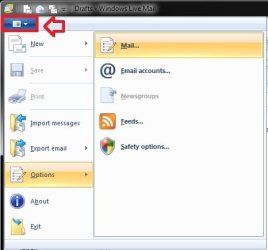
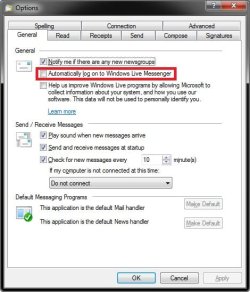
In Windows Live Mail, click on the menu drop down, click on Options, and Mail. In the General tab, see if the Automatically log on to Windows Live Messsenger box is unchecked. If not, uncheck and OK, and test to see if that may have been causing this for you.
remove hotmail account-menu.jpgremove hotmail account-options.jpg
Hope this helps,
Shawn
My System SpecsSystem Spec
Reply

 remove hotmail account problems?


Thread Tools


Similar help and support threads for: remove hotmail account
Thread Forum
Solved Hotmail.co.uk account? Browsers & Mail
Blocked out of my Hotmail account Browsers & Mail
Syncing problems with Hotmail Account Browsers & Mail
Hotmail account hacked? Browsers & Mail
Hotmail is going to cancel my account Browsers & Mail


All times are GMT -5. The time now is 01:53 AM.


Seven Forums Android App Seven Forums IOS App Follow us on Facebook

Windows 7 Forums is an independent web site and has not been authorized,
sponsored, or otherwise approved by Microsoft Corporation.
"Windows 7" and related materials are trademarks of Microsoft Corp.
© Designer Media Ltd
  

1 2 3 4 5 6 7 8 9 10 11 12 13 14 15 16 17 18 19 20 21 22 23 24 25 26 27 28 29 30 31 32