Windows 7 Forums


Windows 7: Save webpage as .xps?

09 May 2011  
kbronski

Windows 7 Home Premium x64
203 posts
 
 
Save webpage as .xps?

A friend of mine accidentally figured out how to save a webpage as .xps while trying to screenshot, but forgot and I would like to know how they did it. Anyone?

My System SpecsSystem Spec

09 May 2011  
Redmage913

Windows 7, Super OS 9.10
44 posts


Which browser do you want to use to do this? I don't know if you can with the default Firefox installation...
My System SpecsSystem Spec
09 May 2011  
Redmage913

Windows 7, Super OS 9.10
44 posts


Sorry for double-posting - I thought of something.

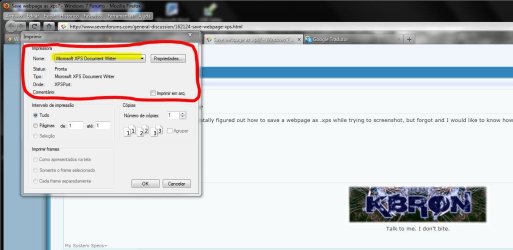
What about going to File>Print... and select the Microsoft XPS Document Writer?
My System SpecsSystem Spec
.


09 May 2011  
Wallonn7

Windows 7 Ultimate x64 SP1
916 posts


Hi kbronski.
Ctrl + P and select Microsoft XPS Document Writer as shown below.


Attached Thumbnails
Save webpage as .xps?-capturar.jpg  
My System SpecsSystem Spec
10 May 2011  
kbronski

Windows 7 Home Premium x64
203 posts


Thank you very much guys. That worked great.
My System SpecsSystem Spec
10 May 2011  
Wallonn7

Windows 7 Ultimate x64 SP1
916 posts


You're welcome!
My System SpecsSystem Spec
Reply

 Save webpage as .xps? problems?


Thread Tools


Similar help and support threads for: Save webpage as .xps?
Thread Forum
How can I save the webpage for browsing offline? Browsers & Mail
Solved Residual File Names in Save/Save As Dialog Boxes General Discussion
Solved Cannot save excel files in a redirected folder unles I use save as Network & Sharing
Want to save 100%-flash webpage 4 browsing offline, but Browsers & Mail
SAVE as .. SAVE button missing in Save Dialog (solved) General Discussion


All times are GMT -5. The time now is 10:13 PM.


Windows 7 Forums is an independent web site and has not been authorized,
sponsored, or otherwise approved by Microsoft Corporation.
"Windows 7" and related materials are trademarks of Microsoft Corp.
© Designer Media Ltd