Windows 7 Forums Search
Welcome to Windows 7 Forums. Our forum is dedicated to helping you find solutions with any problems, errors or issues you are experiencing with Windows 7. The Windows 7 forum also covers news and updates and has an extensive Windows 7 tutorial section that covers a wide range of tips and tricks.


Windows 7 - Java(Sun) does not appear in Internet Options/Advanced

 
06-07-2011   #1


Windows 7


Java(Sun) does not appear in Internet Options/Advanced

I am having a problem downloading an Add-on from Ancesrtry.co.uk. Ancestry tell me that I should be using IE8 so I have reverted having upgraded to IE9. I have to install Java but that is allready installed (I have re-installed anyway). However if I go to Internet Options/Advanced Java(Sun) does not appear just before Multimedia so I can not check the box next to Use JRE (Current version number). I think this is the problem so why does this not appear in Internet Options/Advanced?

Any help please.

My System SpecsSystem Spec
06-09-2011   #2


Windows 7 Enterprise Trial 32-bit SP1


Add-ons for IE are listed under Tools/Manage Add-ons (or possibly via the Windows Control Panel). I have a PC with Java but it doesn't appear in Internet Options.
My System SpecsSystem Spec
06-09-2011   #3


Windows 7 Ultimate x64 SP1


Hi Judesman.
Go to Tools > Internet Options > Programs tab > Manage Add-ons > Toolbar and Extensions > scroll down 'til Sun Microsystems, Inc.
Enable it if it is disabled. Hope that helps!
My System SpecsSystem Spec
.


06-10-2011   #4


Windows 7


Thank you very much. I have found it now and Java was enabled so the guidance I was given by Ancestry.co.uk was out of date and most likely related to XP! Whenever I access their web site I get a message "An Add-on for this website failed to run" The information bar tells me to "Check the security settings in Internet Options for potential conflicts" but apart from the advice given by Ancestry that I have followed to the letter I don't really know what I am looking for.
My System SpecsSystem Spec
06-10-2011   #5


Windows 7 Ultimate x64 SP1


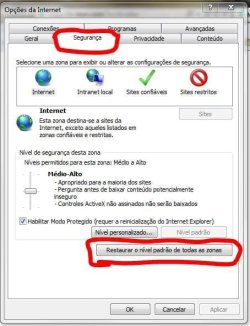
I had no problems accessing the site with Firefox 4.0.1 / Internet Explorer 9. You tried both? If the problem does not manifest in Firefox, try resetting the security settings of IE to defaults. To do this, go to Tools > Internet Options > Security tab > Restore the default level for all zones as shown below. Let us know the results.


Attached Thumbnails
Java(Sun) does not appear in Internet Options/Advanced-capturar.jpg  
My System SpecsSystem Spec
06-10-2011   #6


Windows 7


Thank you Wallonn7. I can access the site it is just that I get this warning about the Add-on failing to run. Ancestry told me that I should be using IE8 so I reverted and it didn't make ant difference. I have restored the default level for all zones but that doesn't make any difference and will have undone a number of changes that Ancestry told me to make. But if you are using IE9 at default level and you do not have this problem then I don't know where to go from here. I don't really want to download Firefox especially as there should not be aproblem with IE. Ancestry can not even tell me what the Add-on is although I suspect it might be their Enhanced Image Viewer. I am registered with Ancestry but don't pay them a subscription at present but that should not make any difference.
My System SpecsSystem Spec
06-10-2011   #7


Windows 7 Ultimate x64 SP1


Open IE. Hold Ctrl + Shift + Del and clear its cache. Make sure you remember all passwords before do that.

Run Internet Explorer 9 in compatibility mode. To run in compatibility mode, click on the compatibility icon located next to the web
address bar. This icon looks like a piece of paper torn in half horizontally.

Try disabling "Protected Mode" using the following:

1. Close all open windows and programs.
2. Click on the Start button and then on Control Panel.
3. Click on "Classic View" on the left side, then double-click on Internet Options.
4. Click on the Security tab
5. Un-check the box for "Internet Explorer Protected Mode"
6. Click OK at the bottom, close the Control Panel, and open Internet Explorer to try again.

If this resolves the issue, then you might want to add Ancestry to your Trusted Sites in Internet Explorer. This will make it so that you
can enable protected mode for every other website but for ours it will be off. To add this to the trusted sites, go back to the options
and the Security tab, click on Trusted Sites, then the Sites button. Type in *.ancestry.co.uk, untick the "Require server verification"
box, and click Add. Then restart Internet Explorer and try again.

Let us know the results.

Last edited by Wallonn7; 06-10-2011 at 10:08 AM.. Reason: Adding guidelines...
My System SpecsSystem Spec
06-10-2011   #8


Windows 7


Yes, I have done that-no difference. I have been in touch with Ancestry support but I don't think they have an answer. I may just have to put up with this irritating feature but it would be good to know what the Add-on is. Thanks for your input.
My System SpecsSystem Spec
06-10-2011   #9


Windows 7 Ultimate x64 SP1


Have you done all above?...
My System SpecsSystem Spec
06-10-2011   #10


Windows 7 Pro 64 SP1


Quote   Quote: Originally Posted by Judesman View Post
Yes, I have done that-no difference. I have been in touch with Ancestry support but I don't think they have an answer. I may just have to put up with this irritating feature but it would be good to know what the Add-on is. Thanks for your input.
Try dis-abling one add-on at a time, see if you can narrow it down.
My System SpecsSystem Spec
Reply

 Java(Sun) does not appear in Internet Options/Advanced problems?


Thread Tools


Similar Threads for: Java(Sun) does not appear in Internet Options/Advanced
Thread Forum
How to set Advanced options in Power Options (64 bit Ultimate) Performance & Maintenance
Advanced Boot Options Tutorials
BOOT Advanced Options Performance & Maintenance
Advanced tab missing in internet options Browsers & Mail
Internet Options - Add or Remove Advanced Tab Tutorials


All times are GMT -5. The time now is 04:55 PM.


Windows 7 Forums is an independent web site and has not been authorized,
sponsored, or otherwise approved by Microsoft Corporation.
"Windows 7" and related materials are trademarks of Microsoft Corp.
© Designer Media Ltd
  

1 2 3 4 5 6 7 8 9 10 11 12 13 14 15 16 17 18 19 20 21 22 23 24 25 26 27 28 29 30