Windows 7 Forums


Windows 7: Font and Web Page Rending Bug in Windows 7

11 Jun 2011   #1

windows 7 32 bit and windows 7 64 bit
 
 
Font and Web Page Rending Bug in Windows 7

Here is my problem on a Window7 32 bit installed machine.

1. I changed the display font from medium to large and found that a web page window with words displayed that linked to other webpages suddenly was smaller, the words that were hot links were text wrapped, and those words that were wrapped were no longer active. This happened in both Firefox 4 and in Internet Explorer 9.

2. I reset the font size to medium but the webpages in both browsers continue to have smaller windows and the text wrap/active link problem persists.

3. I restored the system to an earlier restore point, and the web pages were displayed properly in Internet Explorer, but not in Firefox. The reason for firefox still with the problem is that I had previously changed the font sizes when firefox was the only browser being used and that change preceded the last good restore point.

Some setting is being changed, probably in the registry and then not being restored with the font size is changed.


Has anyone had this problem and is there a fix. It looks like a Windows 7 bug.

Thanks
RAE
My System SpecsSystem Spec

12 Jun 2011   #2

Windows 8; Windows 7 x86 (Dec2008-Jan2013)


Have you tried to play with settings in Firefox : Tools - Options -Content tab - Fonts & Colors ?
My System SpecsSystem Spec
13 Jun 2011   #3

windows 7 32 bit and windows 7 64 bit


Yes, of course, but the problem existed in both firefox and internet explorer. The difficulty clearly emanates in Windows 7 font management. I haven't duplicated it on my Windows 7 64 bilt machine, so the problem may be only for 32 bit Windows 7 versions.

RAE
My System SpecsSystem Spec
.


13 Jun 2011   #4

Windows 8; Windows 7 x86 (Dec2008-Jan2013)


Can you please post a screenshot?
My System SpecsSystem Spec
13 Jun 2011   #5

windows 7 32 bit and windows 7 64 bit


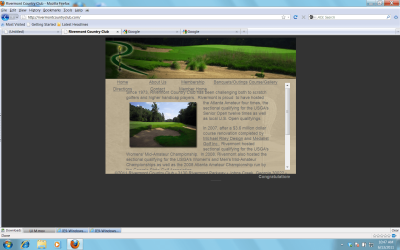
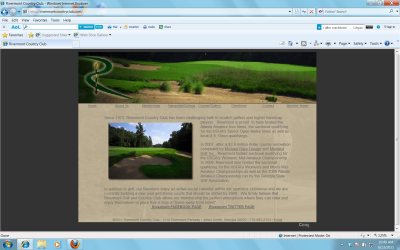
Attached are two screen shots. Rivermont 2 is how the screen should look with the Home, About US, ... active links
Rivermont 1 is how the screen looked after changing the font in Windows 7 and then changing it back to the original setting. The words across the first row are now active but the second row no longer is. the screen has been compressed.

All the settings were the same for both screen shots except that Rivermont 1 was taken after Windows 7 fonts were increased in size and then returned to their original setting.

Thanks for your interest in this problem
My System SpecsSystem Spec
13 Jun 2011   #6

windows 7 32 bit and windows 7 64 bit


Attached are two screen shots. Rivermont 2 is how the screen should look with the Home, About US, ... active links
Rivermont 1 is how the screen looked after changing the font in Windows 7 and then changing it back to the original setting. The words across the first row are now active but the second row no longer is. the screen has been compressed.

All the settings were the same for both screen shots except that Rivermont 1 was taken after Windows 7 fonts were increased in size and then returned to their original setting.Font and Web Page Rending Bug in Windows 7-rivermont-1.pngFont and Web Page Rending Bug in Windows 7-rivermont-2.png

Thanks for your interest in this problem
My System SpecsSystem Spec
13 Jun 2011   #7

Windows 8; Windows 7 x86 (Dec2008-Jan2013)


Where you did change that? In Control Panel - Display? or some item in Personalization - Window Color and Appearance

Also, does it changes if you switch to Windows Classic theme and back to Aero?
My System SpecsSystem Spec
Reply

 Font and Web Page Rending Bug in Windows 7 problems?


Thread Tools


Similar help and support threads for: Font and Web Page Rending Bug in Windows 7
Thread Forum
Solved In Windows Live Mail, how do I reset the default font and font size? Browsers & Mail
Solved Changed Font Name Caused Corruption of Font Directory Microsoft Office
windows 7 prints directory cover page picture on back page Microsoft Office
printing from Windows-7 (selecting 1 page or 2-page in General Discussion
Opera Font & Simply Font Problem Software


All times are GMT -5. The time now is 09:51 PM.


Seven Forums Android App Seven Forums IOS App Follow us on Facebook

Windows 7 Forums is an independent web site and has not been authorized,
sponsored, or otherwise approved by Microsoft Corporation.
"Windows 7" and related materials are trademarks of Microsoft Corp.
© Designer Media Ltd
  

1 2 3 4 5 6 7 8 9 10 11 12 13 14 15 16 17 18 19 20 21 22 23 24 25 26 27 28 29 30 31 32