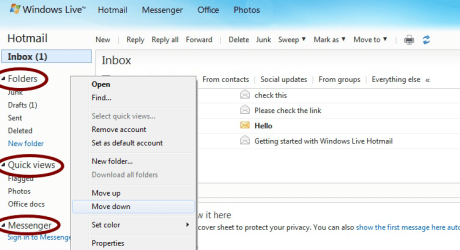
Windows Live Mail 2011:
In the left pane is a list of folders - accounts, really. I have many. Sometimes I want to move them up or down in the list. The only way to do this seems to be by right-clicking and clicking Move Up or Move Down. This can take a while if I want to move the one at the top to the bottom position. Isn't there a faster way? Dragging doesn't seem to work.
While I'm here, how about resizing the font of those account folders? I found how to change the colour, but that doesn't help me to see all of my accounts without scrolling. Is it really necessary for the font to be so huge? I can't find how to do this in the Options, but maybe there is something I can change in the Registry?
Thanks!
In the left pane is a list of folders - accounts, really. I have many. Sometimes I want to move them up or down in the list. The only way to do this seems to be by right-clicking and clicking Move Up or Move Down. This can take a while if I want to move the one at the top to the bottom position. Isn't there a faster way? Dragging doesn't seem to work.
While I'm here, how about resizing the font of those account folders? I found how to change the colour, but that doesn't help me to see all of my accounts without scrolling. Is it really necessary for the font to be so huge? I can't find how to do this in the Options, but maybe there is something I can change in the Registry?
Thanks!
Last edited:
My Computer
At a glance
Windows 7 Home Premium 64bitIntel Pentium P62004GB DDR3Intel HD
- Computer Manufacturer/Model Number
- Acer Aspire 741Z-4806
- OS
- Windows 7 Home Premium 64bit
- CPU
- Intel Pentium P6200
- Memory
- 4GB DDR3
- Graphics Card(s)
- Intel HD
- Monitor(s) Displays
- 17.3" HD+ LED LCD
- Hard Drives
- 640 GB