| Windows 7: Windows Live Mail 2011 essentials |
02 Jul 2011
|
#1 | | |
Windows Live Mail 2011 essentials I made the mistake of logging into Window Live ID while using windows live mail now I cannot start using the mail program untill I log into Window live ID, how do I get rid of the nag everytime I use mAIL??? | My System Specs |
| System Manufacturer/Model Number assemble my own OS Windows 7 Pro 64 bit CPU AMD Motherboard ASUS Memory 6GB Graphics Card ON BOARD Sound Card ON BOARD Monitor(s) Displays HP FALT SCREEN 21" PSU 500w Case NEW TO FIT Cooling WGAT CANE WUTG CASE Hard Drives ONE 1.5TB, ONE .5TB |
02 Jul 2011
|
#2 | | Vista and now 7 in 32 and 64 bit. Denmark |
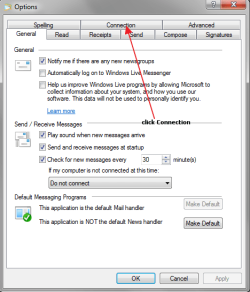
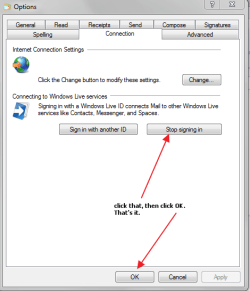
Click the small square over top far left. Select Options - Mail. Click the connection tab. "Stop signing in" | My System Specs | | System Manufacturer/Model Number Three desktops and one laptop with good specs.. OS Vista and now 7 in 32 and 64 bit. |
02 Jul 2011
|
#3 | | Win7 H.Prem. 32bit+SP1 Scotland |
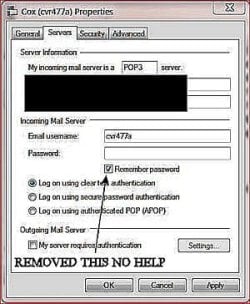
Hi Just married, if you only have one account, you can clear or tick the 'Remember Password' box in account properties. | My System Specs | | System Manufacturer/Model Number Look in my Signature. OS Win7 H.Prem. 32bit+SP1 |
02 Jul 2011
|
#4 | | |
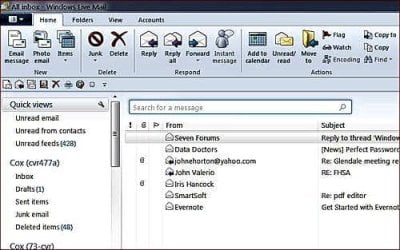
windows live mail I clicked something and lost the reply, so am replacing it. This is in response to two replies to my question. I am going to upoload two images to show what I want to do and where to find properties.
The first image is the nag i want to get rid of, the second is what the mail program looks like, one of the replies refers to Properties, i cannot find properties in the email program window, please adivise, I do not want ti log into windows live mail every time I want to read mail. | My System Specs | | System Manufacturer/Model Number assemble my own OS Windows 7 Pro 64 bit CPU AMD Motherboard ASUS Memory 6GB Graphics Card ON BOARD Sound Card ON BOARD Monitor(s) Displays HP FALT SCREEN 21" PSU 500w Case NEW TO FIT Cooling WGAT CANE WUTG CASE Hard Drives ONE 1.5TB, ONE .5TB |
02 Jul 2011
|
#5 | | |

Quote: Originally Posted by Just married I clicked something and lost the reply, so am replacing it. This is in response to two replies to my question. I am going to upoload two images to show what I want to do and where to find properties.
The first image is the nag i want to get rid of, the second is what the mail program looks like, one of the replies refers to Properties, i cannot find properties in the email program window, please adivise, I do not want ti log into windows live mail every time I want to read mail.
Actually, all you'd need to do is tick the "Remember me and sign me in automatically" box.
In reference to "properties," what you'd need to do is -- right click on your account name (in your 2nd screenshot, where it says "Cox (cvr477a)." The "properties" option will be at the very bottom of the menu that comes up.
HTH,
robertwnielsen | My System Specs | | OS Windows 7 Ultimate CPU AMD Sempron LE-1150 2.0 Ghz Motherboard Gigabyte GA-M61PME-S2 Graphics Card ATi Radeon HD 3650 Sound Card Realtek HD Onboard Audio Monitor(s) Displays HP 1702 Screen Resolution 1280x1024 Keyboard Logitech Wireless Mouse Logitech Wireless Internet Speed 7 MB DSL |
02 Jul 2011
|
#6 | | |
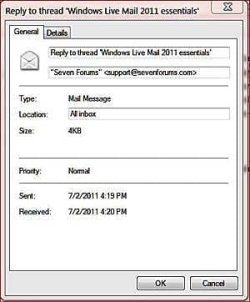
Windows Live Mail Thanks for your reply. Still no luch attached is the properties window from right clicking my email address related to an emial message. I tried several messages withe different ones of my addresses, same result. | My System Specs | | System Manufacturer/Model Number assemble my own OS Windows 7 Pro 64 bit CPU AMD Motherboard ASUS Memory 6GB Graphics Card ON BOARD Sound Card ON BOARD Monitor(s) Displays HP FALT SCREEN 21" PSU 500w Case NEW TO FIT Cooling WGAT CANE WUTG CASE Hard Drives ONE 1.5TB, ONE .5TB |
02 Jul 2011
|
#7 | | |
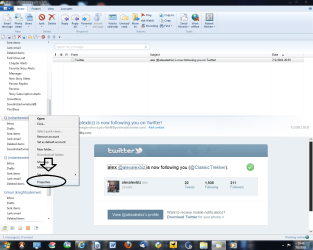
Okay, take a look at the screenshot I've uploaded --
The "properties" I refer to is accessed by right-clicking your email account name (in your example, "Cox (cvr477a) in that left hand column. "Properties" will be at the very bottom. Stick with me...we'll figure this out! | My System Specs | | OS Windows 7 Ultimate CPU AMD Sempron LE-1150 2.0 Ghz Motherboard Gigabyte GA-M61PME-S2 Graphics Card ATi Radeon HD 3650 Sound Card Realtek HD Onboard Audio Monitor(s) Displays HP 1702 Screen Resolution 1280x1024 Keyboard Logitech Wireless Mouse Logitech Wireless Internet Speed 7 MB DSL |
02 Jul 2011
|
#8 | | Windows 7 Home Premium 64-bit, SP1 |

Quote: Originally Posted by Just married Thanks for your reply. Still no luch attached is the properties window from right clicking my email address related to an emial message. I tried several messages withe different ones of my addresses, same result. OK.This is what they meant regarding " Properties "....
( *** I am not suggesting that it is the solution to your problem. I am just showing you what they meant by " Properties " ).
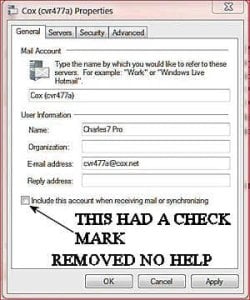
Open your Windows Live Mail 2011 (WLM) > top left corner, click the blue button > click Options > click @ Email accounts > click your Cox account > click Properties at right side> click Servers tab at the top > under Incoming Mail Server, put a checkmark at Remember Password > click OK when done. | My System Specs | | System Manufacturer/Model Number Acer Aspire 7741Z OS Windows 7 Home Premium 64-bit, SP1 CPU Intel Pentium P6200, Cores 2, 2.13 GHz Memory 4 GB Graphics Card Intel HD Sound Card unknown Monitor(s) Displays 17.3 inches Screen Resolution 1600 x 900 Hard Drives 640 GB, 5400 PRM |
02 Jul 2011
|
#9 | | Windows 7 Home Premium 64-bit, SP1 |
Just married,
Follow what davehc said. | My System Specs | | System Manufacturer/Model Number Acer Aspire 7741Z OS Windows 7 Home Premium 64-bit, SP1 CPU Intel Pentium P6200, Cores 2, 2.13 GHz Memory 4 GB Graphics Card Intel HD Sound Card unknown Monitor(s) Displays 17.3 inches Screen Resolution 1600 x 900 Hard Drives 640 GB, 5400 PRM |
02 Jul 2011
|
#10 | | Vista and now 7 in 32 and 64 bit. Denmark |
Here is a (low quality!) movie. | My System Specs | | System Manufacturer/Model Number Three desktops and one laptop with good specs.. OS Vista and now 7 in 32 and 64 bit. Windows Live Mail 2011 essentials problems? All times are GMT -5. The time now is 05:29 PM. | |