| Windows 7: Missing Multiple Hotmail Accounts on login screen |
02 Jul 2011
|
#1 | | |
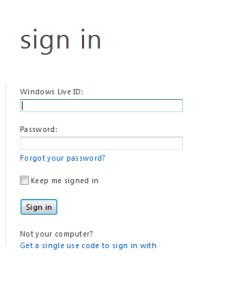
Missing Multiple Hotmail Accounts on login screen Until recently something caused a change to my Window Live Hotmail login screen. It used to display multiple hotmail accounts. Now the multiple accounts are gone and replaced by the fields for my hotmail address and my password. The REMEMBER ME option is also missing. I'm using IE version 8.0.7601.175141C on Windows 7 Ultimate 64 bit Service Pack 1. My attempts to fix this have failed so far. After reading a number of posts in various forums, I successfully downloaded and re-installed the sign-in assistant. I've been to the Manage Add-on area but there's no sign-in assistant showing, only Windows Live ID Sign-in Control and Windows Live ID Sign-in Helper -- both are enabled. Most of the posts I've read suggest enabling the Sign-in Assistant but it's not there to be enabled. Is that the problem and if so, how do I get it to “show” in the add-on manager so I can enable it? Otherwise, what else should I do to fix this problem?
Thanks
Jeff | My System Specs |
| |
02 Jul 2011
|
#2 | | Windows 7 Home Premium 64-bit, SP1 |

Quote: Originally Posted by jbrune Until recently something caused a change to my Window Live Hotmail login screen. It used to display multiple hotmail accounts. Now the multiple accounts are gone and replaced by the fields for my hotmail address and my password. The REMEMBER ME option is also missing. I'm using IE version 8.0.7601.175141C on Windows 7 Ultimate 64 bit Service Pack 1. My attempts to fix this have failed so far. After reading a number of posts in various forums, I successfully downloaded and re-installed the sign-in assistant. I've been to the Manage Add-on area but there's no sign-in assistant showing, only Windows Live ID Sign-in Control and Windows Live ID Sign-in Helper -- both are enabled. Most of the posts I've read suggest enabling the Sign-in Assistant but it's not there to be enabled. Is that the problem and if so, how do I get it to “show” in the add-on manager so I can enable it? Otherwise, what else should I do to fix this problem?
Thanks
Jeff
You are not the only one. I have the same issue. I can't find the solution.
Is this what you see ?...... | My System Specs | | System Manufacturer/Model Number Acer Aspire 7741Z OS Windows 7 Home Premium 64-bit, SP1 CPU Intel Pentium P6200, Cores 2, 2.13 GHz Memory 4 GB Graphics Card Intel HD Sound Card unknown Monitor(s) Displays 17.3 inches Screen Resolution 1600 x 900 Hard Drives 640 GB, 5400 PRM |
02 Jul 2011
|
#3 | | Windows 7 Home Premium 64-bit, SP1 |
Link to Windows Live Solution Center, Hotmail forum : Hotmail Threads
All Windows Live issues are to be handled by Windows Live Solution Center.
We might get an answer there. | My System Specs | | System Manufacturer/Model Number Acer Aspire 7741Z OS Windows 7 Home Premium 64-bit, SP1 CPU Intel Pentium P6200, Cores 2, 2.13 GHz Memory 4 GB Graphics Card Intel HD Sound Card unknown Monitor(s) Displays 17.3 inches Screen Resolution 1600 x 900 Hard Drives 640 GB, 5400 PRM |
02 Jul 2011
|
#5 | | Win 7 Ultimate (64-bit), Win 7 Pro (32-bit) N. Calif |
I ran into it too but figured that MS had removed the feature to make the login screen more secure. Not a big deal to me, I just type in email id & pw to log in. | My System Specs | | System Manufacturer/Model Number Home Built, Dell Inspiron 1520 Laptop OS Win 7 Ultimate (64-bit), Win 7 Pro (32-bit) CPU 3.4Ghz 3770K i7, 2.4Ghz Core 2 Duo Motherboard Gigabyte Z77X-UD3H, Dell Memory 8G, 3G Graphics Card ATI Radeon HD 5770, Mobile Intel 965 Sound Card High Definition Audio (Built-in to mobo) Monitor(s) Displays Dell 2409W 24" Screen Resolution 1920x1080 Keyboard IBM Model M - used continuously since 1986 Mouse Microsoft PSU Antec Case Antec 100 Cooling CM 212+ Hard Drives 128G SSD OS; 1.5T & 2T Data on Desktop, 320G for laptop Internet Speed 1.5M down 1.2M up :-( Other Info Also have an Acer Aspire netbook, a home-built AMD Dual core (Minecraft server) and home-built Pent 4 all running Win 7. Also have various machines running XP, Win Server 2K, Win Server 2003, Linux and DOS. I think I have a problem... |
02 Jul 2011
|
#6 | | Windows 7 Home Premium 64-bit, SP1 |

Quote: Originally Posted by strollin I ran into it too but figured that MS had removed the feature to make the login screen more secure. Not a big deal to me, I just type in email id & pw to log in. For login security, it is agreeable, absolutely.
For someone who has "multiple " hotmail accounts, not so agreeable. | My System Specs | | System Manufacturer/Model Number Acer Aspire 7741Z OS Windows 7 Home Premium 64-bit, SP1 CPU Intel Pentium P6200, Cores 2, 2.13 GHz Memory 4 GB Graphics Card Intel HD Sound Card unknown Monitor(s) Displays 17.3 inches Screen Resolution 1600 x 900 Hard Drives 640 GB, 5400 PRM |
02 Jul 2011
|
#7 | | |
I'm all for security controls as long as they are proportional to the risk. in this case, not so much. | My System Specs | | |
03 Jul 2011
|
#8 | | |
I am having the same problem. It has run perfectly well for years and then changed the other day, just after I installed IE9 and a few updates I think. Driving me crazy! It runs fine on my windows 7, it is with vista on my laptop that I am having the issue. I have reinstalled everything to no avail. Hope someone can find a solution soon! | My System Specs | | |
03 Jul 2011
|
#9 | | |
Remember me is gone I get the same problem, the 'remember me' option has gone
No big deal for someone with one account but if you have multiple accounts it really is annoying | My System Specs | | |
06 Jul 2011
|
#10 | | |
I run a couple different Hotmail accounts for personal and private matters and it kind of sucks and I hope they fix soon. | My System Specs | | Missing Multiple Hotmail Accounts on login screen problems? All times are GMT -5. The time now is 12:14 PM. | |