
You are using an out of date browser. It may not display this or other websites correctly.
You should upgrade or use an alternative browser.
You should upgrade or use an alternative browser.
Solved How to turn on spell check for all msg's
- Thread starter curtiswa
- Start date

t-4-2
Banned
- Local time
- 4:24 PM
- Messages
- 997
Only see that it works for current message I am writing.
Must be missing something here - just loaded win-7 and live mail.
thasnks,
You'll have to elaborate more in details.
Speel Check only works on the message you are typing. What's wrong with that ?
Please explain what do you want SpellCheck to do.
My Computer
At a glance
Windows 7 Home Premium 64-bit, SP1Intel Pentium P6200, Cores 2, 2.13 GHz4 GBIntel HD
- Computer Manufacturer/Model Number
- Acer Aspire 7741Z
- OS
- Windows 7 Home Premium 64-bit, SP1
- CPU
- Intel Pentium P6200, Cores 2, 2.13 GHz
- Memory
- 4 GB
- Graphics Card(s)
- Intel HD
- Sound Card
- unknown
- Monitor(s) Displays
- 17.3 inches
- Screen Resolution
- 1600 x 900
- Hard Drives
- 640 GB, 5400 PRM
seavixen32
New member
Only see that it works for current message I am writing.
Must be missing something here - just loaded win-7 and live mail.
thasnks,
Not being funny, but why do you need a spell checker for a message you haven't created?
If the spell checker works for each message you create, what exactly is the problem?
My Computer
At a glance
Windows 7 Ultimate SP1 64-BitIntel Core i7 870 @ 2.93GHz8Gb Dual-Channel DDR3 @ 664MHznVidia GeForce GTX 460 1024MB dedicated RAM
- Computer Manufacturer/Model Number
- HP Pavilion Elite 495UK
- OS
- Windows 7 Ultimate SP1 64-Bit
- CPU
- Intel Core i7 870 @ 2.93GHz
- Motherboard
- MSI 2A9C (CPU1)
- Memory
- 8Gb Dual-Channel DDR3 @ 664MHz
- Graphics Card(s)
- nVidia GeForce GTX 460 1024MB dedicated RAM
- Sound Card
- Realtek HD Audio
- Monitor(s) Displays
- HP2310i
- Screen Resolution
- 1920 x 1080
- Hard Drives
- 1x1954GB Hitachi HDS22020ALA 330 (RAID), 1x1954GB Hitachi External for backup and storage
- PSU
- 460W
- Case
- HP Elite
- Cooling
- Air cooled
- Keyboard
- Logitech K750 solar-powered keyboard
- Mouse
- Logitech Wireless M180 mouse
- Internet Speed
- 2Mb
- Other Info
- Pure Avanti Flow Internet Radio with iPod Dock, 64Gb iPod, HP USB Speakers, Sony MDR-V500 Headphones, Sony Vaio F-Series Laptop
Would like to turn on spell checker permenatly for all messages I send - like in Vista
windows mail, else will I have to hit the icon before sending each time ?
Sorry for the confusion.
windows mail, else will I have to hit the icon before sending each time ?
Sorry for the confusion.
My Computer
At a glance
windows 7
- Computer Manufacturer/Model Number
- Acer
- OS
- windows 7
seavixen32
New member
Try Tools>Options>Spelling and see if you can configure the settings from there.
My Computer
At a glance
Windows 7 Ultimate SP1 64-BitIntel Core i7 870 @ 2.93GHz8Gb Dual-Channel DDR3 @ 664MHznVidia GeForce GTX 460 1024MB dedicated RAM
- Computer Manufacturer/Model Number
- HP Pavilion Elite 495UK
- OS
- Windows 7 Ultimate SP1 64-Bit
- CPU
- Intel Core i7 870 @ 2.93GHz
- Motherboard
- MSI 2A9C (CPU1)
- Memory
- 8Gb Dual-Channel DDR3 @ 664MHz
- Graphics Card(s)
- nVidia GeForce GTX 460 1024MB dedicated RAM
- Sound Card
- Realtek HD Audio
- Monitor(s) Displays
- HP2310i
- Screen Resolution
- 1920 x 1080
- Hard Drives
- 1x1954GB Hitachi HDS22020ALA 330 (RAID), 1x1954GB Hitachi External for backup and storage
- PSU
- 460W
- Case
- HP Elite
- Cooling
- Air cooled
- Keyboard
- Logitech K750 solar-powered keyboard
- Mouse
- Logitech Wireless M180 mouse
- Internet Speed
- 2Mb
- Other Info
- Pure Avanti Flow Internet Radio with iPod Dock, 64Gb iPod, HP USB Speakers, Sony MDR-V500 Headphones, Sony Vaio F-Series Laptop

Open Live Mail, top left hand corner you'll see a small blue box with a drop down arrow - click it and choose Options, then Mail, click the Spelling tab and check the box Always check mail before sending
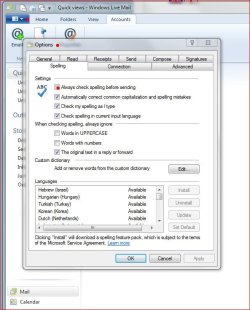
And yes, it's a good idea to have this box checked, you never know when you may forget to do a spell check
Good luck.
And yes, it's a good idea to have this box checked, you never know when you may forget to do a spell check
Good luck.
My Computer
At a glance
Windows 10 ProIntel Core i7-4770K (3.5Ghz)32 gig Corsair Dominator Platinum (4x8Gig)Sapphire Tri-X R9 Fury
- Computer type
- PC/Desktop
- Computer Manufacturer/Model Number
- Custom built by me.
- OS
- Windows 10 Pro
- CPU
- Intel Core i7-4770K (3.5Ghz)
- Motherboard
- Gigabyte G1 Sniper 5 (F10 Bios)
- Memory
- 32 gig Corsair Dominator Platinum (4x8Gig)
- Graphics Card(s)
- Sapphire Tri-X R9 Fury
- Sound Card
- Soundblaster ZXR
- Monitor(s) Displays
- NEC PA242W 24" LCD Monitor
- Screen Resolution
- 1920 x 1200
- Hard Drives
- Primary - Samsung 850 Pro (512gig), Samsung 840 Pro (256gig), 2TB WD Caviar Black.
- PSU
- EVGA Supernova 1000 G2
- Case
- Cooler Master HAF X
- Cooling
- Corsair H100i with Corsair Air Series SP120 Quiet Fans
- Keyboard
- Logitech Wireless Wave
- Mouse
- Logitech Performance MX
- Internet Speed
- High Speed Cable
- Antivirus
- Norton Security
- Browser
- IE11
- Other Info
- Memory Timings - 1866MHz @ 9-9-9-27-1T @ 1.5 volts
Or you could see if other spell checkers are more to your liking:
Speckie - spell check for IE
ieSpell - Spell Checker add-on for Internet Explorer
Speckie - spell check for IE
ieSpell - Spell Checker add-on for Internet Explorer
My Computer
At a glance
Win 7 Pro 64-bitIntel i5 2.4 Ghz8GB DDR3Intel HD 3000
- Computer type
- Laptop
- Computer Manufacturer/Model Number
- Sony Vaio VPCEB47GM Laptop
- OS
- Win 7 Pro 64-bit
- CPU
- Intel i5 2.4 Ghz
- Memory
- 8GB DDR3
- Graphics Card(s)
- Intel HD 3000
- Sound Card
- IDT High Definition
- Monitor(s) Displays
- 15.6 WGXA Anti-Glare LED
- Screen Resolution
- 1280x800
- Hard Drives
- 640Gb 7200rpm
- Antivirus
- MSE
- Browser
- Opera (primary) with IE9 backup
t-4-2
Banned
- Local time
- 4:24 PM
- Messages
- 997
Would like to turn on spell checker permenatly for all messages I send - like in Vista
windows mail, else will I have to hit the icon before sending each time ?
Sorry for the confusion.
As already mentioned to you, you can enable " Always check spelling before sending "option.
But, if you have already enabled " Check my spelling as I type ",then all the messages you sent had beem spell-checked. Why would you need to worry about it at all ?
To enable both " Always check spelling before sending " and " Check my spelling as I type " would be redundant. Don't you think ?
Bear in mind that if you mis-spell, there will be a jagged red line underneath the mis-spelled word. You will have to correct that before you continue typing. Yes ?
So,why the extra worry ?
My Computer
At a glance
Windows 7 Home Premium 64-bit, SP1Intel Pentium P6200, Cores 2, 2.13 GHz4 GBIntel HD
- Computer Manufacturer/Model Number
- Acer Aspire 7741Z
- OS
- Windows 7 Home Premium 64-bit, SP1
- CPU
- Intel Pentium P6200, Cores 2, 2.13 GHz
- Memory
- 4 GB
- Graphics Card(s)
- Intel HD
- Sound Card
- unknown
- Monitor(s) Displays
- 17.3 inches
- Screen Resolution
- 1600 x 900
- Hard Drives
- 640 GB, 5400 PRM
He already got it solved.

Thanks.
Thanks.
My Computer
At a glance
Windows 10 ProIntel Core i7-4770K (3.5Ghz)32 gig Corsair Dominator Platinum (4x8Gig)Sapphire Tri-X R9 Fury
- Computer type
- PC/Desktop
- Computer Manufacturer/Model Number
- Custom built by me.
- OS
- Windows 10 Pro
- CPU
- Intel Core i7-4770K (3.5Ghz)
- Motherboard
- Gigabyte G1 Sniper 5 (F10 Bios)
- Memory
- 32 gig Corsair Dominator Platinum (4x8Gig)
- Graphics Card(s)
- Sapphire Tri-X R9 Fury
- Sound Card
- Soundblaster ZXR
- Monitor(s) Displays
- NEC PA242W 24" LCD Monitor
- Screen Resolution
- 1920 x 1200
- Hard Drives
- Primary - Samsung 850 Pro (512gig), Samsung 840 Pro (256gig), 2TB WD Caviar Black.
- PSU
- EVGA Supernova 1000 G2
- Case
- Cooler Master HAF X
- Cooling
- Corsair H100i with Corsair Air Series SP120 Quiet Fans
- Keyboard
- Logitech Wireless Wave
- Mouse
- Logitech Performance MX
- Internet Speed
- High Speed Cable
- Antivirus
- Norton Security
- Browser
- IE11
- Other Info
- Memory Timings - 1866MHz @ 9-9-9-27-1T @ 1.5 volts
Similar threads
- Replies
- 3
- Views
- 2K

- Replies
- 4
- Views
- 1K
