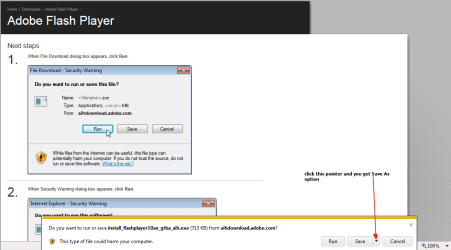
A friend of mine just purchased a Dell Laptop running Windows 7 and IE9 (both the 32-bit and 64-bit versions of IE9 were installed, but he is using the 32-bit version). He wanted to download the latest Adobe Flash Player 10.3, so we went to the Adobe website, clicked on the Download button, and waited for the 'Run or Save' dialog box to appear. It never did.
We then went to another website (forgot which one) and tried to download a file. Same problem....we clicked on the Download button and waited for something to happen. Once again, the file download dialog box never appeared.
Other than not being able to download files, IE9 appears to be working fine. Any suggestions for identifying and fixing this file download problem would be appreciated. Thanks in advance......
We then went to another website (forgot which one) and tried to download a file. Same problem....we clicked on the Download button and waited for something to happen. Once again, the file download dialog box never appeared.
Other than not being able to download files, IE9 appears to be working fine. Any suggestions for identifying and fixing this file download problem would be appreciated. Thanks in advance......
My Computer
At a glance
win 7 proIntel Core i5-6600, 4 core @ 3.3GHz16 GB Crucial Ballistix2GB EVGA NVIDIA GeForce GTX950 GDDR5
- Computer type
- PC/Desktop
- Computer Manufacturer/Model Number
- Custom Build by Velocity Micro/Raptor Z55 SKYLAKE
- OS
- win 7 pro
- CPU
- Intel Core i5-6600, 4 core @ 3.3GHz
- Motherboard
- Asus Z170-P Intel Z170 base chipset
- Memory
- 16 GB Crucial Ballistix
- Graphics Card(s)
- 2GB EVGA NVIDIA GeForce GTX950 GDDR5
- Sound Card
- On-Board Integrated Realtek ALC887 7.1 Channel Audio
- Monitor(s) Displays
- Viewsonic 28"
- Hard Drives
- 512GB Samsung 950 Pros PCIe 3.0 SSD
Two - 2TB 7200 SATA 600 with 64MB Cache
- PSU
- 750 Watt EVGA SuperNOVA
- Case
- Full Sized ATX
- Cooling
- Intel High Performance Heatsink
- Keyboard
- Logitech Illuminated k740
- Mouse
- Logitech Wireless M310
- Internet Speed
- 2.5 (slow DSL)
- Antivirus
- Microsoft Security Essentials, Malwarebytes
- Browser
- Internet Explorer 11
- Other Info
- TeamViewer installed
Acronis True Image installed