4 x 4GB DDR3-1600 Corsair Vengeance CMZ8GX3M2A1600C9B (16GB)
Graphics Card(s)
MSI GeForce GTX770 Gaming OC 2GB
Sound Card
Realtek High Definition on board solution (ALC 898)
Monitor(s) Displays
ViewSonic VA1912w Widescreen (VGA)
Screen Resolution
1440x900
Hard Drives
OCZ Agility 3 SSD 120GB SATA III x2 (RAID 0)
Samsung HD501LJ 500GB SATA II x2
Hitachi HDS721010CLA332 1TB SATA II
Iomega 1.5TB Ext USB 2.0
WD 2.0TB Ext USB 3.0
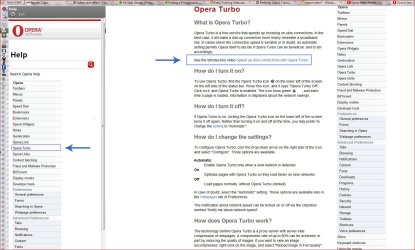
Press F1 on your Keyboard to open the Help Menu , you can easily add the Help Menu to your Panels by using this Link Opera Help: Panels
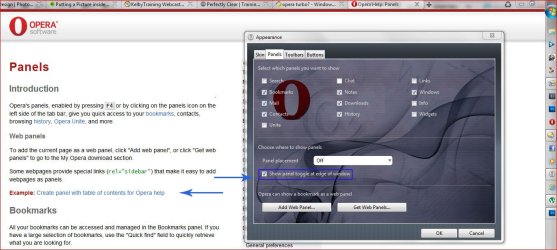
& Clicking on Example: Create panel with table of contents for Opera help & then OK on the pop up.
For easy access to your Panels open Appearence from the Menu or Shift+F12 select the Panels tab & tick show panel toggle at edge of the window, it makes the left hand border of the opera window a tall narrow button the height of the Window.
From the help Menu select Opera Turbo & then > See the introductory video Speed up slow connections with Opera Turbo.
If your Broadband connection is fast Opera Turbo can make browsing slower & images can look worse due to the compression.
If you pay for the your Internet connection by how much you download Opera Turbo can save you money due to the approx 80% compression.
Attachments
OP panels.JPG
137.5 KB
· Views: 7
OP turbo.JPG
222.1 KB
· Views: 6
My Computer
At a glance
Windows 7 Ultimate 64 bitIntel Core i7 4770K overclocked to 4.7GHz Qua...16GB Team Group Vulcan Gold 2133MHzATI Radeon HD 7880 Series Display adapter
Computer type
PC/Desktop
Computer Manufacturer/Model Number
self build
OS
Windows 7 Ultimate 64 bit
CPU
Intel Core i7 4770K overclocked to 4.7GHz Quad Core Haswell
Motherboard
Asus Z87 Pro (Socket 1150) ATX Motherboard
Memory
16GB Team Group Vulcan Gold 2133MHz
Graphics Card(s)
ATI Radeon HD 7880 Series Display adapter
Monitor(s) Displays
NEC LCD2690WUXi2
Screen Resolution
26" 1920 x 1200
Hard Drives
Samsung 500GB SSD 840 EVO SATA 6Gb/s
Samsung 250GB SSD 840 EVO SATA 6Gb/s
PSU
Corsair AX760 Platinum
Case
Cooler Master HAF X Gaming Tower
Cooling
XSPC RayStorm 750 RS360 Water cooling
Mouse
Razer Death Adder left handed
Internet Speed
126Mb download 11.5Mb up
Antivirus
Avast free
Browser
Opera
Other Info
Main Browser is Opera
Favorite software Adobe Lightroom & Photoshop
best plugins Nik software
Firewall : Private firewall 7
I wonder if that happened to my FF6 after making some "optimization" changes in about:config. It seemed "faster" soon after but then I kept running into problems with page load speed and image rendering (pages full of broken links)
so I reset it and won't touch it again
but yeah, I don't use Turbo - it seems pointless on cable
Opera Turbo is totally unrelated to Firefox.
Even with fast broadband & mine is 50 Mbps cable websites can be slow for lots of reasons & Turbo can help if the page is already on Opera's servers.
My Computer
At a glance
Windows 7 Ultimate 64 bitIntel Core i7 4770K overclocked to 4.7GHz Qua...16GB Team Group Vulcan Gold 2133MHzATI Radeon HD 7880 Series Display adapter
Computer type
PC/Desktop
Computer Manufacturer/Model Number
self build
OS
Windows 7 Ultimate 64 bit
CPU
Intel Core i7 4770K overclocked to 4.7GHz Quad Core Haswell
Motherboard
Asus Z87 Pro (Socket 1150) ATX Motherboard
Memory
16GB Team Group Vulcan Gold 2133MHz
Graphics Card(s)
ATI Radeon HD 7880 Series Display adapter
Monitor(s) Displays
NEC LCD2690WUXi2
Screen Resolution
26" 1920 x 1200
Hard Drives
Samsung 500GB SSD 840 EVO SATA 6Gb/s
Samsung 250GB SSD 840 EVO SATA 6Gb/s
PSU
Corsair AX760 Platinum
Case
Cooler Master HAF X Gaming Tower
Cooling
XSPC RayStorm 750 RS360 Water cooling
Mouse
Razer Death Adder left handed
Internet Speed
126Mb download 11.5Mb up
Antivirus
Avast free
Browser
Opera
Other Info
Main Browser is Opera
Favorite software Adobe Lightroom & Photoshop
best plugins Nik software
Firewall : Private firewall 7