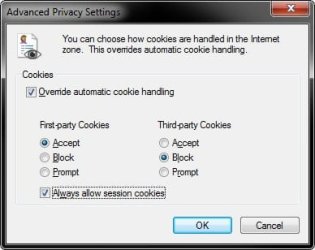
I keep gettiing:
Please Enable Cookies to Continue
To continue shopping at Amazon.com, please enable cookies in your Web browser. Learn more about cookies and how to enable them. Once you have enabled cookies in your browser, please click on the button below to return to the previous page.
I've tried lowering security settings, overriding cookie handling to allow everything, cleared cache, cookies and everything else, and even reset Internet Explorer entirely. I also tried with no Antivirus running.
Is this a known issue? It just started happening for me.
Oh, and yes Firefox works, but I want to get to the bottom of it so I can have the option of using IE9 if I want. Plus I have items saved in my cart that FF can't see.
Please Enable Cookies to Continue
To continue shopping at Amazon.com, please enable cookies in your Web browser. Learn more about cookies and how to enable them. Once you have enabled cookies in your browser, please click on the button below to return to the previous page.
I've tried lowering security settings, overriding cookie handling to allow everything, cleared cache, cookies and everything else, and even reset Internet Explorer entirely. I also tried with no Antivirus running.
Is this a known issue? It just started happening for me.
Oh, and yes Firefox works, but I want to get to the bottom of it so I can have the option of using IE9 if I want. Plus I have items saved in my cart that FF can't see.
My Computer
At a glance
Windows 7 Professional x64 (Retail)AMD Phenom II X3 7208GB Patriot 800MHz DDR2 4-4-4-12ATI 3200 (onboard)
- Computer type
- PC/Desktop
- Computer Manufacturer/Model Number
- System Builder
- OS
- Windows 7 Professional x64 (Retail)
- CPU
- AMD Phenom II X3 720
- Motherboard
- Asus M3A78-EM
- Memory
- 8GB Patriot 800MHz DDR2 4-4-4-12
- Graphics Card(s)
- ATI 3200 (onboard)
- Sound Card
- Realtek onboard & M-Audio Delta 66
- Monitor(s) Displays
- Dell 2209WA
- Hard Drives
- Sandisk 2240GB SSD
Several non-raid SATA drives for storage
- PSU
- Antec 400W
- Case
- Antec
- Cooling
- Arctic Cooling
- Keyboard
- Logitech Illuminated
- Mouse
- Microsoft Comgort Mouse 6000
- Internet Speed
- Verizon FiOS 50/25