Live Mail: How did they get this GREAT navigation toolbar?
Hi guys,
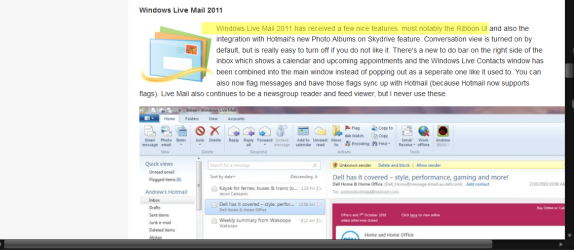
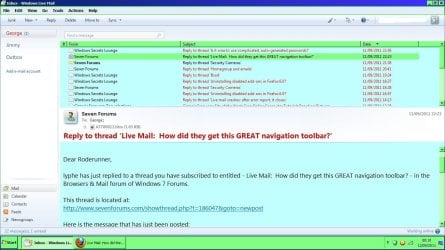
I love my Windows Live Mail ... but hate the menu bar ( ribbon style ) at the top. I was on the verge of downloading another mail app I dislike it so much. But then, I happened across a site that was showing an image of a GREAT looking Windows Live Mail toolbar ... although I have no idea how they achieved it.
System Manufacturer/Model Number Hewlett packard/p6512uk OS Microsoft Windows 7 Home Premium 64-bit 7600 CPU IIx4 amd athelon 635 processor Motherboard FOXCONN 2AA9 Memory 2x2gb Graphics Card ati radeon HD 5450 Sound Card (1) Realtek High Definition Audio (2) AMD High Definition Monitor(s) Displays samsung lcd tv 32" Screen Resolution 1360x 768
Keyboard wireless hp Mouse wireless Hp,optical PSU ? Cooling air! Hard Drives (1) WDC WD10 01FAES-60Z2A0 SATA Disk Device (2) Maxtor OneTouch USB Device (3) ST310003 33AS USB Device (4) WD My Book 1111 USB Device Internet Speed 1.10mb/s Antivirus MSE Browser Firefox
presumably it will give you windows live mail without the ribbon as it is pre 2011.
and give you the bar you wanted.
maybe not !
bit more info please roderunner,
you cant expect folks to install stuff without any info.
System Manufacturer/Model Number Hewlett packard/p6512uk OS Microsoft Windows 7 Home Premium 64-bit 7600 CPU IIx4 amd athelon 635 processor Motherboard FOXCONN 2AA9 Memory 2x2gb Graphics Card ati radeon HD 5450 Sound Card (1) Realtek High Definition Audio (2) AMD High Definition Monitor(s) Displays samsung lcd tv 32" Screen Resolution 1360x 768
Keyboard wireless hp Mouse wireless Hp,optical PSU ? Cooling air! Hard Drives (1) WDC WD10 01FAES-60Z2A0 SATA Disk Device (2) Maxtor OneTouch USB Device (3) ST310003 33AS USB Device (4) WD My Book 1111 USB Device Internet Speed 1.10mb/s Antivirus MSE Browser Firefox
Is it possible that the person with this toolbar minimized (hid) the Ribbon itself, and just has the QuickAccess Toolbar displayed instead? I don't know if that's possible with Windows Live Mail, but that's how I display my MS Office docs and it works extremely well for me because I can access the Ribbon whenever I need it, but don't have to look at it or have it waste precious screen real estate when I'm not using it.
System Manufacturer/Model Number HP Pavillion dv5t (generation 1) OS Vista 64 bit and 32 bit (SP2) CPU Intel(R) Core(TM)2 Duo Processor T9400 (2.53 GHz Memory 4GB DDR2 System Memory (2 Dimm) Graphics Card 512 MB NVIDIA GeForce 9600M GT Monitor(s) Displays 15.4" diagonal WSXGA+ High-Definition HP BrightView Widescre Screen Resolution 1680 x 1050
Keyboard Built-in HP Mouse Built in - Synaptics TouchPad V6.5 on PS/2 Port Hard Drives 320GB 5400RPM SATA Hard Drive with HP ProtectSmart Hard Drive Protection Internet Speed Max Other Info ~ Intel Next-Gen Wireless-N Mini-card w/Bluetooth ~ Blu-Ray ROM DVD+/-R/RW ~ Integ. HDTV Hybrid Tuner ~ 12 Cell Battery ~ MS Office (Home Premium) 2007 ~
you can minimize the ribbon in wlm2011 and have the quick access tool bar but the items in the tool bar dont display the same way as the OP screenshot, also the items in the quick access are not the same, there is no forward option .
System Manufacturer/Model Number Hewlett packard/p6512uk OS Microsoft Windows 7 Home Premium 64-bit 7600 CPU IIx4 amd athelon 635 processor Motherboard FOXCONN 2AA9 Memory 2x2gb Graphics Card ati radeon HD 5450 Sound Card (1) Realtek High Definition Audio (2) AMD High Definition Monitor(s) Displays samsung lcd tv 32" Screen Resolution 1360x 768
Keyboard wireless hp Mouse wireless Hp,optical PSU ? Cooling air! Hard Drives (1) WDC WD10 01FAES-60Z2A0 SATA Disk Device (2) Maxtor OneTouch USB Device (3) ST310003 33AS USB Device (4) WD My Book 1111 USB Device Internet Speed 1.10mb/s Antivirus MSE Browser Firefox
you can minimize the ribbon in wlm2011 and have the quick access tool bar but the items in the tool bar dont display the same way as the OP screenshot, also the items in the quick access are not the same, there is no forward option .
Very glad to know that both are possible! So the screenshot must be of a 3rd party app.
System Manufacturer/Model Number HP Pavillion dv5t (generation 1) OS Vista 64 bit and 32 bit (SP2) CPU Intel(R) Core(TM)2 Duo Processor T9400 (2.53 GHz Memory 4GB DDR2 System Memory (2 Dimm) Graphics Card 512 MB NVIDIA GeForce 9600M GT Monitor(s) Displays 15.4" diagonal WSXGA+ High-Definition HP BrightView Widescre Screen Resolution 1680 x 1050
Keyboard Built-in HP Mouse Built in - Synaptics TouchPad V6.5 on PS/2 Port Hard Drives 320GB 5400RPM SATA Hard Drive with HP ProtectSmart Hard Drive Protection Internet Speed Max Other Info ~ Intel Next-Gen Wireless-N Mini-card w/Bluetooth ~ Blu-Ray ROM DVD+/-R/RW ~ Integ. HDTV Hybrid Tuner ~ 12 Cell Battery ~ MS Office (Home Premium) 2007 ~