

Hello there, sorry that I'm very late with this post, but I was not at home some time and was very bussy.
Anyway...
Right click on taskbar and select Properties. From tabs select Start Menu and there uncheck Store and display recently opened items in the start menu and the taskbar.
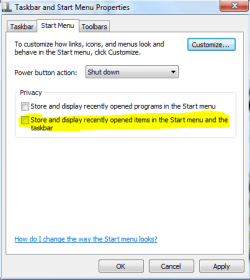
After that, it should be ok.
StalkeR.
Anyway...
Right click on taskbar and select Properties. From tabs select Start Menu and there uncheck Store and display recently opened items in the start menu and the taskbar.
After that, it should be ok.
StalkeR.
My Computer
At a glance
Windows 10 Pro x64Intel Core i5 4440 @Stock4 x 4GB HyperX Fury DDR3Gigabyte GTX 1050Ti O4G
- Computer type
- PC/Desktop
- Computer Manufacturer/Model Number
- Custom Build
- OS
- Windows 10 Pro x64
- CPU
- Intel Core i5 4440 @Stock
- Motherboard
- Gigabyte Z97 D3H
- Memory
- 4 x 4GB HyperX Fury DDR3
- Graphics Card(s)
- Gigabyte GTX 1050Ti O4G
- Sound Card
- Integrated
- Monitor(s) Displays
- Dell P2417H
- Screen Resolution
- 1920 x 1080
- Hard Drives
- Samsung EVO 850 120GB / Toshiba DT01ACA050 1TB 7200prm 32MB
- PSU
- Riotoro Onyx 750W
- Case
- NZXT H500 Black-Red
- Cooling
- Stock CPU + NZXT 120mm + 2x120mm red fans
- Keyboard
- Modecom Volcano Lanparty
- Mouse
- Asus ROG Gladius / DeepCool E-Pad Plus
- Internet Speed
- DOCSIS 50/3 Mbit
- Browser
- Google Chrome
- Other Info
- Asus K55VJ(i5 3210M, GT635M / 2GB, 8GB DDR3, 500GB HDD)


