| Windows 7: Security certificate (I think) help, please |
03 Nov 2011
|
#1 | | |
Security certificate (I think) help, please Hi all,
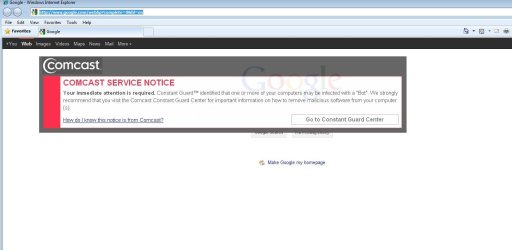
I keep getting these security certificates - at least that's what I think they are - pop up in my browser from my ISP. They warn me of bot detection, but there are no bots; I have even had a sup from tech support give me a whole list of things that might cause a 'false positive'.
So, they started with emails only, which are kind of annoying, but not all that bad. Now, they have added these security certificate looking things that pop up in your browser, IMHO, these are way too obtrusive, especially being that you don't have the option of closing them. So, I am trying to figure out how to stop them from popping up.
These are not pop-ups in the traditional sense; turning on IE8's pop-up blocker does nothing.
I have tried two things:
In Tools > Sec., I have located the setting "Don't prompt for client certificate selection when no certificates or only one certificate exists", and clicked the Enable radio button.
I have also unchecked "check for publisher's certificate revocation" and "check for server certificate revocation".
Neither of these things stops the certificate from popping up. i was hoping someone had an idea here?
Thank you in advance. | My System Specs |
| |
04 Nov 2011
|
#2 | | Windows 8 Pro with Media Center x64 Southern California, USA |
look for anything they might have installed in control panel and under manage add-ons. update your browser to IE9 if you can. They could have something enabled under tracking protection: | My System Specs | | Computer type PC/Desktop System Manufacturer/Model Number Dell Inspiron M5040 OS Windows 8 Pro with Media Center x64 CPU AMD E-450 APU 1.65 GHz Memory 4GB Graphics Card Built-in Radeon HD 6320 Graphics Screen Resolution 1366 x 768 Mouse Microsoft Wireless Mobile Mouse 3500 Cooling fan Hard Drives 500GB Internet Speed 2.86Mbps Download Speed, 2.85Mbps Upload Speed & 26ms Ping Antivirus Defender Browser IE10 |
04 Nov 2011
|
#3 | | Windows 7 Enterprise Trial 32-bit SP1 |

Quote: Originally Posted by jasong1968 ...These are not pop-ups in the traditional sense; turning on IE8's pop-up blocker does nothing... You should install and run:
Microsoft Security Essentials: Microsoft Security Essentials - Free Antivirus for Windows
Malwarebytes: Malwarebytes : Malwarebytes Anti-Malware is a free download that removes viruses and malware from your computer | My System Specs | | System Manufacturer/Model Number OQO 2+ OS Windows 7 Enterprise Trial 32-bit SP1 CPU Intel Atom 1.86 GHz Motherboard OQO 2+ Memory 2 GB Graphics Card Intel GMA 500 Sound Card IDT Monitor(s) Displays LCD Screen Resolution 800 x 480 (portable) 1280 x 1024 (docked) Keyboard Slide out (portable) DiNovo Edge (docked) Mouse Eraser head (portable) Logitech Bluetooth (docked) PSU 9 Ah Battery (portable) or OQO Brick (docked) Case Shirt Pocket Sized Cooling Tiny Fan Hard Drives 64 GB SSD Internet Speed WWAN or 802.11G (portable) T1 (docked) Other Info DVD-RW OQO Docking Station |
04 Nov 2011
|
#4 | | |
Thanks for the replies.
Dust > I have nothing in the CtrPanel that I see to uninstall here. In manage add-ons, the onoy thing I have enabled is shockwave.
Ron > umm, I already have Malwarebytes, Besides, those apps are not going to stop those security certificates from popping up.
Anything else I can do here?
Thanks. | My System Specs | | |
04 Nov 2011
|
#5 | | Windows 8 Pro with Media Center x64 Southern California, USA |

Quote: Originally Posted by jasong1968 Ron > umm, I already have Malwarebytes, Besides, those apps are not going to stop those security certificates from popping up.
Anything else I can do here?
Thanks. Maybe they will.
Unless you are paying for malwarebytes, you will need an antivirus on top of it (run together, as they are not both antiviruses). I've never heard someone paying for malwarebytes and only running it without an AV either. Microsoft security essentials is recommended as a free antivirus, but you really need one, it may help you out.
If it is a virus, naturally you'll need an antivirus. And they can keep you safer in the future anyway (besides malwarebytes, never run two av's together) | My System Specs | | Computer type PC/Desktop System Manufacturer/Model Number Dell Inspiron M5040 OS Windows 8 Pro with Media Center x64 CPU AMD E-450 APU 1.65 GHz Memory 4GB Graphics Card Built-in Radeon HD 6320 Graphics Screen Resolution 1366 x 768 Mouse Microsoft Wireless Mobile Mouse 3500 Cooling fan Hard Drives 500GB Internet Speed 2.86Mbps Download Speed, 2.85Mbps Upload Speed & 26ms Ping Antivirus Defender Browser IE10 |
04 Nov 2011
|
#6 | | |
I am sorry - maybe you are misunderstanding.
I am not asking for help with bot removal. I do not need halp there; I do not have any bots.
I am asking for assistance with stopping that security certificate from popping up.
Thank you. | My System Specs | | |
04 Nov 2011
|
#7 | | Windows 8 Pro Standish, Lancashire, England |
Can you post a snip of one of these popups? | My System Specs | | Computer type PC/Desktop System Manufacturer/Model Number doofenshmirtz evil incorporated OS Windows 8 Pro CPU Intel Core i7-3970X Extreme Edition Motherboard ASRock X79 EXTREME11 Memory 32GB (8x4GB) Corsair DDR3 Dominator Platinum Graphics Card 2x 3GB EVGA GTX 660 Ti Superclocked+ Sound Card Creative Monitor(s) Displays 3 x27" Dell & 2 x 23" Dell Screen Resolution 3 @ 2560x1440 & 2 @ 1920x1080 Keyboard Microsoft Ergononic 7000 Mouse Logitech Performance MX PSU 1500W ThermalTake Toughpower Case Thermaltake Level 10 GT Cooling Antec Kúhler H2O 620 CPU Watercooler Hard Drives 240GB Intel 520 Series, 2.5" SSD, SATA III
Intel X25-M SSD - 160GB Internet Speed 34 Mb/s ADSL2+ (Bonded) Antivirus Windows Defender, Malwarebytes Pro Browser Firefox Other Info WinTV NovaTD
HP CP1515n Color Laser
Sony BD-5300S-0B Blu-ray Writer
Microsoft LifeCam Cinema
APC 750i Smart UPS |
04 Nov 2011
|
#9 | | Windows 8 Pro with Media Center x64 Southern California, USA |
did you visit the website? You don't know what started these things off? You don't have a program named constant guard installed?
You could call comcast and ask whats up. IE9 is an update to IE8 and may help
That looks pretty suspicious to me. Why would you have something that claims to want to help you while obstructing your view? | My System Specs | | Computer type PC/Desktop System Manufacturer/Model Number Dell Inspiron M5040 OS Windows 8 Pro with Media Center x64 CPU AMD E-450 APU 1.65 GHz Memory 4GB Graphics Card Built-in Radeon HD 6320 Graphics Screen Resolution 1366 x 768 Mouse Microsoft Wireless Mobile Mouse 3500 Cooling fan Hard Drives 500GB Internet Speed 2.86Mbps Download Speed, 2.85Mbps Upload Speed & 26ms Ping Antivirus Defender Browser IE10 |
04 Nov 2011
|
#10 | | Windows 7 Enterprise Trial 32-bit SP1 |

Quote: Originally Posted by jasong1968 ...Ron > umm, I already have Malwarebytes, Besides, those apps are not going to stop those security certificates from popping up... The Comcast window you are seeing is either true or false...
If true...you have a "Bot" as defined by "Comcast" so perhaps you should ask them why they sent you a popup. Did you install software from Comcast that might allow them to create popups on your PC?
If false...you have malware causing the popup which can't be believed. That's why I suggested running MSS (or your antivirus) and also MalwareBytes. | My System Specs | | System Manufacturer/Model Number OQO 2+ OS Windows 7 Enterprise Trial 32-bit SP1 CPU Intel Atom 1.86 GHz Motherboard OQO 2+ Memory 2 GB Graphics Card Intel GMA 500 Sound Card IDT Monitor(s) Displays LCD Screen Resolution 800 x 480 (portable) 1280 x 1024 (docked) Keyboard Slide out (portable) DiNovo Edge (docked) Mouse Eraser head (portable) Logitech Bluetooth (docked) PSU 9 Ah Battery (portable) or OQO Brick (docked) Case Shirt Pocket Sized Cooling Tiny Fan Hard Drives 64 GB SSD Internet Speed WWAN or 802.11G (portable) T1 (docked) Other Info DVD-RW OQO Docking Station Security certificate (I think) help, please problems? All times are GMT -5. The time now is 07:56 PM. | |