| Windows 7: how can I permanently uninstall internet explorer? |
12 Nov 2011
|
#1 | | |
how can I permanently uninstall internet explorer? Every time I restart my computer I am getting this annoying prompt which asks me to set my default search provider, I always click "prevent programs from suggesting changes to my default search provider" then cancel it yet it still manage to to change my search provider in Google chrome which is the only browser I use.
I have disabled internet explorer yet I am still getting this stupid prompt. Is there a way for me uninstall internet explorer from windows 7 once and for all? It's like Microsoft is force me to use IE and Bing. | My System Specs |
| |
12 Nov 2011
|
#2 | | Windows 7 Professional 64bit East Hampton, NY |
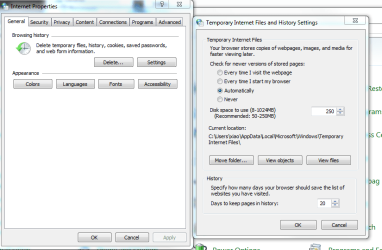
You cannot uninstall it because everything in Windows is inetgrated but you can turn off the prompt. Open Control Panel/Internet Options and on the General tab click the Settings button for 'Change search defaults. If Google is not listed click on 'Find more search providers' and choose Google as your default.
Go to the Programs tab and make sure that IE is NOT the default browser and that there is NOT a check mark in the 'Tell me if Internet Explorer is not the default web browser' box.
Next in Control Panel click on Default Programs and make sure that Chrome has all its defaults.
Next in Run type msconfig and go to the Startup tab and make sure Internet Explorer is not listed. If it is, un-check it and reboot. | My System Specs | | System Manufacturer/Model Number MSI OS Windows 7 Professional 64bit CPU Intel Celeron 2.4 GH Memory 4 GB Graphics Card NVidia GeForce 9800GT Sound Card ATI HDMI Audio Monitor(s) Displays Acer S231HL Dual Monitors Keyboard Logitech wireless Mouse Logitech wireless Cooling Standard Hard Drives Hitachi 300GB ATA
Maxtor 300GB USB Internet Speed Cable |
12 Nov 2011
|
#3 | | Windows 7 Ultimate SP1 64-Bit Peterborough, England |
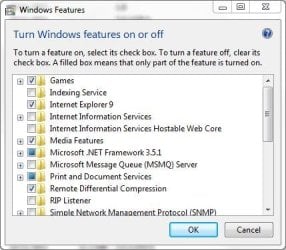
You can disable it in Windows Features. | My System Specs | | System Manufacturer/Model Number HP Pavilion Elite 495UK OS Windows 7 Ultimate SP1 64-Bit CPU Intel Core i7 870 @ 2.93GHz Motherboard MSI 2A9C (CPU1) Memory 8Gb Dual-Channel DDR3 @ 664MHz Graphics Card nVidia GeForce GTX 460 1024MB dedicated RAM Sound Card Realtek HD Audio Monitor(s) Displays HP2310i Screen Resolution 1920 x 1080 Keyboard Logitech K750 solar-powered keyboard Mouse Logitech Wireless M180 mouse PSU 460W Case HP Elite Cooling Air cooled Hard Drives 1x1954GB Hitachi HDS22020ALA 330 (RAID), 1x1954GB Hitachi External for backup and storage Internet Speed 2Mb Other Info Pure Avanti Flow Internet Radio with iPod Dock, 64Gb iPod, HP USB Speakers, Sony MDR-V500 Headphones, Sony Vaio F-Series Laptop |
12 Nov 2011
|
#4 | | Windows 7 Enterprise Trial 32-bit SP1 |
All you can do is uncheck the IE option in Programs and Features/Windows Features. I would think that the default search provider could be different for each browser you use. (Don't know for sure since I only use IE.) However, I have set Google as the default search provider for IE which, once set, never changes nor do I see any request to change it. In IE go to Tools/Manage Add-ons/Search Providers; select the current default and if it's not what you want click "Find more..."; in the gallery type the name of the provider to the left of the magnifying glass icon; when you see the one you want add it. One added it can be highlighted in the Manage Add-ons window and made the default by clicking "set as default". Now you do not need to remove IE at all, just don't use it for browsing the web. | My System Specs | | System Manufacturer/Model Number OQO 2+ OS Windows 7 Enterprise Trial 32-bit SP1 CPU Intel Atom 1.86 GHz Motherboard OQO 2+ Memory 2 GB Graphics Card Intel GMA 500 Sound Card IDT Monitor(s) Displays LCD Screen Resolution 800 x 480 (portable) 1280 x 1024 (docked) Keyboard Slide out (portable) DiNovo Edge (docked) Mouse Eraser head (portable) Logitech Bluetooth (docked) PSU 9 Ah Battery (portable) or OQO Brick (docked) Case Shirt Pocket Sized Cooling Tiny Fan Hard Drives 64 GB SSD Internet Speed WWAN or 802.11G (portable) T1 (docked) Other Info DVD-RW OQO Docking Station |
12 Nov 2011
|
#5 | | |

Quote: Originally Posted by roban Open Control Panel/Internet Options and on the General tab click the Settings button for 'Change search defaults. If Google is not listed click on 'Find more search providers' and choose Google as your default. I don't have that option, I only have "settings" for browsing history under General tab... | My System Specs | | |
12 Nov 2011
|
#6 | | |
Read my first post guys, I have already disabled Internet Explorer in Windows Features, somehow still changing my default search provider. | My System Specs | | |
12 Nov 2011
|
#7 | | Windows 7 Ultimate SP1 64-Bit Peterborough, England |
Just disable it as I suggested and save yourself unecessary hassle. | My System Specs | | System Manufacturer/Model Number HP Pavilion Elite 495UK OS Windows 7 Ultimate SP1 64-Bit CPU Intel Core i7 870 @ 2.93GHz Motherboard MSI 2A9C (CPU1) Memory 8Gb Dual-Channel DDR3 @ 664MHz Graphics Card nVidia GeForce GTX 460 1024MB dedicated RAM Sound Card Realtek HD Audio Monitor(s) Displays HP2310i Screen Resolution 1920 x 1080 Keyboard Logitech K750 solar-powered keyboard Mouse Logitech Wireless M180 mouse PSU 460W Case HP Elite Cooling Air cooled Hard Drives 1x1954GB Hitachi HDS22020ALA 330 (RAID), 1x1954GB Hitachi External for backup and storage Internet Speed 2Mb Other Info Pure Avanti Flow Internet Radio with iPod Dock, 64Gb iPod, HP USB Speakers, Sony MDR-V500 Headphones, Sony Vaio F-Series Laptop |
12 Nov 2011
|
#8 | | Windows 7 Enterprise Trial 32-bit SP1 |
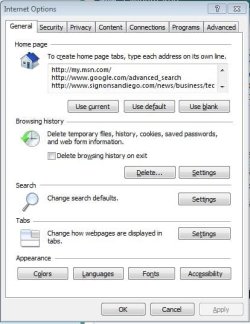
It should look like this. Use the "Search" settings button; it's a shortcut to the procedure I provided above. Not sure, but you may have to reenable IE to set its default search engine. But as I said above, once you set it, there is no need to uncheck the IE "Windows Feature", just don't use it. | My System Specs | | System Manufacturer/Model Number OQO 2+ OS Windows 7 Enterprise Trial 32-bit SP1 CPU Intel Atom 1.86 GHz Motherboard OQO 2+ Memory 2 GB Graphics Card Intel GMA 500 Sound Card IDT Monitor(s) Displays LCD Screen Resolution 800 x 480 (portable) 1280 x 1024 (docked) Keyboard Slide out (portable) DiNovo Edge (docked) Mouse Eraser head (portable) Logitech Bluetooth (docked) PSU 9 Ah Battery (portable) or OQO Brick (docked) Case Shirt Pocket Sized Cooling Tiny Fan Hard Drives 64 GB SSD Internet Speed WWAN or 802.11G (portable) T1 (docked) Other Info DVD-RW OQO Docking Station |
12 Nov 2011
|
#9 | | Windows 7 Ultimate SP1 64-Bit Peterborough, England |

Quote: Originally Posted by investmenttech Read my first post guys, I have already disabled Internet Explorer in Windows Features, somehow still changing my default search provider. In that case, I do apologise. That's what happens when you dive into a thread without reading all of it. | My System Specs | | System Manufacturer/Model Number HP Pavilion Elite 495UK OS Windows 7 Ultimate SP1 64-Bit CPU Intel Core i7 870 @ 2.93GHz Motherboard MSI 2A9C (CPU1) Memory 8Gb Dual-Channel DDR3 @ 664MHz Graphics Card nVidia GeForce GTX 460 1024MB dedicated RAM Sound Card Realtek HD Audio Monitor(s) Displays HP2310i Screen Resolution 1920 x 1080 Keyboard Logitech K750 solar-powered keyboard Mouse Logitech Wireless M180 mouse PSU 460W Case HP Elite Cooling Air cooled Hard Drives 1x1954GB Hitachi HDS22020ALA 330 (RAID), 1x1954GB Hitachi External for backup and storage Internet Speed 2Mb Other Info Pure Avanti Flow Internet Radio with iPod Dock, 64Gb iPod, HP USB Speakers, Sony MDR-V500 Headphones, Sony Vaio F-Series Laptop |
12 Nov 2011
|
#10 | | |
err .. I found the culprit, it was Youtube Downloader Toolbar, somehow I installed it when I installed youtube downloader.
Thanks for your help guys. | My System Specs | | how can I permanently uninstall internet explorer? problems? All times are GMT -5. The time now is 01:14 PM. | |