| Windows 7: IE8 on Windows 7? |
25 Dec 2011
|
#1 | | Windows 7 Home Premium 32bit. |
IE8 on Windows 7? Is it possible to run Internet Explorer 8 under Windows 7? Please let it be so. Among other things, my webmail does not support IE9. If so, any tips? Thanks in advance. | My System Specs |
| System Manufacturer/Model Number Acer 5250BZ479 OS Windows 7 Home Premium 32bit. CPU AMD |
25 Dec 2011
|
#2 | | Windows 7 HP 64bit, Windows 8 Pro w/Media Center 64bit Covington, La |
IE8 is the default for Windows 7 and is included as a Feature. Open Control Panel/Program and Features and on the left side click on "Turn Windows Features on of off" and if you have IE9 installed it will show up. To remove IE9 go to Control Panel/Program and Features and click on View Installed Updates. Look for Windows Internet Explorer 9 and uninstall it. After the uninstall IE8 will show up in the Features window instead of IE9.

Jim | My System Specs | | Computer type PC/Desktop System Manufacturer/Model Number Home Built OS Windows 7 HP 64bit, Windows 8 Pro w/Media Center 64bit CPU Phenom II X6 1100T Motherboard ASUS M5A99X EVO Memory Crucial Balistic 8gb DDR3-1866 CL9 Graphics Card MSI R6850 Cyclone IGD5 PE Sound Card On Board Monitor(s) Displays ASUS VE258Q 25" LED with DVI-HDMI-DisplayPort Screen Resolution 1920 x 1080 Keyboard Logitech K120 Mouse Logitech Marble Mouse USB, Logitech Precision Game Pad PSU Seasonic X650 80 Plus GOLD Modular Case Corsair 400R Cooling Antec Kuhler H2O 620, Two 120mm and four 140mm Hard Drives Two WD Cavier Black 2TB Sata III, WD My Book Essential 2TB USB 3.0 Internet Speed 15MB Antivirus Norton IS 2012, Malwarebytes Pro Browser IE-10, FF-19 Other Info APC UPS ES 750, Netgear WNR3500L Gigabit & Wireless N Router with SamKnows Test Program, Motorola SB6120 Gigabit Cable Modem. Brother HL-2170W Laser Printer, Epson V300 Scanner |
25 Dec 2011
|
#3 | | Windows 7 Home Premium 32bit. |
Didn't work, Gave me a LOT of trouble Well, in a word, NO.
DO NOT DO THIS!
It worked up to "Turn Windows features on or off" then it went WAY south. I have a brand-new 64-bit Windows 7 laptop, and it DOES NOT HAVE IE8 ON IT. When I uninstalled IE9, I HAD NO BROWSER AT ALL. Fortunately I had a stand-alone Firefox from another computer (XP/SP3, thank you) and ran that, to get back on the net. I downloaded every version of IE8 from several sites, always the same, NOT COMPATIBLE WITH THIS OPERATING SYSTEM. So, I went crawling back to M$, downloaded IE9, and installed it, then I had to manually set up my icons, startup, menu, taskbar etc. Large PITA.
Thanks for the tip, but it turned out to be misinformation.
Hell with it. Firefox it is.
_________________________
IE8 is the default for Windows 7 and is included as a Feature. Open Control Panel/Program and Features and on the left side click on "Turn Windows Features on of off" and if you have IE9 installed it will show up. To remove IE9 go to Control Panel/Program and Features and click on View Installed Updates. Look for Windows Internet Explorer 9 and uninstall it. After the uninstall IE8 will show up in the Features window instead of IE9. | My System Specs | | System Manufacturer/Model Number Acer 5250BZ479 OS Windows 7 Home Premium 32bit. CPU AMD |
25 Dec 2011
|
#4 | | Windows 7 HP 64bit, Windows 8 Pro w/Media Center 64bit Covington, La |
When you went to the Features window what did it show? It should show IE9 if it is installed and when removed it should then show IE8 and for IE8 to work it needs a check mark. IE8 is part of Windows 7 and can not be removed. It can be disabled by unchecking it in Features and then the browser will not show up.
Jim | My System Specs | | Computer type PC/Desktop System Manufacturer/Model Number Home Built OS Windows 7 HP 64bit, Windows 8 Pro w/Media Center 64bit CPU Phenom II X6 1100T Motherboard ASUS M5A99X EVO Memory Crucial Balistic 8gb DDR3-1866 CL9 Graphics Card MSI R6850 Cyclone IGD5 PE Sound Card On Board Monitor(s) Displays ASUS VE258Q 25" LED with DVI-HDMI-DisplayPort Screen Resolution 1920 x 1080 Keyboard Logitech K120 Mouse Logitech Marble Mouse USB, Logitech Precision Game Pad PSU Seasonic X650 80 Plus GOLD Modular Case Corsair 400R Cooling Antec Kuhler H2O 620, Two 120mm and four 140mm Hard Drives Two WD Cavier Black 2TB Sata III, WD My Book Essential 2TB USB 3.0 Internet Speed 15MB Antivirus Norton IS 2012, Malwarebytes Pro Browser IE-10, FF-19 Other Info APC UPS ES 750, Netgear WNR3500L Gigabit & Wireless N Router with SamKnows Test Program, Motorola SB6120 Gigabit Cable Modem. Brother HL-2170W Laser Printer, Epson V300 Scanner |
25 Dec 2011
|
#5 | | |
Sounds like after turning IE9 off you forgot to make sure IE8 was turned on in Programs & Features.
You can also remove IE9 from Windows update.
Phone Man provided you with good info so give it another try. | My System Specs | | OS Windows 7 64 bit CPU Intel Core i7 920 overclocked to 4.252Ghz Motherboard ASUSTeK Computer INC. Rampage II Extreme Rev 2 Memory 6GB Graphics Card ATI Radeon HD 5800 Series Display adapter Monitor(s) Displays NEC LCD2690WUXi2 Screen Resolution 26" 1920 x 1200 Mouse Razer Death Adder left handed Case Made by Xclio Hard Drives Intel SSDSA2M080G2GC [Hard drive] (80.03 GB) System drive
Plus several more Internet Speed 50MB Other Info Main Browser is Opera
Favorite software Adobe Lightroom & Photoshop
best plugins Nik software |
25 Dec 2011
|
#6 | | Windows 7 Home Premium 32bit. |
When you went to the Features window what did it show? It should show IE9 if it is installed and when removed it should then show IE8 and for IE8 to work it needs a check mark. IE8 is part of Windows 7 and can not be removed. It can be disabled by unchecking it in Features and then the browser will not show up.
_______________________________________________________________
After unchecking IE9 in Programs & features, there was no IE8 offered.
After uninstalling IE9 I looked again. It was not there to check either time
I will look again, mostly for curiosity, as I do think Firefox is easier to live with.
Thanks for the help.
Gord. | My System Specs | | System Manufacturer/Model Number Acer 5250BZ479 OS Windows 7 Home Premium 32bit. CPU AMD |
25 Dec 2011
|
#7 | | Windows 7 Home Premium 32bit. |
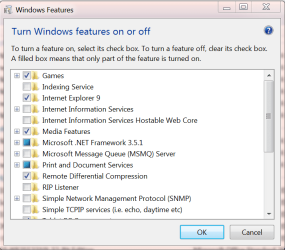
Same result, no IE8 Tried again. Same result. Unchecked IE9, waited until prompt, re-booted
This is the screenshot AFTER IE9 turned off, and re-booted. Note there is no IE8 option, IE9 remains as the only browser choice. IE9 NOT uninstalled this time.. Too much hassle to try again, as the reinstall is not complete, tedious.
Windows Home Premium, SP1.
Thanks anyway.
BTW, how to check Windows 7 version in more detail? | My System Specs | | System Manufacturer/Model Number Acer 5250BZ479 OS Windows 7 Home Premium 32bit. CPU AMD |
25 Dec 2011
|
#8 | | The 8th OS made by Billy Microsoft |
Quote: BTW, how to check Windows 7 version in more detail? Type " winver " in start menu.
And if you want to uninstall ie9 go to: Control Panel\Programs\Programs and Features-View installed updates | My System Specs | | System Manufacturer/Model Number Custom OS The 8th OS made by Billy Microsoft |
25 Dec 2011
|
#9 | | Windows 7 Enterprise Trial 32-bit SP1 |

Quote: Originally Posted by GordP This is the screenshot AFTER IE9 turned off, and re-booted. Note there is no IE8 option, IE9 remains as the only browser choice. IE9 NOT uninstalled this time... unCHECKING IE (whether 8 or 9) hides it from view as a browser. If IE9 has been installed as a replacement for IE8, it must be unINSTALLED not unCHECHED to revert back to IE8. After IE9 is uninstalled the Windows IE feature becomes IE8, which must be checked if you want to see it as an available browser. Same for IE9, when IE9 is the version of IE that is part of Windows, then it must be checked to see it as a browser and unchecked to hide it as a browser. They will never both be available to be checked at the same time since one replaces the other during the install or uninstall of IE9. | My System Specs | | System Manufacturer/Model Number OQO 2+ OS Windows 7 Enterprise Trial 32-bit SP1 CPU Intel Atom 1.86 GHz Motherboard OQO 2+ Memory 2 GB Graphics Card Intel GMA 500 Sound Card IDT Monitor(s) Displays LCD Screen Resolution 800 x 480 (portable) 1280 x 1024 (docked) Keyboard Slide out (portable) DiNovo Edge (docked) Mouse Eraser head (portable) Logitech Bluetooth (docked) PSU 9 Ah Battery (portable) or OQO Brick (docked) Case Shirt Pocket Sized Cooling Tiny Fan Hard Drives 64 GB SSD Internet Speed WWAN or 802.11G (portable) T1 (docked) Other Info DVD-RW OQO Docking Station |
09 Jan 2012
|
#10 | | Windows 7 Home Premium 32bit. |
I already uninstalled IE9, which left me with NO browser. IE8 did NOT come up, before or after boot. Had to install Firefox from USB. It was NOT installed as a replacement for IE8, came already installed on the new computer. So all evidence says there is no IE8 on this $%^& thing, and it willo not install from a download. Thanks for help, right and wrong.
____________________
unCHECKING IE (whether 8 or 9) hides it from view as a browser. If IE9 has been installed as a replacement for IE8, it must be unINSTALLED not unCHECHED to revert back to IE8. After IE9 is uninstalled the Windows IE feature becomes IE8, which must be checked if you want to see it as an available browser. Same for IE9, when IE9 is the version of IE that is part of Windows, then it must be checked to see it as a browser and unchecked to hide it as a browser. They will never both be available to be checked at the same time since one replaces the other during the install or uninstall of IE9. | My System Specs | | System Manufacturer/Model Number Acer 5250BZ479 OS Windows 7 Home Premium 32bit. CPU AMD IE8 on Windows 7? problems? All times are GMT -5. The time now is 08:43 AM. | |