|
Welcome to Windows 7 Forums. Our forum is dedicated to helping you find solutions with any problems, errors or issues you are experiencing with Windows 7. The Windows 7 forum also covers news and updates and has an extensive Windows 7 tutorial section that covers a wide range of tips and tricks.
Windows 7 - How to set ANY new tab to open my home page in IE9 |
01-13-2012
|
#1 | | Windows 7 Home Premium 64 bit |
How to set ANY new tab to open my home page in IE9 I am really frustrated with tabbed browsing in IE 9. My home page is Google, and I want ANY new tab to open to that, no matter what site I am on at the time.
For instance, if I am in my home page, and hit a taskbar link to say eBay, find something there I want to check out further, click on the new tab, it opens to another eBay window, Not the desired Google page.
I only have one link in my home pages, that is Google. I have new tab set to "first home page".
However, if I open eBay, then click on internet options nothing is in the home page window, and it says "eBay home pages"
It seems that "first home page" means the first page opened in that browsing session. NOT what I want! I want a permanent setting so that ANY new tab opens to my home page, like it was in earlier versions of IE.
If I am in my Google home page to start, then click a task bar link, it changes what the "first home page" is. Just plain sucks for me. 80% of the time I want my new tab to go to Google. The other times I just type in what I want. I rarely want to open a new page that is a duplicate of my current page!
| My System Specs | | OS Windows 7 Home Premium 64 bit CPU Intel E8400 core duo Motherboard Asus P5B deluxe WiFi AP Memory 4 Gb Graphics Card Asus Monitor(s) Displays Samsung Syncmaster 245BW Case Cooler Master Elite Hard Drives Two Hitachi 80 Gb in Raid 1
One Seagate 300 Gb
One External 1Tb backup. |
01-13-2012
|
#2 | | Windows 7 Ultimate x64 SP1 |
Hello DShealey,
The tutorial below can help show you how to set what a new tab opens to in IE9. Internet Explorer 9 New Tab - Change What Page it Opens To
To prevent your homepage from being changed, you might also use the tutorial below to help. Internet Explorer Home Page - Specify and Prevent Changing
Hope this helps,
Shawn | My System Specs | | System Manufacturer/Model Number Self built custom OS Windows 7 Ultimate x64 SP1 CPU Intel i7-980X 3.3 Ghz (3.48 Ghz OC'd) Motherboard ASUS P6X58D Premium Memory 12 GB (2GBx6) DDR3 PC3-16000 2000 MHz Kingston HyperX Graphics Card Sapphire HD5870 Eyefinity 6 2GB Sound Card Realtek HD Audio ALC889 Integrated Chip Monitor(s) Displays 3x 27" Asus VE278Q Screen Resolution 1920x1080 Keyboard Logitech Cordless Desktop MX 5500 Revolution Mouse Logitech Cordless Desktop MX 5500 Revolution PSU OCZ Series Gold OCZZ1000M 1000W Case Corsair Obsidian 800D Cooling Thermalright Ultra 120 Extreme Copper CPU heat sink w/120 MM Hard Drives 160GB OCZ RevoDrive X2
** 2 x 1TB Samsung HDD HD154UI SATA Internet Speed 50 Mb/s Download and 2 Mb/s Upload Other Info Microsoft LifeCam Cinema
** Lite-On iHBS212 12x BD Writer
** Samsung CLX-3175FW Printer
** Netgear WNDR3800 Router
** Motorola SBG6580 Cable Modem
** 2x APC Back-UPS XS 1500 |
01-13-2012
|
#3 | | Microsoft Windows 7 Home Premium 64-bit 7600 |
Internet Explorer 9 - Open google.com.
- Click the Tools button (which looks like a gear) in the browser, then click Internet options.
- Click Use current.
- Click OK.
edit, this is just for the Home button. sorry | My System Specs | | System Manufacturer/Model Number Hewlett packard/p6512uk OS Microsoft Windows 7 Home Premium 64-bit 7600 CPU IIx4 amd athelon 635 processor Motherboard FOXCONN 2AA9 Memory 2x2gb Graphics Card ati radeon HD 5450 Sound Card (1) Realtek High Definition Audio (2) AMD High Definition Monitor(s) Displays samsung lcd tv 32" Screen Resolution 1360x 768 Keyboard wireless hp Mouse wireless Hp,optical PSU ? Cooling air! Hard Drives (1) WDC WD10 01FAES-60Z2A0 SATA Disk Device (2) Maxtor OneTouch USB Device (3) ST310003 33AS USB Device (4) WD My Book 1111 USB Device Internet Speed 1.10mb/s Other Info at last i got a decent off the shelf upgrade, haha i dont even know what a psu is,
UPDATE: of course now im a guru i know its a power supply unit! |
01-13-2012
|
#4 | | windows 7 Home Premium 64 Bit SP 1 |
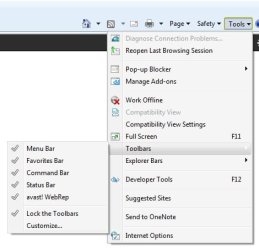
Tools > Toolbars> Menu Bar to see the classic menu bar in IE9.
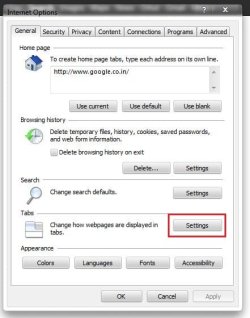
Now. Tools > Internet options to open the Internet options window. At the bottom area, there is tabs, with a settings button. Click on it .
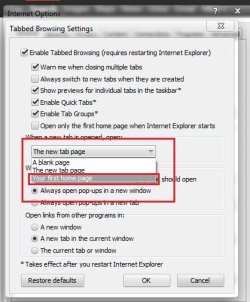
Click on the arrow at the left of the new tab page, button, and activate "your first home page" Click ok.
Hope it works for you.
EDIT : Brink's Tutorial explains it in a very easier way | My System Specs | | System Manufacturer/Model Number Self Assembled OS windows 7 Home Premium 64 Bit SP 1 CPU Intel Core i3 Motherboard Intel DH55TC Media Series Memory Corsair 2GB x2 Graphics Card Onboard Sound Card Onboard Monitor(s) Displays LG Flatron E2040T Screen Resolution 1600x900 Keyboard iBall Mouse Logitech Case iBall Hard Drives Western Digital 1 TB
Seagate 500 GB Internet Speed BSNL Broadband Other Info Dell Studio 15" Laptop |
01-13-2012
|
#5 | | Windows 7 Home Premium 64 bit |
I have already tried all the stated options, none of them work. I did look for quite some time for an answer before posting, none of the normaly stated settings fix my issue.
Someone else try this:
1-Open IE9 to your normal home page.
2-Click on the new tab, it should open another same page.
3-Then click on a taskbar internet link to another site.
4-Now click on the new tab, if it behaves like mine it will now open another page like the one from the taskbar link, NOT the desired home page.
My example:
My home page (the only one in the home pages window in options) is Google.com
I have some links to often used sites (example: eBay) on my links area on the taskbar.
If I open IE9, I get my normal Google home page, and if I click a new tab I get that again.
BUT: If I am in my Google home page, and click eBay on my taskbar, it opens eBay, now if I click on a new tab, it opens yet another eBay page, NOT my home page.
It seems that whatever is in the url address window on the left becomes "the first home page" for any new tab thereafter. Not what I want. | My System Specs | | OS Windows 7 Home Premium 64 bit CPU Intel E8400 core duo Motherboard Asus P5B deluxe WiFi AP Memory 4 Gb Graphics Card Asus Monitor(s) Displays Samsung Syncmaster 245BW Case Cooler Master Elite Hard Drives Two Hitachi 80 Gb in Raid 1
One Seagate 300 Gb
One External 1Tb backup. |
01-13-2012
|
#6 | | Windows 7 Ultimate x64 SP1 |
DShealey,
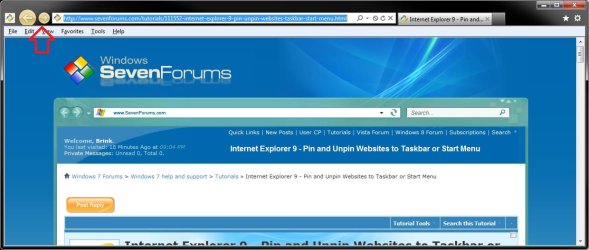
I think I know what is going on here now. By chance when you click on say the pinned eBay icon on the taskbar, is the back and forward arrow buttons a yellowish orange color like in the screenshot below? 
If so, then see the tutorial for a more detailed explanation of this. Basically, by pinning a site, the site is at the center of the experience, not the browser. When a pinned site is launched from the taskbar, the browser frame and navigational controls integrate the site's icon and primary color, providing an experience that's tailored to the site you're viewing. Internet Explorer 9 - Pin and Unpin Websites to Taskbar or Start Menu
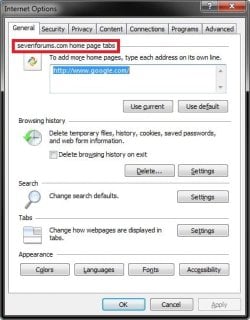
This would be why your Google homepage is not there when you click on the pinned eBay taskbar icon, and why new tabs will only open to say eBay when using "Your first home page" with Google set as the home page even in the pinned ebay IE. In a say pinned eBay taskbar icon when opened, Ebay is considered to be the first home page no matter what and cannot be changed. Does your Internet Options look like this for the opened pinned eBay icon with the example of the area boxed in red below? 
To not have this issue anymore, create your internet shortcut using OPTION THREE in the tutorial below instead, then pin that icon to the taskbar. A IE shortcut using this method will open and work normally in IE like you are wanting instead. Internet Website Shortcut - Create | My System Specs | | System Manufacturer/Model Number Self built custom OS Windows 7 Ultimate x64 SP1 CPU Intel i7-980X 3.3 Ghz (3.48 Ghz OC'd) Motherboard ASUS P6X58D Premium Memory 12 GB (2GBx6) DDR3 PC3-16000 2000 MHz Kingston HyperX Graphics Card Sapphire HD5870 Eyefinity 6 2GB Sound Card Realtek HD Audio ALC889 Integrated Chip Monitor(s) Displays 3x 27" Asus VE278Q Screen Resolution 1920x1080 Keyboard Logitech Cordless Desktop MX 5500 Revolution Mouse Logitech Cordless Desktop MX 5500 Revolution PSU OCZ Series Gold OCZZ1000M 1000W Case Corsair Obsidian 800D Cooling Thermalright Ultra 120 Extreme Copper CPU heat sink w/120 MM Hard Drives 160GB OCZ RevoDrive X2
** 2 x 1TB Samsung HDD HD154UI SATA Internet Speed 50 Mb/s Download and 2 Mb/s Upload Other Info Microsoft LifeCam Cinema
** Lite-On iHBS212 12x BD Writer
** Samsung CLX-3175FW Printer
** Netgear WNDR3800 Router
** Motorola SBG6580 Cable Modem
** 2x APC Back-UPS XS 1500 |
01-14-2012
|
#7 | | Windows 7 Home Premium 64 bit |
That worked! Thanks Brink,
You grasped my explanation of what I wanted, and solved it.
I was saying TaskBar in my explanation, it was really the "Quick Launch" bar on the Task Bar. my bad, but your explanation worked like a charm, but I had to right click on the newly created shortcuts to drag them to the Quick Launch bar, but now it works like I wanted it to.
Question: Why does Microsoft keep changing the way things "always" worked, without the simple option to use it like before. They could have easily added "Use Default Home Page" to the drop down for how to open new tabs, and everything would have been just fine. "But no, we must make use of our system far more difficult for those who want to use it as before to force them to learn our "better" way."
Last edited by DShealey; 01-14-2012 at 10:00 AM..
| My System Specs | | OS Windows 7 Home Premium 64 bit CPU Intel E8400 core duo Motherboard Asus P5B deluxe WiFi AP Memory 4 Gb Graphics Card Asus Monitor(s) Displays Samsung Syncmaster 245BW Case Cooler Master Elite Hard Drives Two Hitachi 80 Gb in Raid 1
One Seagate 300 Gb
One External 1Tb backup. |
01-14-2012
|
#8 | | Windows 7 Ultimate x64 SP1 |
You're most welcome DShealey. Pinned Sites is a new concept in IE9 that was designed to be able to have shortcuts to a website that opens IE in a separate process with that specific website as the pure focus instead with it's own separate Internet Options settings.
It could be a useful for it purpose, but no so much if you still wanted to use the default IE home page instead of the pinned site. | My System Specs | | System Manufacturer/Model Number Self built custom OS Windows 7 Ultimate x64 SP1 CPU Intel i7-980X 3.3 Ghz (3.48 Ghz OC'd) Motherboard ASUS P6X58D Premium Memory 12 GB (2GBx6) DDR3 PC3-16000 2000 MHz Kingston HyperX Graphics Card Sapphire HD5870 Eyefinity 6 2GB Sound Card Realtek HD Audio ALC889 Integrated Chip Monitor(s) Displays 3x 27" Asus VE278Q Screen Resolution 1920x1080 Keyboard Logitech Cordless Desktop MX 5500 Revolution Mouse Logitech Cordless Desktop MX 5500 Revolution PSU OCZ Series Gold OCZZ1000M 1000W Case Corsair Obsidian 800D Cooling Thermalright Ultra 120 Extreme Copper CPU heat sink w/120 MM Hard Drives 160GB OCZ RevoDrive X2
** 2 x 1TB Samsung HDD HD154UI SATA Internet Speed 50 Mb/s Download and 2 Mb/s Upload Other Info Microsoft LifeCam Cinema
** Lite-On iHBS212 12x BD Writer
** Samsung CLX-3175FW Printer
** Netgear WNDR3800 Router
** Motorola SBG6580 Cable Modem
** 2x APC Back-UPS XS 1500 How to set ANY new tab to open my home page in IE9 problems? All times are GMT -5. The time now is 06:44 PM. |  |