Hello All,
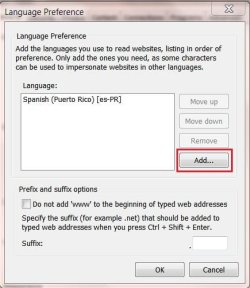
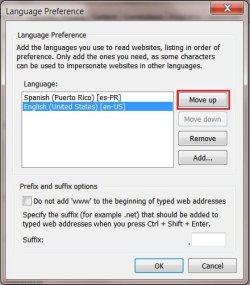
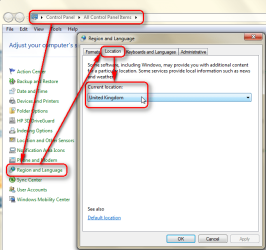
Can some one tell how (if possible) how to change the
country specific default in Internet Explorer 9.
I was able to do it in Google.
I would like to change it to non specific or USA.
Right now its on latin america ( I live in Puerto Rico).
Any help will be appreciated
Can some one tell how (if possible) how to change the
country specific default in Internet Explorer 9.
I was able to do it in Google.
I would like to change it to non specific or USA.
Right now its on latin america ( I live in Puerto Rico).
Any help will be appreciated
My Computer
At a glance
Windows 7 Ultimate 64x and 32xAcer: Intel Pentium E5700 HP: Core 2 Duo E4500Acer: 4 GB HP: 3 GBAcer: Integrated HP: Integrated
- Computer Manufacturer/Model Number
- Acer Aspire X3910 & HP Pavilion a6334f
- OS
- Windows 7 Ultimate 64x and 32x
- CPU
- Acer: Intel Pentium E5700 HP: Core 2 Duo E4500
- Memory
- Acer: 4 GB HP: 3 GB
- Graphics Card(s)
- Acer: Integrated HP: Integrated
- Sound Card
- Acer: Integrated HP: Integrated
- Monitor(s) Displays
- Sceptre 21"
- Screen Resolution
- 1440x900
- Hard Drives
- Acer: WD Caviar Blue 640 GB WD6400AAKS-22A7B2
HP: WD 500GB WDC WD5000AAKS-65YGA0
- Cooling
- Both: CPU Fan
- Internet Speed
- 4.5 To 5.0
- Other Info
- Seagate Ext. Port. Drive 2.5" 500 GB
Hitachi Ext. Port. Drive 2.5" 320 GB