Windows 7 Forums


Windows 7: Customizing new tab colour in IE 9

16 Feb 2012   #1

windows 7 home premium x64
 
 
Customizing new tab colour in IE 9

Hi

When I use internet explorer, and open up new tab in the same window, the new tab colour is quite dark so can not read on the tab which web page it is in there.

How can I change the colour so that writing will be more visible.


Regards

My System SpecsSystem Spec

17 Feb 2012   #2

Windows 7 Ultimate x64


Hi email257525 and welcome to SevenForums

I do not know how to manually change each Tab's colour, but fortunately you can disable them:

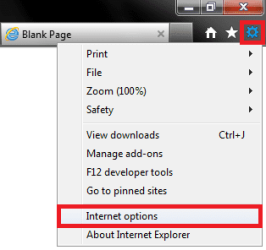
Open Internet Explorer, click the Settings Icon and select Internet Options.
Name:  1.png
Views: 420
Size:  16.5 KB

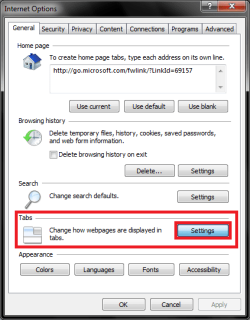
Select the General Tab and under the Tabs Section select Settings.
Customizing new tab colour in  IE 9-2.png

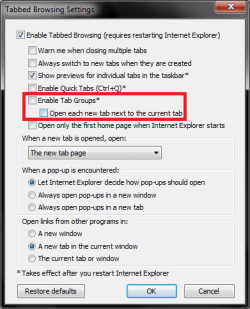
Now deselect Enable Tab Groups from the Tabbed Browsing Settings Dialogue.
Customizing new tab colour in  IE 9-3.png

Close and reopen explorer and coloured tabs should be disabled.
My System SpecsSystem Spec
17 Feb 2012   #3

Windows 7 Home Premium x64
Belgrade, Serbia


There isn't a way to customize the colors at all, but like Infinity said, you can disable them completely.
My System SpecsSystem Spec
.


Reply

 Customizing new tab colour in IE 9 problems?


Thread Tools


Similar help and support threads for: Customizing new tab colour in IE 9
Thread Forum
Customizing WMP12 looks Customization
Solved Problem in customizing cmd.exe General Discussion
need help customizing Customization
Customizing Windows Customization
customizing fn + key? Software


All times are GMT -5. The time now is 11:13 AM.


Windows 7 Forums is an independent web site and has not been authorized,
sponsored, or otherwise approved by Microsoft Corporation.
"Windows 7" and related materials are trademarks of Microsoft Corp.
© Designer Media Ltd