Windows 7 Forums


Windows 7: Spell Check Is Not Active

19 Feb 2012   #1

Windows 7 64 bit
 
 
Spell Check Is Not Active

Although I can see the spell check icon in Windows Live, it is dimmed and not active. How can I make it active? I thought I picked it under Mail Options, but it doesn't seem to make any difference.

My System SpecsSystem Spec

19 Feb 2012   #2

Windows 7 Ultimate 64bit SP1


Hi.

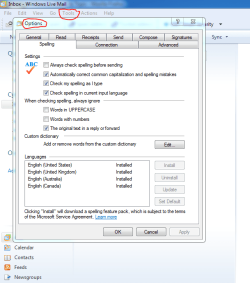
Tools>Options>Spelling....
Attached Thumbnails
Spell Check Is Not Active-capture.png  
My System SpecsSystem Spec
19 Feb 2012   #3

Windows 7 Ultimate x64


Hi Judy R, and welcome to SevenForums

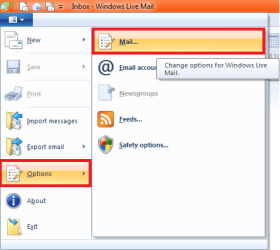
First click the Blue Dropdown bar and select Options and then Mail.
Spell Check Is Not Active-example.png

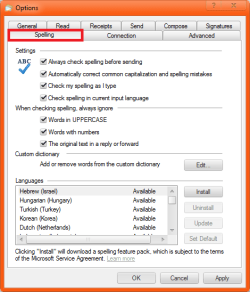
In the Window that opens click the Spelling Tab at the Top Right.

You can then adjust it to your liking, Install and Uninstall Spelling Languages, and Edit the Spelling Dictionary, you just want to select these under Settings:

Always check spelling before sending
Automatically correct common capitalization and spelling mistakes
Check spelling as I type
Check spelling in my current input language
.

Spell Check Is Not Active-example-2.png

After selecting these press OK and you should now have Spell-Check Enabled.
My System SpecsSystem Spec
.


Reply

 Spell Check Is Not Active problems?


Thread Tools


Similar help and support threads for: Spell Check Is Not Active
Thread Forum
Spell Check IE9 Browsers & Mail
Solved Spell check isn't working Microsoft Office
Solved How to turn on spell check for all msg's Browsers & Mail
IE 9 and Spell Check Browsers & Mail
Browser Spell check Browsers & Mail


All times are GMT -5. The time now is 02:31 AM.


Windows 7 Forums is an independent web site and has not been authorized,
sponsored, or otherwise approved by Microsoft Corporation.
"Windows 7" and related materials are trademarks of Microsoft Corp.
© Designer Media Ltd