Windows 7 Forums


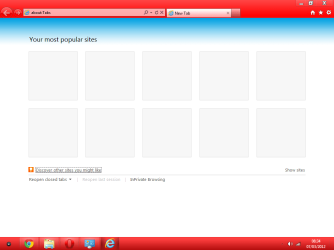
Windows 7: "Your popular sites" Not populating

05 Mar 2012   #1

windows 7 ultimate x64
 
 
"Your popular sites" Not populating

Hi Guys,

I'm using Windows 7 64bits Ultimate edition. My IE9 started giving me issue 2 days ago. T

The "Your popular sites" in IE9 lost all the sites
I tried restting it to default settings and did a reset > same issue

I have to add that nothing was installed nor any add-on

Can someone help me ?

Thanks!!

My System SpecsSystem Spec

06 Mar 2012   #2

Windows 7 Ultimate x64
United Kingdom


Hello,

Is it just you who accesses your PC? Have you cleaned the history or anything like that?


Dave
My System SpecsSystem Spec
06 Mar 2012   #3

windows 7 ultimate x64


Hi Dave,

I am the only one who have access to the PC
I didn't clear the history, but I noticed not long ago, that history is not populating either, But I didn't care much about....
My System SpecsSystem Spec
.


06 Mar 2012   #4

Windows 7 Ultimate x64


Try this first:
http://www.sevenforums.com/tutorials...age-opens.html

Try reinstalling Internet Explorer by going to Control Panel - Programs and features - Turn Windows features on or off, and deselecting IE. Restart. Go back to Turn Windows features on or off and enable it again. Restart - Is it back?

You could then try opening Internet Options. Click the Advanced Tab and select Reset.

If none of the above helps try reading the microsoft article below or an SFC Scan
How to reinstall or repair Internet Explorer in Windows 7, Windows Vista, and Windows XP
My System SpecsSystem Spec
06 Mar 2012   #5

Windows 7 Home Premium 64 bit. SP-1
Northern Ohio


I read it before and now again and I still don't know what popular sites not populated is. Where it should be.
My System SpecsSystem Spec
07 Mar 2012   #6

Windows 7 Ultimate x64


@Layback Bear, for me it opens in a New Tab:

http://www.sevenforums.com/tutorials...age-opens.html

"Your popular sites" Not populating-example-2.png

Last edited by Brink; 07 Mar 2012 at 08:40 AM.. Reason: added link for more info
My System SpecsSystem Spec
07 Mar 2012   #7

windows 7 ultimate x64


That's exactly what I have here. I don't see my sites there anymore and I don't feel like re-installing IE9

I'm asking for help on this forum to find an alternative
My System SpecsSystem Spec
07 Mar 2012   #8

Windows 7 Ultimate x64


If you do not want to try troubleshooting using the steps suggested I suggest you try a third party browser like Chrome, Safari or Opera (I know Safari supports this feature).
My System SpecsSystem Spec
07 Mar 2012   #9

windows 7 ultimate x64


I appreciate your help and time, but I have already tried the first and and third option before. I thought there would be another solution than re-installing IE9

In all cases, what would be the best way to re-install it without loosing any data (Such as the addresss drop menu, usernames and passwords....) ?
My System SpecsSystem Spec
07 Mar 2012   #10

Windows 7 Ultimate x64


My System SpecsSystem Spec
Reply

 "Your popular sites" Not populating problems?


Thread Tools


Similar help and support threads for: "Your popular sites" Not populating
Thread Forum
IE9 "New Tab" keeps losing "Most Popular Sites" . Browsers & Mail
Internet Explorer "about:Tabs" - Show More Rows of Sites Tutorials
"Top Sites" or "Speed Dial" for IE9? Browsers & Mail
Windows 7 "Remove from this list" not populating. General Discussion
What is "Feeds for U 29", "Popular Gov823", and ..... Browsers & Mail


All times are GMT -5. The time now is 12:12 AM.


Seven Forums Android App Seven Forums IOS App Follow us on Facebook

Windows 7 Forums is an independent web site and has not been authorized,
sponsored, or otherwise approved by Microsoft Corporation.
"Windows 7" and related materials are trademarks of Microsoft Corp.
© Designer Media Ltd
  

1 2 3 4 5 6 7 8 9 10 11 12 13 14 15 16 17 18 19 20 21 22 23 24 25 26 27 28 29 30 31 32