Windows 7 Forums


Windows 7: Outlook equivalent to Thunderbird "Local Folders"?

25 Mar 2012   #1

Windows 7 Home Premium 64bit
 
 
Outlook equivalent to Thunderbird "Local Folders"?

TBird has "Local Folders" which a user can set up any way desired; an email can be dragged from the Inbox into a folder for archiving. Can't seem to make this happen in Outlook: there's a Folder button available in the Navigation Pane, but dragging isn't "allowed."


Anyone have a clue? How do Outlook users organize old emails?
My System SpecsSystem Spec

25 Mar 2012   #2

Win 7 Pro x64 SP1, Win 7 Ult x86 SP1
NC, USA


I use Outlook 2010 and can right click on emails and drag them to wherever i want to copy or move them.

Rt click on Folders also works...

This doesn't work for you?

edit: I'm talking home use. Are you using Outlook in a Business environment?

Last edited by DavidW7ncus; 25 Mar 2012 at 01:05 PM.. Reason: edit
My System SpecsSystem Spec
25 Mar 2012   #3

Windows 7 Home Premium 64bit


Quote   Quote: Originally Posted by DavidW7ncus View Post
I use Outlook 2010 and can right click on emails and drag them to wherever i want to copy or move them.
This doesn't work for you?
edit: I'm talking home use. Are you using Outlook in a Business environment?
Yeah, that works...barely. I can't set up a folder tree within Outlook to hold my emails that's independent of the email accounts my emails arrive into, but I did set up a Library of folders to which I can drag the individual emails. It feels clumsy, but I suppose it'll have to do.

Thunderbird is set up so much better, much like the old Outlook Express. I just wish it worked all the time!

I'm not in a Business environment per se, but have numerous email accounts on different servers.
My System SpecsSystem Spec
.


26 Mar 2012   #4

Win 7 Pro x64 SP1, Win 7 Ult x86 SP1
NC, USA


Maybe I'm not understanding this, but...

There is a default "Personal Folders" that is the "Local Folders" (PST file) that you can setup any way you want. You can also add more PST files for Local storage if you so choose.

You can create folders, sub-folders, etc. for your preferred "Folder Tree", and it can be independent of email accounts.

I've never used a "Library of folders" within Outlook, so I'm not sure how that works.

It may be that OE and TB are easier for you, but when I tried those they did not offer the same functionality as Outlook.

It may be that I have used Outlook for so long I am just use to it, and prefer it for that reason.
My System SpecsSystem Spec
30 Mar 2012   #5

Windows 7 Home Premium 64bit


Quote   Quote: Originally Posted by DavidW7ncus View Post
Maybe I'm not understanding this, but...

There is a default "Personal Folders" that is the "Local Folders" (PST file) that you can setup any way you want. You can also add more PST files for Local storage if you so choose.
You can create folders, sub-folders, etc. for your preferred "Folder Tree", and it can be independent of email accounts.
We are talking Outlook 2010, right? I don't see any of this. Here's a screenshot of my Outlook:

My System SpecsSystem Spec
30 Mar 2012   #6

Win 7 Pro x64 SP1, Win 7 Ult x86 SP1
NC, USA


Hi,
I'm here now.
I can't read your screen print, so I'll get some of mine and post them in a bit.

edit: Yes, i use Office 2010. i have 6 email accounts, various types...

Last edited by DavidW7ncus; 30 Mar 2012 at 12:05 PM.. Reason: edit:
My System SpecsSystem Spec
30 Mar 2012   #7

Win 7 Pro x64 SP1, Win 7 Ult x86 SP1
NC, USA


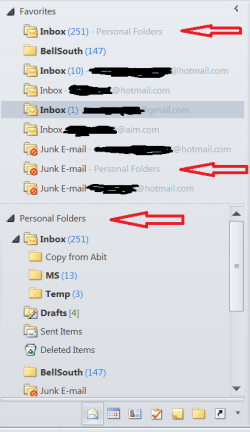
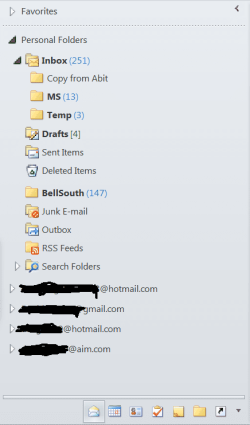
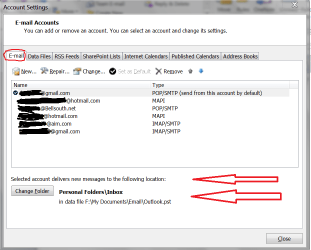
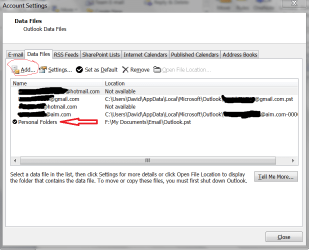
Ok, here's some screen prints for my Outlook setup.
The 2nd image shows i can structure my Personal Folders (Local)...
If you don't have a "Personal Folders", note in the last screen print you can add a PST Local folder...
I blacked out my personal info, and HOPE i got it all

Outlook equivalent to Thunderbird "Local Folders"?-outlook-scrprt-01.png

Outlook equivalent to Thunderbird "Local Folders"?-outlook-scrprt-02.png

Outlook equivalent to Thunderbird "Local Folders"?-outlook-scrprt-03.png

Outlook equivalent to Thunderbird "Local Folders"?-outlook-scrprt-04.png
My System SpecsSystem Spec
Reply

 Outlook equivalent to Thunderbird "Local Folders"? problems?


Thread Tools


Similar help and support threads for: Outlook equivalent to Thunderbird "Local Folders"?
Thread Forum
Assigning "domain user" to "local admin" on select PCs Network & Sharing
""Local Area Connection" Doesn't have a valid ip config " Network & Sharing
"System Reserved (C:)" and "Local Disk (D:)" ?? Installation & Setup
Remaking "My Music", "My Pictures", "My Videos" folders Customization
Windows 7 "Login Items" equivalent? General Discussion


All times are GMT -5. The time now is 12:30 AM.


Seven Forums Android App Seven Forums IOS App Follow us on Facebook

Windows 7 Forums is an independent web site and has not been authorized,
sponsored, or otherwise approved by Microsoft Corporation.
"Windows 7" and related materials are trademarks of Microsoft Corp.
© Designer Media Ltd
  

1 2 3 4 5 6 7 8 9 10 11 12 13 14 15 16 17 18 19 20 21 22 23 24 25 26 27 28 29 30 31 32