Windows 7 Forums


Windows 7: Firefox Bookmarks

26 Mar 2012   #1

Windows 7 Home Premium 64 bit SP1
Dublin, Ireland
 
 
Firefox Bookmarks

Hello,

At present, to access all of my Bookmarks I have to click the arrow at the end
of the Toolbar.
There is a way of enlarging this Toolbar so that I can see ALL of my Bookmarks
without having to click that arrow.
Advice on this would be appreciated. I cannot see to reference to it in any of
the Mozilla Firefox tutorials.

My System SpecsSystem Spec

26 Mar 2012   #2

Windows 7 X64 Professional
Eagle River, AK


What version of Firefox are you running? In version 11, there are several ways to access your bookmarks. Personally, I prefer to add a bookmarks toolbar to the toolbar area of Firefox and add folders for different bookmark categories:

Another way is to add a bookmarks button to your toolbar. This opens up your bookmarks in a sidebar:

And, finally, there is the keyboard shortcut, CTRL+SHIFT+B.
My System SpecsSystem Spec
26 Mar 2012   #3

Windows 7 SP1, Home Premium, 64-bit


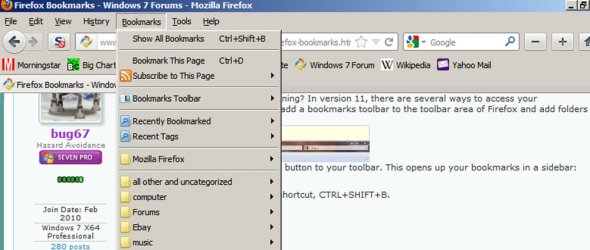
I put my most often used bookmarks on the bookmarks toolbar immediately below the address bar.

Then I have all bookmarks available from a bookmarks menu next to file/edit/view/history.

I can't remember how I moved bookmarks from the right to the top of the screen, but it isn't difficult--probably a right click and then choosing from a dropdown menu.
Attached Thumbnails
Firefox Bookmarks-untitled-1.jpg  
My System SpecsSystem Spec
.


26 Mar 2012   #4

Windows 7 Ultimate x64


You could install some Firefox addons:

In addition, have a read at this:
5 Excellent Firefox Extensions to Manage your Bookmarks

I personally use Speed Dial and Smart Bookmarks Bar.
My System SpecsSystem Spec
26 Mar 2012   #5

Microsoft Windows 7 Home Premium 64-bit 7600
cornwall UK


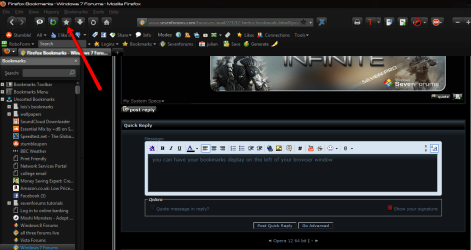
you can have your bookmarks display on the left of your browser window ,
to do so you need to right click at the top of the firefox window and select customize ,in the new pane that opens drag the bookmarks button to where you want it on the toolbar.
clicking the button will open and close the bookmarks sidebar.
an alternate way to have the bookmark sidebar showing is to click view/sidebar/bookmarks.
i prefer to have the button as you can open and close it with a click.

Firefox Bookmarks-2012-03-26_1949.png
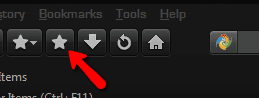
note: there are two bookmark buttons, one has a dropdown arrow beside it and one is just a star,its the second one you want as the button with the dropdown opens a pop up bookmarks list that dissapears when you click in the browser again.

Name:  2012-03-26_1955.png
Views: 176
Size:  8.1 KB
My System SpecsSystem Spec
Reply

 Firefox Bookmarks problems?


Thread Tools


Similar help and support threads for: Firefox Bookmarks
Thread Forum
Firefox 5 bookmarks copying Browsers & Mail
Firefox 3.5.x bookmarks folder Browsers & Mail
Firefox bookmarks ? Browsers & Mail
Screenshot of Firefox bookmarks Software
Firefox bookmarks are not where they should be?? Browsers & Mail


All times are GMT -5. The time now is 02:03 AM.


Seven Forums Android App Seven Forums IOS App Follow us on Facebook

Windows 7 Forums is an independent web site and has not been authorized,
sponsored, or otherwise approved by Microsoft Corporation.
"Windows 7" and related materials are trademarks of Microsoft Corp.
© Designer Media Ltd
  

1 2 3 4 5 6 7 8 9 10 11 12 13 14 15 16 17 18 19 20 21 22 23 24 25 26 27 28 29 30 31 32