| Windows 7: How can I choose where to install windows live mail? |
24 May 2012
|
#1 | | Windows 7 HP x64 SP1 London UK |
How can I choose where to install windows live mail? Windows live mail (amongst many other programs) got deleted from my c:/program files (x86) folder through what seems to be malware that I may or may not have fixed. So I want to avoid windows live mail being installed there again and wish to install it elsewhere, such as c:/program files, or even another hard drive of mine. But windows live essentials does it it all automated and I don't think it gives me a choice, so how can I choose to install it to anywhere except program files (x86)?
Thanks. | My System Specs |
| OS Windows 7 HP x64 SP1 CPU Phenom II x2 550BE @3.1Ghz Motherboard GA-MA770-UD3 rev 2.0 Memory Patriot Viper 2x2GB DDR2 6400 Graphics Card Sapphire HD5850 Extreme 1GB Sound Card Onboard Realtek Monitor(s) Displays Samsung 23" S23A700D * 120Hz * 3D * 2ms response Screen Resolution 1920x1080 Keyboard Razer Lycosa Mouse Logitech MX518 PSU XFX Pro 650w Core Edition Case Coolermaster CM690 Dominator Cooling TRUE Rev.C + Arctic Cooling MX-2 + various 12cm fans Hard Drives SSD Samsung 830 128GB/Seagate 2TB (2 x single platter)/ WD 1TB Cav Black/ WD RE3 1TB /WD 320GB IDE/IBM 120GB IDE Internet Speed Fibre Optic 60MB Down * 3MB Up |
25 May 2012
|
#2 | | Windows 7 Enterprise Trial 32-bit SP1 |
Just a thought: If you have malware it would be better to imagine you can't hide anything from it. Use Microsoft's free "Windows Defender Offline" which scans your hard drive from its own bootable CD. You can also install a free version of Malwarebytes and do a scan with it. Keep your pc up to date with all the security updates from Windows Update. Use only the latest versions of Flash and don't install any programs or browser add-ons you don't need (Java, Shockwave, etc) unless you plan to keep them up to date as well. Keep one antivirus program running all the time like Microsoft's free "Security Essentials". | My System Specs | | System Manufacturer/Model Number OQO 2+ OS Windows 7 Enterprise Trial 32-bit SP1 CPU Intel Atom 1.86 GHz Motherboard OQO 2+ Memory 2 GB Graphics Card Intel GMA 500 Sound Card IDT Monitor(s) Displays LCD Screen Resolution 800 x 480 (portable) 1280 x 1024 (docked) Keyboard Slide out (portable) DiNovo Edge (docked) Mouse Eraser head (portable) Logitech Bluetooth (docked) PSU 9 Ah Battery (portable) or OQO Brick (docked) Case Shirt Pocket Sized Cooling Tiny Fan Hard Drives 64 GB SSD Internet Speed WWAN or 802.11G (portable) T1 (docked) Other Info DVD-RW OQO Docking Station |
25 May 2012
|
#3 | | Windows 7 HP x64 SP1 London UK |
Thanks roncerr, yeah, defender offline is something that has been suggested to me so I'll try it. Tbh though, I think damage limitation is needed. my PC is currently becoming a nightmare. Mail and live movie maker have disappeared and windows live essentials says they're installed. I installed mail again but it's not installed. I can't install any windows live programs now, it lists them all with big green ticks saying they're installed and just a close button. If I try to delete the live mail folders showing up in program files x86 and program files, it says you require permission from trustedinstaller to make changes to this folder. I'm getting that on a few programs. There's so many messed up things now I think my only choice is to format and do a complete Windows 7 reinstall. It's been a long time coming anyway, it's just a PITA to go through the backing up and reinstalling stuff. I'll do a ghetto backup and manually transfer important stuff to my laptop and nuke this C drive and reinstall windows.
I found thousands of .eml files in app data, so it looks like my emails are intact. So I presume I can import them into windows live mail on the new windows install. | My System Specs | | OS Windows 7 HP x64 SP1 CPU Phenom II x2 550BE @3.1Ghz Motherboard GA-MA770-UD3 rev 2.0 Memory Patriot Viper 2x2GB DDR2 6400 Graphics Card Sapphire HD5850 Extreme 1GB Sound Card Onboard Realtek Monitor(s) Displays Samsung 23" S23A700D * 120Hz * 3D * 2ms response Screen Resolution 1920x1080 Keyboard Razer Lycosa Mouse Logitech MX518 PSU XFX Pro 650w Core Edition Case Coolermaster CM690 Dominator Cooling TRUE Rev.C + Arctic Cooling MX-2 + various 12cm fans Hard Drives SSD Samsung 830 128GB/Seagate 2TB (2 x single platter)/ WD 1TB Cav Black/ WD RE3 1TB /WD 320GB IDE/IBM 120GB IDE Internet Speed Fibre Optic 60MB Down * 3MB Up |
25 May 2012
|
#4 | | MS Windows 7 Ultimate SP1 64-bit Austin, Texas |
Roman,
Please immediatley see the answer I gave in your other post.
In reality you have stated the same problem over which is rather frowned upon.
Immediately follow the procedure I gave in your other thread. | My System Specs | | System Manufacturer/Model Number Toshiba Satellite S875D-S7239 laptop OS MS Windows 7 Ultimate SP1 64-bit CPU AMD A10-4600M Motherboard AMD Pumori (Socket FT1) Memory 6.00 GB Dual-Channel DDR3 @ 798MHz (11-11-12-28) Graphics Card AMD Radeon HD 7660G Sound Card High Definition Audio Device Monitor(s) Displays Generic PnP Monitor (1600x900@60Hz) Screen Resolution 1600x900@60Hz Keyboard Standard PS/2 Keyboard Mouse HP Wireless Optical Mobile Mouse Model FHA-3410 Hard Drives SSD 119GB Corsair CSSD-V128GB2 ATA Device Internet Speed What the local pub, local coffee shop offers. Other Info Optical Drive:MATSHITA BD-CMB UJ160B ATA Device
Also have an Asus ha1002xp netbook with Win 7 Ultimate installed. |
29 Sep 2012
|
#5 | | Windows 7 Professional 64 |
There are other reasons for not installing on the C: drive.
My new computer has an SSD for the operating system and most software, and an HDD for user data -- including e-mail and temp Internet files. The latter often change, so I'm trying to avoid putting that data on the SSD.
The current version of Live Mail doesn't seem to have any option for changing the location of the storage directory. Therefore, I'd like to know how to force Live Mail installation on the hard drive, or simply move my Sent and Mailed folders to it.
Unless you can recommend a mail/news server that can import Outlook Express files, I have no desire to use anything other than Live Mail. There is too much "baggage" that I need to carry over.
Thank you. | My System Specs | | OS Windows 7 Professional 64 |
29 Sep 2012
|
#6 | | Windows 7 Enterprise Trial 32-bit SP1 |

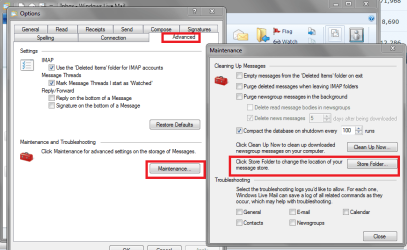
Quote: Originally Posted by GrizzledGeezer ...The current version of Live Mail doesn't seem to have any option for changing the location of the storage directory. Therefore, I'd like to know how to force Live Mail installation on the hard drive... Options/Advanced/Maintenance/"Store Folder"/Change. (At least WLM 2009 has that ability.) | My System Specs | | System Manufacturer/Model Number OQO 2+ OS Windows 7 Enterprise Trial 32-bit SP1 CPU Intel Atom 1.86 GHz Motherboard OQO 2+ Memory 2 GB Graphics Card Intel GMA 500 Sound Card IDT Monitor(s) Displays LCD Screen Resolution 800 x 480 (portable) 1280 x 1024 (docked) Keyboard Slide out (portable) DiNovo Edge (docked) Mouse Eraser head (portable) Logitech Bluetooth (docked) PSU 9 Ah Battery (portable) or OQO Brick (docked) Case Shirt Pocket Sized Cooling Tiny Fan Hard Drives 64 GB SSD Internet Speed WWAN or 802.11G (portable) T1 (docked) Other Info DVD-RW OQO Docking Station |
29 Sep 2012
|
#7 | | Windows 7 Professional 64 |
I'm working with the 2012 version. There is no Options menu, nor a Maintenance sub-menu. | My System Specs | | OS Windows 7 Professional 64 |
30 Sep 2012
|
#8 | | Windows 7 Enterprise Trial 32-bit SP1 |

Quote: Originally Posted by GrizzledGeezer I'm working with the 2012 version. There is no Options menu, nor a Maintenance sub-menu. I can't imagine it's not there. | My System Specs | | System Manufacturer/Model Number OQO 2+ OS Windows 7 Enterprise Trial 32-bit SP1 CPU Intel Atom 1.86 GHz Motherboard OQO 2+ Memory 2 GB Graphics Card Intel GMA 500 Sound Card IDT Monitor(s) Displays LCD Screen Resolution 800 x 480 (portable) 1280 x 1024 (docked) Keyboard Slide out (portable) DiNovo Edge (docked) Mouse Eraser head (portable) Logitech Bluetooth (docked) PSU 9 Ah Battery (portable) or OQO Brick (docked) Case Shirt Pocket Sized Cooling Tiny Fan Hard Drives 64 GB SSD Internet Speed WWAN or 802.11G (portable) T1 (docked) Other Info DVD-RW OQO Docking Station |
30 Sep 2012
|
#9 | | Win 7 Pro x64 SP1, Win 7 Ult x86 SP1 NC, USA |
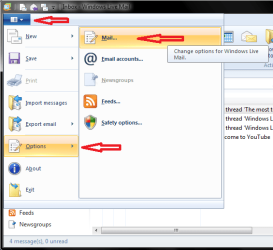
From Icon in upper left corner of WLM 2012.
Options > Mail...
Advanced Tab > Maintenance... > Store Folder... | My System Specs | | Computer type PC/Desktop System Manufacturer/Model Number home built OS Win 7 Pro x64 SP1, Win 7 Ult x86 SP1 CPU AMD Athlon II x4 620 Motherboard Gigabyte GA-MA785G-UD3H Memory 6GB GSkill DDR2 800 Graphics Card AMD 4670 GPU + AMD 4200 IGP Sound Card on board Realtek ALC889A Monitor(s) Displays RCA 40" LCD TV, Insignia 32" LCD TV, HP 15" LCD monitor Screen Resolution 1680 x 1050... Keyboard Gyration wireless, Logitech wireless, Dell USB wired Mouse Gyration wireless, Logitech wireless, V7 USB wired PSU Corsair 500 W Case Rosewill mid tower Cooling CM 90mm Tower Hard Drives OCZ Vertex 3 120GB,
Samsung F3 1TB (3),
Several others - WD, Seagate, Hitachi, ... Internet Speed Uverse - 12Mbps D / 1.5Mbps U Antivirus Avast free OR MSE. (+ MBAM Pro). Browser 1-Firefox, 2-IE. (Chrome and Opera for testing) Other Info 2 PCs: Primary: dual-boot, Test: triple-boot.
Mainly HTPC/Gen purpose (no gaming).
Trendnet USB KVM.
LG DVD burner/Blue Ray Player.
Tray system for removable SATA backup drives.
Not currently OCd, under-volted.
I use Hybrid sleep, rarely re-boot or shutdown.
Hauppauge HD-PVR, Avermedia PCIe TV Tuner, Hauppauge PCI TV Tuner. |
30 Sep 2012
|
#10 | | Windows 7 Professional 64 |
I sincerely apologize for wasting your time.
It's been a while since I've used the newer Microsoft applications with things that used to be under File hidden under an unlabeled menu. I don't know why I didn't click on it.
Thank you very much for your help. | My System Specs | | OS Windows 7 Professional 64 How can I choose where to install windows live mail? problems? All times are GMT -5. The time now is 03:12 AM. | |