Windows 7 Forums


Windows 7: Attaching files from Skydrive

29 May 2012   #1

Windows 7 Home Premium 64bit.
 
 
Attaching files from Skydrive

Maybe I've never done this before, so maybe the program is working as intended. Anyway-

I open either Yahoo Mail or Hotmail. I wanna send an email, and the attachment is inside a Skydrive folder. If I go to my email attachments and then double click on the Skydrive icon once I've navigated to it, shouldn't I be able to open the folder? Both email clients want to attach the whole folder.
?

My System SpecsSystem Spec

29 May 2012   #2

Microsoft Windows 7 Home Premium 64-bit 7600
cornwall UK


i just tried as a test,
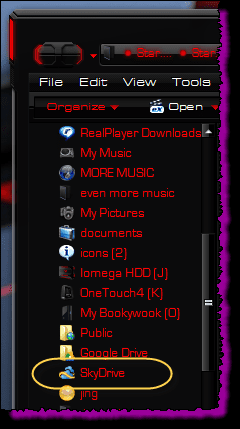
once you click attachment( in hotmail) on the favourites list in the explorer window that opens ,

Attaching files from Skydrive-skd.png

i clicked on the skydrive folder and it opened showing the attachments, i selected and attached no problem,

try it that way
My System SpecsSystem Spec
29 May 2012   #3

Windows 7 Home Premium 64bit.


well, I am using desktop, not mobile.
My System SpecsSystem Spec
.


29 May 2012   #4

Windows 7 Home Premium 64bit.


hold on, i am stupid.
I was clicking on the desktop icon, not the list of folders in explorer.
sorry, it's the day after a holiday. must reboot brain.
My System SpecsSystem Spec
29 May 2012   #5

Microsoft Windows 7 Home Premium 64-bit 7600
cornwall UK


reeboot it twice , i never said i was using a mobile
My System SpecsSystem Spec
Reply

 Attaching files from Skydrive problems?


Thread Tools


Similar help and support threads for: Attaching files from Skydrive
Thread Forum
Share files using SkyDrive with a Link Network & Sharing
WLM 2011 attaching files freeze Browsers & Mail
Solved Is it possible to download skydrive SYNCED files? Network & Sharing
Searching for Files When Attaching to Gmail Browsers & Mail
Accessing your Office files from any PC with SkyDrive News


All times are GMT -5. The time now is 04:24 PM.


Seven Forums Android App Seven Forums IOS App Follow us on Facebook

Windows 7 Forums is an independent web site and has not been authorized,
sponsored, or otherwise approved by Microsoft Corporation.
"Windows 7" and related materials are trademarks of Microsoft Corp.
© Designer Media Ltd
  

1 2 3 4 5 6 7 8 9 10 11 12 13 14 15 16 17 18 19 20 21 22 23 24 25 26 27 28 29 30 31 32