Windows 7 Forums


Windows 7: In Windows Live Mail, how do I reset the default font and font size?

02 Jun 2012  
warcher

Windows 7
2 posts
 
 
In Windows Live Mail, how do I reset the default font and font size?

Every time I begin a new message, the same font and size come on, unbidden. I do see how to reset them every time, but how can I can I reset them so that my own choices appear automatically?

My System SpecsSystem Spec

02 Jun 2012  
BrightBlessings

Win7 Pro-64 Bit
1,172 posts


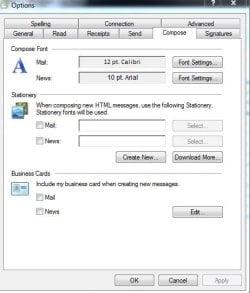
Go to tools>options>compose tab.
In Windows Live Mail, how do I reset the default font and font size?-capture.jpg
My System SpecsSystem Spec
02 Jun 2012  
warcher

Windows 7
2 posts


Thank you, BrightBlessings!
My System SpecsSystem Spec
.


02 Jun 2012  
BrightBlessings

Win7 Pro-64 Bit
1,172 posts


Your welcome.
My System SpecsSystem Spec
Reply

 In Windows Live Mail, how do I reset the default font and font size? problems?


Thread Tools


Similar help and support threads for: In Windows Live Mail, how do I reset the default font and font size?
Thread Forum
How do I change font size in Windows Live Mail? Browsers & Mail
windows live messenger font size change Software
Set default font and size foe text email Browsers & Mail
Set default menu size and font for new users? Customization
Win7 Default Font size 100% but want 96% instead General Discussion


All times are GMT -5. The time now is 05:37 AM.


Windows 7 Forums is an independent web site and has not been authorized,
sponsored, or otherwise approved by Microsoft Corporation.
"Windows 7" and related materials are trademarks of Microsoft Corp.
© Designer Media Ltd