| Windows 7: How do I delete ALL Favorites in Internet Explorer 9 |
03 Jun 2012
|
#1 | | Microsoft Windows 7 Home Premium 32-bit 7601 Multiprocessor Free Service Pack 1 Los Angeles, CA |
How do I delete ALL Favorites in Internet Explorer 9 Hello,
I have searched in vain for a way to delete all of my Favorites from IE9.
Can someone please tell me?
Thanks! | My System Specs |
| System Manufacturer/Model Number HP Pavilion Media Center PC m7350n OS Microsoft Windows 7 Home Premium 32-bit 7601 Multiprocessor Free Service Pack 1 CPU Intel(R) Pentium(R) D CPU 2.80GHz Motherboard ASUSTek Computer INC. EMERY Memory 2.00 GB Graphics Card NVIDIA GeForce 6200SE TurboCache(TM) Sound Card Realtek High Definition Audio Monitor(s) Displays HP L1710 LCD Display Screen Resolution 1280 x 1024 x 32 bits (4294967296 colors) @ 60 Hz Hard Drives (1) SAMSUNG SP2504C (2) EPSON Stylus Storage USB Device (3) Generic USB CF Reader USB Device (4) Generic USB MS Reader USB Device (5) Generic USB SD Reader USB Device (6) Generic USB SM Reader USB Device (7) Seagate FA GoFlex Desk USB Dev Internet Speed 20+mbps |
03 Jun 2012
|
#2 | | Windows 7 Professional SP1 64-bit Virginia |
Go to My Computer > C > Users > [your username] > Favorites. Click any file or folder in the favorites folder, press CTRL+A, and then press the delete key. Make sure to empty your Recycle Bin. | My System Specs | | System Manufacturer/Model Number Toshiba P775-S7100 OS Windows 7 Professional SP1 64-bit CPU Intel Core i5-2450M @2.5 GHz Memory 6 GB DDR3 1333MHz Graphics Card Intel HD 3000 Monitor(s) Displays Built-in 17.3" LED; 22" Insignia NS-L22Q-10A Screen Resolution 1600x900; 1360x768 Hard Drives 750 GB Hitachi
1TB Seagate FreeAgent External Internet Speed Verizon DSL Speed(Down/Up): 3360 Kbps / 800 Kbps Antivirus MSE and MBAM Pro Browser IE10 RP |
03 Jun 2012
|
#3 | | Windows 7 Home Premium x64 SP1 England |
Hello juanantoniod
If I understand you correctly just delete them from your favourites folder in your user account.(C:/Users/Username/Favourites)
Danny | My System Specs | | System Manufacturer/Model Number acer aspire 5935g OS Windows 7 Home Premium x64 SP1 CPU intel(R)core(TM)2 duo CPU T6600 @ 2.20GHz Motherboard intel gm45/gm47 revision 07 Memory 3 gb ddr3 Graphics Card ati radeon hd4570/512mb Monitor(s) Displays lop156wh2-tle1 15.3 flat Screen Resolution 1366x768 Mouse Optical Hard Drives OCZ-Agility3 60gig ssd
320gig external hdd
500gig external hdd Internet Speed 30Mbps Down/30Mbps Up |
03 Jun 2012
|
#4 | | Microsoft Windows 7 Home Premium 32-bit 7601 Multiprocessor Free Service Pack 1 Los Angeles, CA |
Thanks very much for this useful information! I could not find the Favorites folder in my laptop, so I resorted to deleting them manually. It wasn't that bad, using keyboard shortcuts. | My System Specs | | System Manufacturer/Model Number HP Pavilion Media Center PC m7350n OS Microsoft Windows 7 Home Premium 32-bit 7601 Multiprocessor Free Service Pack 1 CPU Intel(R) Pentium(R) D CPU 2.80GHz Motherboard ASUSTek Computer INC. EMERY Memory 2.00 GB Graphics Card NVIDIA GeForce 6200SE TurboCache(TM) Sound Card Realtek High Definition Audio Monitor(s) Displays HP L1710 LCD Display Screen Resolution 1280 x 1024 x 32 bits (4294967296 colors) @ 60 Hz Hard Drives (1) SAMSUNG SP2504C (2) EPSON Stylus Storage USB Device (3) Generic USB CF Reader USB Device (4) Generic USB MS Reader USB Device (5) Generic USB SD Reader USB Device (6) Generic USB SM Reader USB Device (7) Seagate FA GoFlex Desk USB Dev Internet Speed 20+mbps |
03 Jun 2012
|
#5 | | Windows 7 Home Premium x64 SP1 Bay Area Peninsula |

Quote: Originally Posted by xxxdannyxxx Hello juanantoniod
If I understand you correctly just delete them from your favourites folder in your user account.(C:/Users/Username/Favourites)
Danny Danny, he'd have never found them in the U.S.
A Guy | My System Specs | | OS Windows 7 Home Premium x64 SP1 CPU INTEL Core i5-750 Quad-Core 3.37GHz Motherboard ASUS P7P55D Memory KINGSTON 4GB (2 x 2GB) HyperX PC3-12800 DDR3 1600MHz CL8 Graphics Card MSI N240GT-MD1G/D5 GeForce GT 240 1GB 128-bit GDDR5 Monitor(s) Displays Samsung SyncMaster B2430H 24" Screen Resolution 1920 x 1080 PSU ANTEC TruePower New TP-550, 80 PLUS, 550W Case ANTEC Three Hundred Illusion Cooling COOLER MASTER Hyper 212 Plus, 4 x 120mm 1 x 140mm Noctua's Hard Drives Intel X25M Gen2 80GB, SEAGATE 500GB Barracudaź 7200.12, SATA 3 Gb/s, 7200 RPM, 16MB cache Internet Speed 20 + Mbps Antivirus Avast Browser Opera |
28 Jun 2012
|
#6 | | Windows Home Premium 64-bit |
I delete the favorites, but it keeps comming back. How can I stop this?
Thanks Clint | My System Specs | | System Manufacturer/Model Number Dell XPS 9100 OS Windows Home Premium 64-bit CPU Intel I-7 Motherboard Dell Memory 8 Gig Graphics Card ATI 5670 Sound Card Internal Monitor(s) Displays 23 Wide Flat LED PSU 550 W Case Mid Cooling Fan Hard Drives 2 |
29 Jun 2012
|
#7 | | Windows 7 Home Premium x64 SP1 Bay Area Peninsula |
It? A specific favorite? In IE? More info please
A Guy | My System Specs | | OS Windows 7 Home Premium x64 SP1 CPU INTEL Core i5-750 Quad-Core 3.37GHz Motherboard ASUS P7P55D Memory KINGSTON 4GB (2 x 2GB) HyperX PC3-12800 DDR3 1600MHz CL8 Graphics Card MSI N240GT-MD1G/D5 GeForce GT 240 1GB 128-bit GDDR5 Monitor(s) Displays Samsung SyncMaster B2430H 24" Screen Resolution 1920 x 1080 PSU ANTEC TruePower New TP-550, 80 PLUS, 550W Case ANTEC Three Hundred Illusion Cooling COOLER MASTER Hyper 212 Plus, 4 x 120mm 1 x 140mm Noctua's Hard Drives Intel X25M Gen2 80GB, SEAGATE 500GB Barracudaź 7200.12, SATA 3 Gb/s, 7200 RPM, 16MB cache Internet Speed 20 + Mbps Antivirus Avast Browser Opera |
29 Jun 2012
|
#8 | | Windows Home Premium 64-bit |
Sorry Guy. I have Windows 7 Home Premium 64-bit IE 9. When in the menu bar I click on Favorites in the drop down at the bottom is Favorites Bar. It is empty. I want to delete this. It will delete but when I restart IE it is back again. | My System Specs | | System Manufacturer/Model Number Dell XPS 9100 OS Windows Home Premium 64-bit CPU Intel I-7 Motherboard Dell Memory 8 Gig Graphics Card ATI 5670 Sound Card Internal Monitor(s) Displays 23 Wide Flat LED PSU 550 W Case Mid Cooling Fan Hard Drives 2 |
30 Jun 2012
|
#9 | | Windows 7 Home Premium x64 SP1 Bay Area Peninsula |
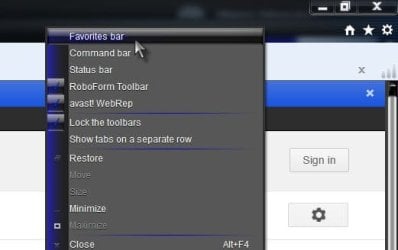
If you mean the favorites bar in the browser, right click the toolbar area at the top of IE, and untick Favorites bar.
This will turn off the favorites bar of course. If I am wrong, can you post a screenshot? Screenshots and Files - Upload and Post in Seven Forums
A Guy | My System Specs | | OS Windows 7 Home Premium x64 SP1 CPU INTEL Core i5-750 Quad-Core 3.37GHz Motherboard ASUS P7P55D Memory KINGSTON 4GB (2 x 2GB) HyperX PC3-12800 DDR3 1600MHz CL8 Graphics Card MSI N240GT-MD1G/D5 GeForce GT 240 1GB 128-bit GDDR5 Monitor(s) Displays Samsung SyncMaster B2430H 24" Screen Resolution 1920 x 1080 PSU ANTEC TruePower New TP-550, 80 PLUS, 550W Case ANTEC Three Hundred Illusion Cooling COOLER MASTER Hyper 212 Plus, 4 x 120mm 1 x 140mm Noctua's Hard Drives Intel X25M Gen2 80GB, SEAGATE 500GB Barracudaź 7200.12, SATA 3 Gb/s, 7200 RPM, 16MB cache Internet Speed 20 + Mbps Antivirus Avast Browser Opera |
30 Jun 2012
|
#10 | | Windows Home Premium 64-bit |
Thanks Guy. I have unticked the Favorites Bar in the tool bar. At the bottom is what I am referring to. Hope the pic works. http://www.sevenforums.com/attachmen...1&d=1341057596 | My System Specs | | System Manufacturer/Model Number Dell XPS 9100 OS Windows Home Premium 64-bit CPU Intel I-7 Motherboard Dell Memory 8 Gig Graphics Card ATI 5670 Sound Card Internal Monitor(s) Displays 23 Wide Flat LED PSU 550 W Case Mid Cooling Fan Hard Drives 2 How do I delete ALL Favorites in Internet Explorer 9 problems? All times are GMT -5. The time now is 07:25 PM. | |