Windows 7 Forums


Windows 7: Windows Live Mail Options settings not holding

17 Jun 2012   #1

Windows 7 Ultimate 32 bit, Windows Vista Ultimate SP2 32 bit
So. California
 
 
Windows Live Mail Options settings not holding

Hi all,

I have a new PC with Windows 7 x64 Home Premium, and am having a problem with the the option settings in Windows Live Mail, such as no auto download of emails, no notification of new emails, etc. that are not holding after being unchecked. The notifications are still coming and each time I open WLM the emails are automatically downloaded without me clicking the Send/receive button. I have a reason why I don't want my emails immediately downloaded when I open WLM and don't know why the settings are not holding from one time to the next.

Has anyone had a similar problem or perhaps know what I might also check to see why these settings are not holding?

Any suggestions or information would truly be appreciated.


Last edited by Tink; 17 Jun 2012 at 08:33 PM.. Reason: Corrections
My System SpecsSystem Spec

18 Jun 2012   #2

Windows 7 Enterprise Trial 32-bit SP1


What type of accounts are having this problem (IMAP, POP3, or HTTP)?
My System SpecsSystem Spec
18 Jun 2012   #3

Windows 7 Ultimate 32 bit, Windows Vista Ultimate SP2 32 bit
So. California


Hi roncerr,

The problem happens with the POP account, I only have the one account at this time.

Thank you for your time and help.
My System SpecsSystem Spec
.


19 Jun 2012   #4

Windows 7 Enterprise Trial 32-bit SP1


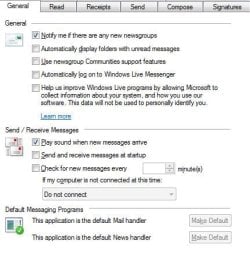
These are the options I have set in WLM 2009 (the version I'm using). I believe it works OK but I usually don't leave it open for a long time. It's possible that if you do, it may use some default download frequency other than never. If that happens you can try to change the "Check for new messages" box to "checked" and fill in the time as 480 minutes (the maximum it will allow).
Attached Thumbnails
Windows Live Mail Options settings not holding-wlm-read.jpg   Windows Live Mail Options settings not holding-wlm-general.jpg  
My System SpecsSystem Spec
19 Jun 2012   #5

Windows 7 Ultimate 32 bit, Windows Vista Ultimate SP2 32 bit
So. California


Hi roncerr, thank you for the attachments. I have a similar setting, although, I don't use sound, and rarely use ngs anymore since MS shut down their NNTP newsgroups. I have tool tip unchecked, and checked auto download for Preview Pane. I also have auto display folders with unread msgs. I don't have it auto check for mail as I prefer to download when I am ready. WLM is open most of the and closed over night. But, this is the first time I have had any problems with the WLM in this regard.

However, I have never used the Home Premium and have now done an Anytime Upgrade to the Windows 7 Ultimate. So will see if there is any change.

Thank you again for your time and help. I keep a check on it and see if there is any change and post back.
My System SpecsSystem Spec
Reply

 Windows Live Mail Options settings not holding problems?


Thread Tools


Similar help and support threads for: Windows Live Mail Options settings not holding
Thread Forum
Solved Trying to find menu bars and options in Windows live Mail Browsers & Mail
Windows live mail settings Browsers & Mail
Windows Mail Live Options at top not available??? General Discussion
Windows Live Mail and Junk settings Browsers & Mail
Settings for Windows Live Mail Browsers & Mail


All times are GMT -5. The time now is 10:06 PM.


Seven Forums Android App Seven Forums IOS App Follow us on Facebook

Windows 7 Forums is an independent web site and has not been authorized,
sponsored, or otherwise approved by Microsoft Corporation.
"Windows 7" and related materials are trademarks of Microsoft Corp.
© Designer Media Ltd
  

1 2 3 4 5 6 7 8 9 10 11 12 13 14 15 16 17 18 19 20 21 22 23 24 25 26 27 28 29 30 31 32