Windows 7 Forums


Windows 7: IE8 opens new windows insteadof tabs

20 Jul 2012   #1
bru

Win 7 Home Premium x64
A suburb of Chicago
 
 
IE8 opens new windows insteadof tabs

Wife used computer and I saw a new window was opened rather than a new tab.

Now any time I click to open a new website (e.g. from a search) it opens a new window instead of a new tab. All Tabs settings were unchanged. I did a system restore, no joy. Reset IE, no joy.

Only way I can get around it is by selecting "always open popups in new tab", but then I get the tabs with the color bars. So it seems it thinks any new click is a pop up. Please help!

My System SpecsSystem Spec

20 Jul 2012   #2

Microsoft Windows 7 Home Premium 64-bits 7601 Multiprocessor Free Service Pack 1
SecretCity


Quote   Quote: Originally Posted by bru View Post
Wife used computer and I saw a new window was opened rather than a new tab.

Now any time I click to open a new website (e.g. from a search) it opens a new window instead of a new tab. All Tabs settings were unchanged. I did a system restore, no joy. Reset IE, no joy.

Only way I can get around it is by selecting "always open popups in new tab", but then I get the tabs with the color bars. So it seems it thinks any new click is a pop up. Please help!
On a normal site: right click a hyperlink:
->open in new tab
->open in new windows
->open

all work as expected?
My System SpecsSystem Spec
20 Jul 2012   #3

Microsoft Windows 7 Home Premium 64-bits 7601 Multiprocessor Free Service Pack 1
SecretCity


On which site is the problem?
My System SpecsSystem Spec
.


20 Jul 2012   #4

Microsoft Windows 7 Home Premium 64-bits 7601 Multiprocessor Free Service Pack 1
SecretCity


Website most likey uses javacript code like window.open or something like that. It opens a new browser window. The website doesn't know you have a tab-aware browser. And there's not something like "open in new tab" in javascript/html etc.
My System SpecsSystem Spec
21 Jul 2012   #5

Windows 7 Enterprise 32bit
United States of America
 
 
Your answer to "IE8 opens new windows insteadof tabs"

By checking the option of popups, only the popups will open in new window, But other links that you wish to open in a new tab will still open in new window.
To open them in a new tab,
1. Firstly click on 'Tools' on your IE 8 browser
2. Select 'Internet Options'
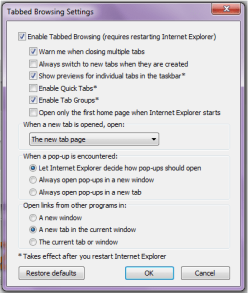
3. Now select "Settings" of "Change how webpages are displayed in tabs"
4. In this window for "Open links from other programs in" select - "A new Tab in the current window" (As in the attached screen shot)
5. Now hit 'Ok' on all the windows and restart your browser.

See if the problem is resolved and let me know.

PCCare247
Attached Thumbnails
IE8 opens new windows insteadof tabs-1.png   IE8 opens new windows insteadof tabs-2.png  
My System SpecsSystem Spec
21 Jul 2012   #6
bru

Win 7 Home Premium x64
A suburb of Chicago


Thanks to all. I had tried pretty much everything suggested as I was pretty familiar with those settings.

It turns out it was a problem with Yahoo. I should have known but of course I started messing with my computer thinking it was my issue. Somehow a setting in Yahoo Search preferences got changed, had to uncheck a box. No idea how it got changed, someone said cookies got deleted but I don't know how. I'm currently having problems with the Yahoo home page not remembering my layout so I think they are having issues.

The ironic thing is I had to use Google to find the problem. I need to give up on yahoo but I have been a user since day one and old habits die hard.
My System SpecsSystem Spec
21 Jul 2012   #7

windows 7


Quote   Quote: Originally Posted by bru View Post
Thanks to all. I had tried pretty much everything suggested as I was pretty familiar with those settings.

It turns out it was a problem with Yahoo. I should have known but of course I started messing with my computer thinking it was my issue. Somehow a setting in Yahoo Search preferences got changed, had to uncheck a box. No idea how it got changed, someone said cookies got deleted but I don't know how. I'm currently having problems with the Yahoo home page not remembering my layout so I think they are having issues.

The ironic thing is I had to use Google to find the problem. I need to give up on yahoo but I have been a user since day one and old habits die hard.
I am having similar problem with Yahoo I don't know why they keep changing things when I do a search now and click on a result new window opens Arrrrrggggghhhhh!!!
My System SpecsSystem Spec
21 Jul 2012   #8
bru

Win 7 Home Premium x64
A suburb of Chicago


Quote   Quote: Originally Posted by hollyoaks777 View Post
I am having similar problem with Yahoo I don't know why they keep changing things when I do a search now and click on a result new window opens Arrrrrggggghhhhh!!!
Who knows why things happen with them. For months Games weren't working properly and even with hundreds of posts complaining they kept insisting nothing was wrong. Then there was the time Maps wouldn't display properly. I could give dozens of examples. I sometimes wonder who is running that site, they certainly seem incompetent. Rant off.

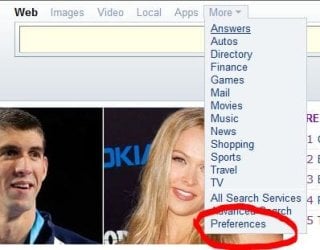
To solve this issue there are a couple of ways but you need to get to Preferences. From the main Yahoo page it can be found under the "More" drop down at the top.

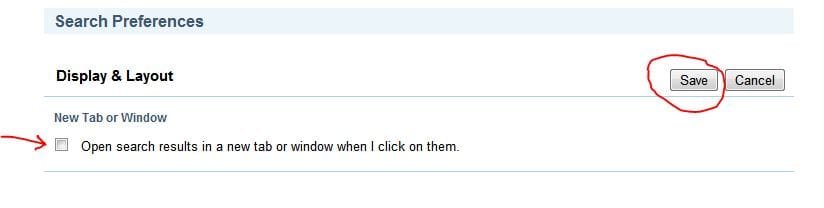
From there under "Display & Layout" you need to make sure "Open results in a new tab or window" is set to "No". Then as long as you have your browser set correct (see above for IE settings) it should work.

The default settings is Yes so maybe that's what they changed.

FWIW my home page is now working so maybe they read my rant on Yahoo! Answers...but I doubt it.
My System SpecsSystem Spec
22 Jul 2012   #9

windows 7


Quote   Quote: Originally Posted by bru View Post
Quote   Quote: Originally Posted by hollyoaks777 View Post
I am having similar problem with Yahoo I don't know why they keep changing things when I do a search now and click on a result new window opens Arrrrrggggghhhhh!!!
Who knows why things happen with them. For months Games weren't working properly and even with hundreds of posts complaining they kept insisting nothing was wrong. Then there was the time Maps wouldn't display properly. I could give dozens of examples. I sometimes wonder who is running that site, they certainly seem incompetent. Rant off.

To solve this issue there are a couple of ways but you need to get to Preferences. From the main Yahoo page it can be found under the "More" drop down at the top.

From there under "Display & Layout" you need to make sure "Open results in a new tab or window" is set to "No". Then as long as you have your browser set correct (see above for IE settings) it should work.

The default settings is Yes so maybe that's what they changed.

FWIW my home page is now working so maybe they read my rant on Yahoo! Answers...but I doubt it.
I don't know how to get here
To solve this issue there are a couple of ways but you need to get to Preferences. From the main Yahoo page it can be found under the "More" drop down at the top.
Internet options are set as PCCare247 said. It is funny how its only a Yahoo problem Google opens as it should

Last edited by hollyoaks777; 22 Jul 2012 at 07:53 AM.. Reason: more info
My System SpecsSystem Spec
22 Jul 2012   #10
bru

Win 7 Home Premium x64
A suburb of Chicago


Make sure you are signed in to your Yahoo account and follow the steps. There should be no check in "Open results in a new tab or window". Then do it when you are not signed in too.

Mine reset itself a few times so if it goes wonky again check the setting. It's probably better not to delete any Yahoo cookies as that might undo the setting.
Attached Thumbnails
IE8 opens new windows insteadof tabs-yahoo1.jpg   IE8 opens new windows insteadof tabs-yahoo2.jpg   IE8 opens new windows insteadof tabs-yahoo3.jpg   IE8 opens new windows insteadof tabs-yahoo4.jpg  
My System SpecsSystem Spec
Reply

 IE8 opens new windows insteadof tabs problems?


Thread Tools


Similar help and support threads for: IE8 opens new windows insteadof tabs
Thread Forum
Browser opens never-ending chain of tabs when I click on send mail to Browsers & Mail
Solved IE9 32bit opens empty new tabs Browsers & Mail
Middle mouse click no longer opens or closes new tabs in ie or firefox General Discussion
Multiple Tabs in FireFox Creates Multiple Window Tabs Browsers & Mail
Spyware problem: Firefox opens up random tabs System Security


All times are GMT -5. The time now is 01:41 PM.


Seven Forums Android App Seven Forums IOS App Follow us on Facebook

Windows 7 Forums is an independent web site and has not been authorized,
sponsored, or otherwise approved by Microsoft Corporation.
"Windows 7" and related materials are trademarks of Microsoft Corp.
© Designer Media Ltd
  

1 2 3 4 5 6 7 8 9 10 11 12 13 14 15 16 17 18 19 20 21 22 23 24 25 26 27 28 29 30 31 32